Would you like to sign out?

Select Country

  • Afghanistan English
  • Albania English
  • Algeria English
  • American Samoa English
  • Andorra English
  • Angola English
  • Anguilla English
  • Antarctica English
  • Antigua and Barbuda English
  • Argentina Español
  • Armenia English
  • Aruba English
  • Australia English
  • Austria English
  • Azerbaijan English
  • Bahamas English
  • Bahrain English
  • Bangladesh English
  • Barbados English
  • Belarus English
  • Belgium English
  • Belize English
  • Benin English
  • Bermuda English
  • Bhutan English
  • Bolivia Español
  • Bosnia and Herzegovina English
  • Botswana English
  • Bouvet Island English
  • Brazil Español
  • British Indian Ocean Territory English
  • British Virgin Islands English
  • Brunei English
  • Bulgaria English
  • Burkina Faso English
  • Burundi English
  • Cambodia English
  • Cameroon English
  • Canada English
  • Cape Verde English
  • Caribbean Netherlands English
  • Cayman Islands English
  • Central African Republic English
  • Chad English
  • Chile Español
  • Christmas Island English
  • Cocos (Keeling) Islands English
  • Colombia Español
  • Comoros English
  • Congo English
  • Cook Islands English
  • Costa Rica Español
  • Côte d’Ivoire English
  • Croatia English
  • Cuba Español
  • Curaçao English
  • Cyprus English
  • Czech Republic English
  • Democratic Republic of the Congo English
  • Denmark English
  • Djibouti English
  • Dominica English
  • Dominican Republic Español
  • Ecuador Español
  • Egypt English
  • El Salvador Español
  • Equatorial Guinea English
  • Eritrea English
  • Estonia English
  • Ethiopia English
  • Falkland Islands English
  • Faroe Islands English
  • Fiji English
  • Finland English
  • France English
  • French Guiana Español
  • French Polynesia English
  • French Southern Territories English
  • Gabon English
  • Gambia English
  • Georgia English
  • Germany English
  • Ghana English
  • Gibraltar English
  • Greece English
  • Greenland English
  • Grenada English
  • Guadeloupe Español
  • Guam English
  • Guatemala Español
  • Guernsey English
  • Guinea English
  • Guinea-Bissau English
  • Guyana English
  • Haiti Español
  • Heard Island and McDonald Islands English
  • Honduras Español
  • Hong Kong English
  • Hungary English
  • Iceland English
  • India English
  • Indonesia English
  • Iran English
  • Iraq English
  • Ireland English
  • Isle of Man English
  • Israel English
  • Italy English
  • Jamaica English
  • Japan 日本語
  • Jersey English
  • Jordan English
  • Kazakhstan English
  • Kenya English
  • Kiribati English
  • South Korea 한국어
  • Kuwait English
  • Kyrgyzstan English
  • Laos English
  • Latvia English
  • Lebanon English
  • Lesotho English
  • Liberia English
  • Libya English
  • Liechtenstein English
  • Lithuania English
  • Luxembourg English
  • Macau English
  • Madagascar English
  • Malawi English
  • Malaysia English
  • Maldives English
  • Mali English
  • Malta English
  • Marshall Islands English
  • Martinique Español
  • Mauritania English
  • Mauritius English
  • Mayotte English
  • Mexico Español
  • Micronesia English
  • Moldova English
  • Monaco English
  • Mongolia English
  • Montenegro English
  • Montserrat English
  • Morocco English
  • Mozambique English
  • Myanmar English
  • Namibia English
  • Nauru English
  • Nepal English
  • Netherlands English
  • New Caledonia English
  • New Zealand English
  • Nicaragua Español
  • Niger English
  • Nigeria English
  • Niue English
  • Norfolk Island English
  • Northern Mariana Islands English
  • Norway English
  • Oman English
  • Pakistan English
  • Palau English
  • Palestine English
  • Panama Español
  • Papua New Guinea English
  • Paraguay Español
  • Peru Español
  • Philippines English
  • Pitcairn Islands English
  • Poland English
  • Portugal Español
  • Puerto Rico Español
  • Qatar English
  • Réunion English
  • Romania English
  • Russia English
  • Rwanda English
  • Saint Barthélemy Español
  • Saint Helena English
  • Saint Kitts and Nevis English
  • Saint Lucia English
  • Saint Martin Español
  • Saint Pierre and Miquelon English
  • Saint Vincent and the Grenadines English
  • Samoa English
  • San Marino English
  • Sao Tome and Principe English
  • Saudi Arabia English
  • Senegal English
  • Serbia English
  • Seychelles English
  • Sierra Leone English
  • Singapore English
  • Sint Maarten English
  • Slovakia English
  • Slovenia English
  • Solomon Islands English
  • Somalia English
  • South Africa English
  • South Georgia English
  • South Sudan English
  • Spain Español
  • Sri Lanka English
  • Sudan English
  • Suriname English
  • Svalbard and Jan Mayen English
  • Eswatini English
  • Sweden English
  • Switzerland English
  • Syria English
  • Taiwan English
  • Tajikistan English
  • Tanzania English
  • Thailand English
  • Togo English
  • Tokelau English
  • Tonga English
  • Trinidad and Tobago English
  • Tunisia English
  • Turkey English
  • Turkmenistan English
  • Turks and Caicos Islands English
  • Tuvalu English
  • U.S. Virgin Islands English
  • Uganda English
  • Ukraine English
  • United Arab Emirates English
  • United Kingdom English
  • United States of America English
  • U.S. Minor Outlying Islands English
  • Uruguay Español
  • Uzbekistan English
  • Vanuatu English
  • Vatican City English
  • Venezuela Español
  • Vietnam English
  • Wallis and Futuna English
  • Western Sahara English
  • Yemen English
  • Zambia English
  • Zimbabwe English
  • Åland Islands English
  • East Timor English
  • Netherlands Antilles English
  • Serbia and Montenegro English
  • North Macedonia English
  • Timor-Leste English
Bridge

Innovative Approaches in Prestressed Girders Bridge Design

Table of Contents Click the table of contents for details.

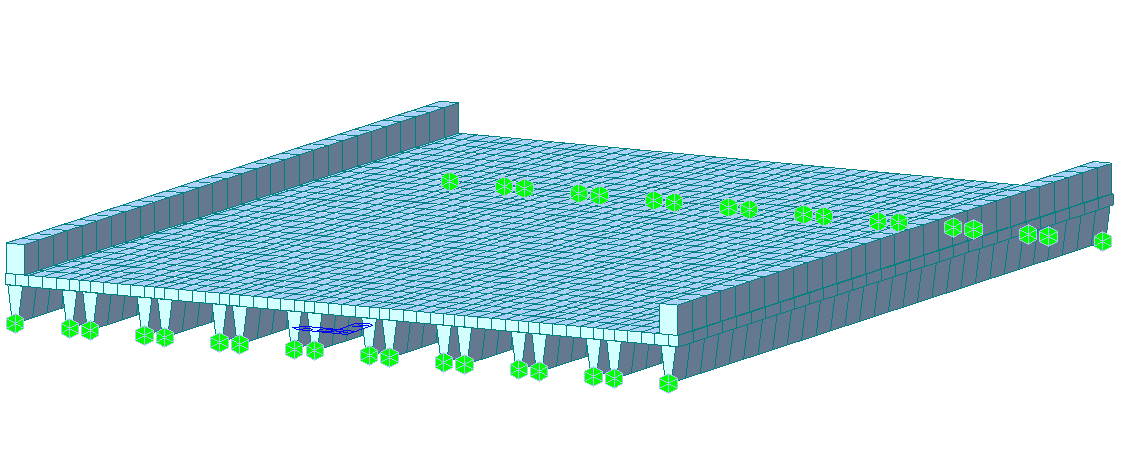
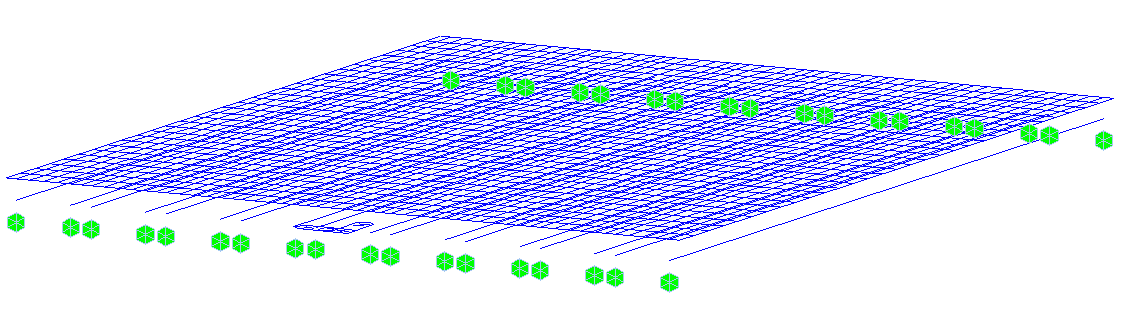
The midas model is for a multi-channel prestressed girders bridge 30 ft span and 24.75 ft width. The bridge is composed of 9-channel prestressed girders placed side by side. The bridge was modeled with frame elements for the girder's webs and plate elements for the girder's flange. Bridge dimensions and midas models are shown below.

 

Figure 1 Bridge DetailsFigure 1: Bridge Details


Figure 2 Midas Model 1Figure 2 Midas Model 2Figure 2: Midas Model


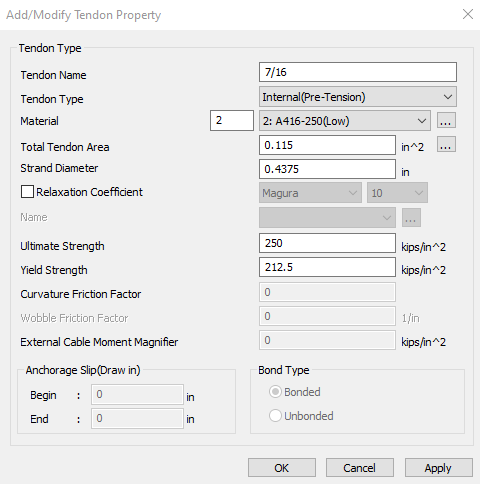
Strands material is ASTM A416-250 low relaxation, and tendon properties are as follows:

  • Diameter: 0.4375 in

  • Area: 0.115 in2

  • Ultimate strength: 250 ksi

  • Yield strength: 212.5 ksi

The figure below shows midas defined strands material and property.
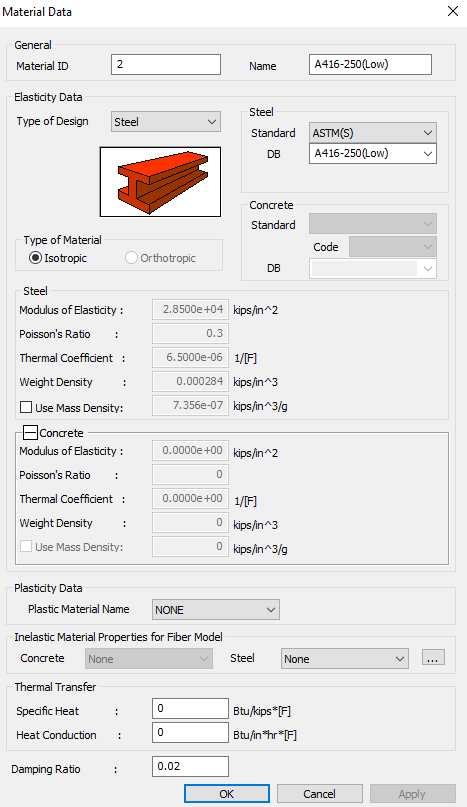
 

Figure 3 Strands defined material and propertyFigure 3 tendon property

Figure 3: Strands defined material and property


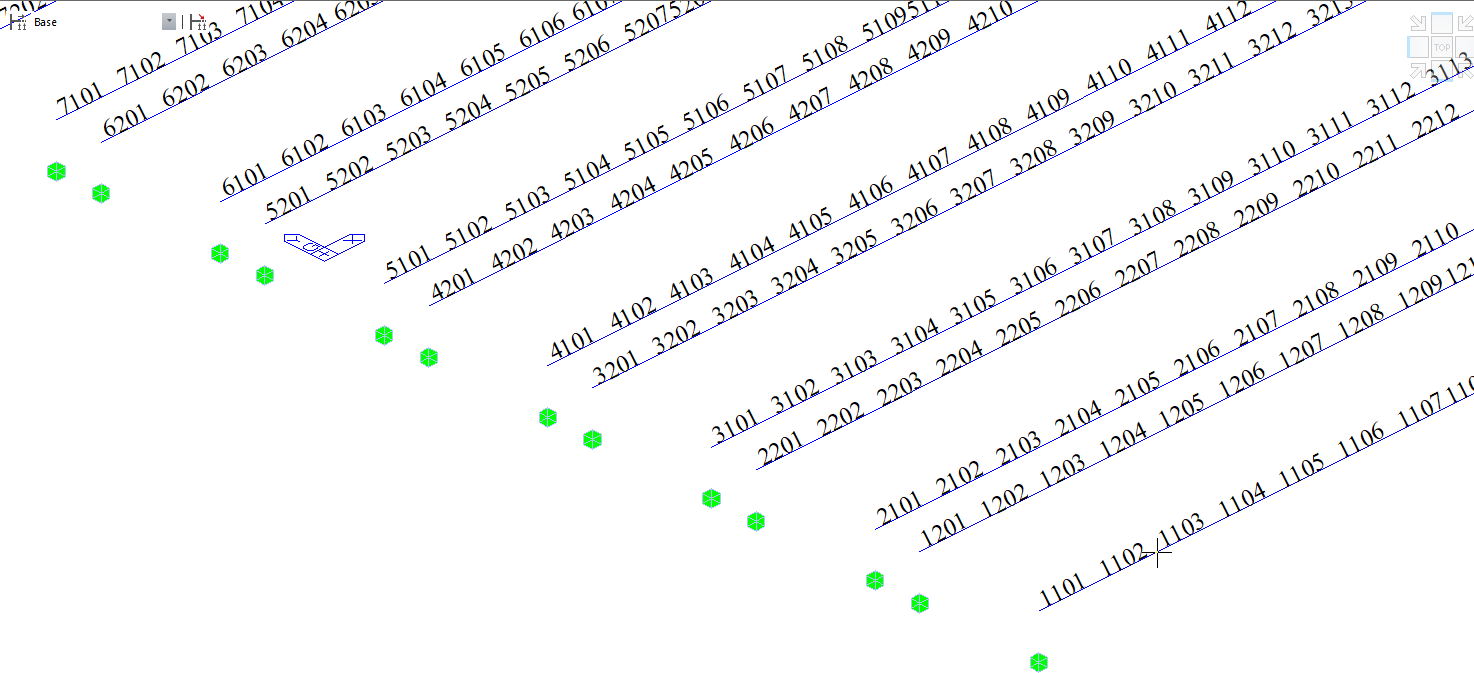
Before creating tendons profile, renumbering girders webs frame element is necessary to allow for using the MCT easier. To do so, the frame elements were numbered as follows:

  • Girders will have numbering starting with thousands. For example, 1000 for girder 1 and 5000 for girder 5.

  • Girder number followed by web numbers with hundreds, either 100 for the 1st web or 200 for the 2nd web.

  • Then the midas auto numbering will follow.

  • For example, to renumber girder 6 web 2 frame elements, we will start with 6201 in the midas auto-numbering tool.

  • Now by activating the girder 6-second web frame element only, we can renumber them as shown in the figure below.

  • Following the same procedures, we can renumber all girder's web frame elements.
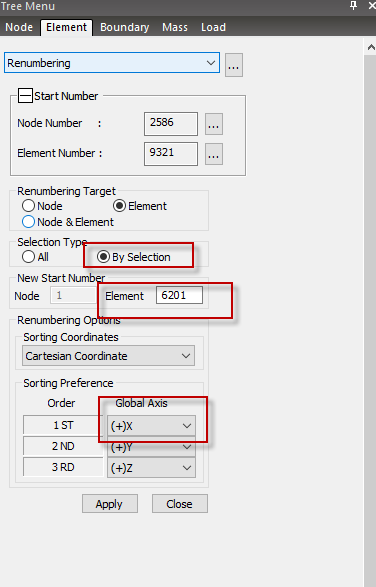
 

Figure 4 Renumbering girder 6 web 2 frame elements

Figure 4: Renumbering girder 6 web 2 frame elements


Figure 5 Renumbered girders webs frame elementsFigure 5: Renumbered girders webs frame elements


Next step, we will define one tendon profile then we will copy that to all girders with the MCT tool.

  • We will define the 1st strand of girder 1 web 1 “we will give the strand a name CH1-W11,” meaning channel 1 web 1 strand 1. 

  • The assigned elements will be 1101 to 1130. The girder web has a total of 30 frame elements along the girder length.

  • The eccentricity of that strand measured from the web centroid was calculated as -4.5741 inches in the Z direction. 

  • The eccentricity of the strand in the X and Y directions is 0.00.
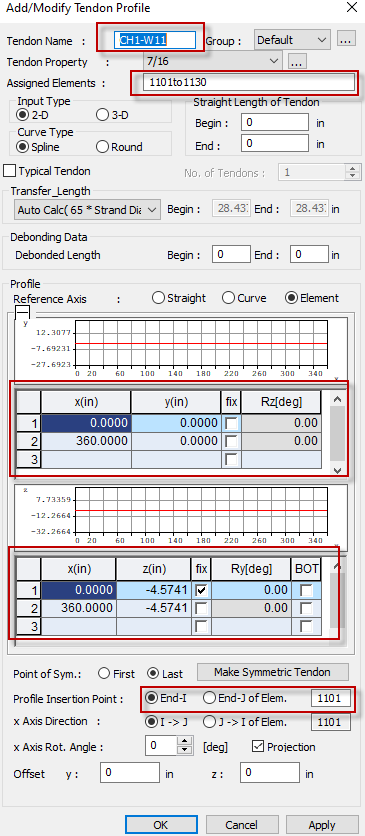
 

Figure 6 Defining girder 1Figure 6 Defining girder 1 web 1 first strand (CH1-W11)Figure 6: Defining girder 1 web 1 first strand (CH1-W11)


Now we can use the MCT tool to copy tendon profile CH1-W11 to the other 3 remaining tendons in girder 1 web 1 (CH1-W12, CH1-W13, and CH1-W14). 

  • The vertical distance between tendons is 2 inches.

  • We will copy the CH1-W11 definition with the MCT tool and change the name and Z coordinate by 2, 4, and 6 inches.

  • Go to the MCT tool and write in the Command or Data “*TDN-PROFILE”, then click insert data. The following screen will show up, and we will see the definition of CH1-W11 tendon.
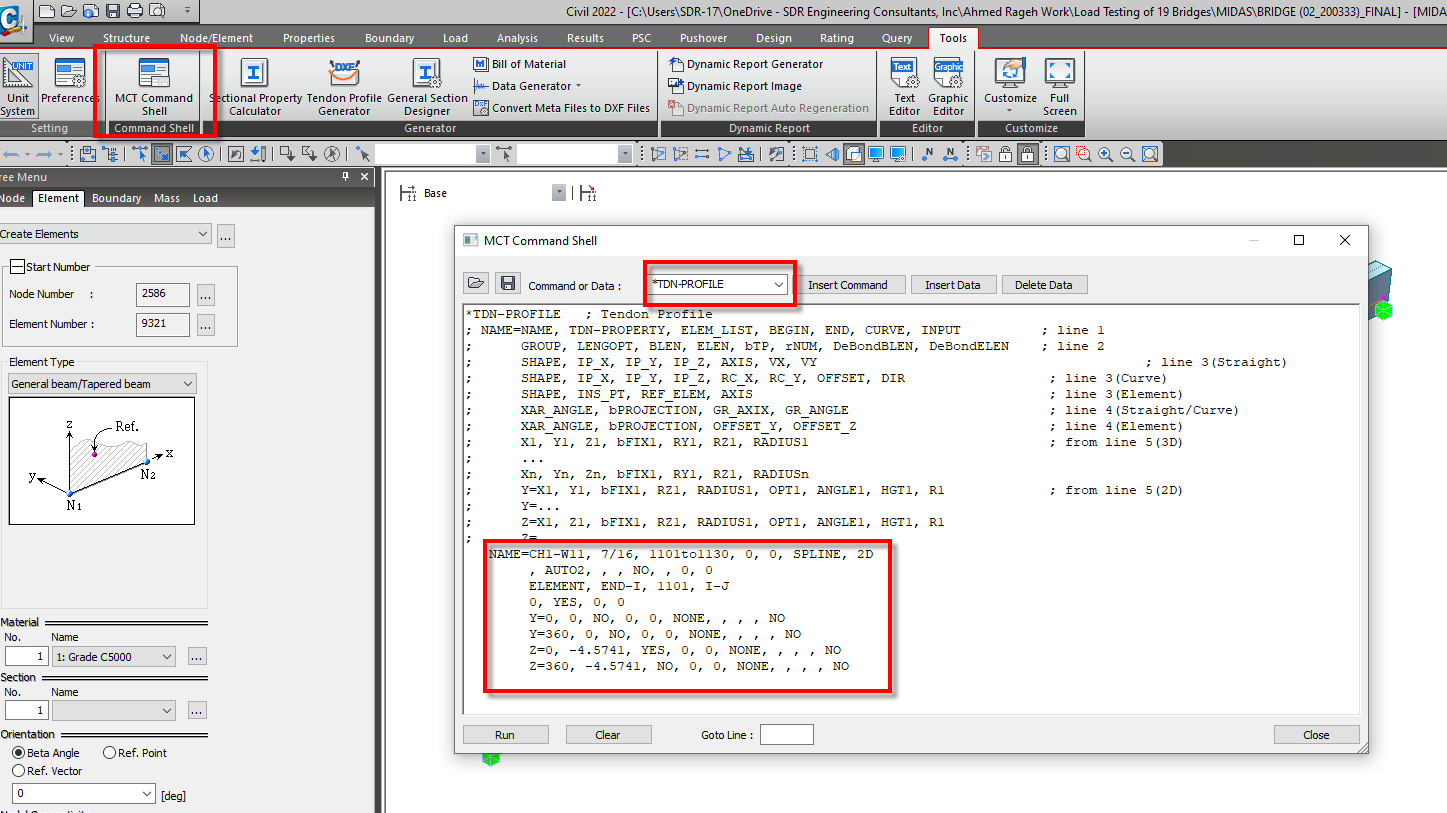
 

Figure 7 MCT Definition of tendon CH1-W11 Figure 7: MCT Definition of tendon CH1-W11


  • Now we will copy the tendon definition TWO times to modify it to the rest of girder 1 web 1 tendons. We will change the code as follows:

    • 1st code portion change: Name to CH1-W12,
      Z coordinates to -2.5741 = -4.5741 + 2 inch upwards

    • 2nd code portion: Name to CH1-W13,
      Z coordinates to -0.5741 = -4.5741 + 4 inch upwards

    • 3rd code portion: Name to CH1-W14,
      Z coordinates to 1.4259 = -4.5741 + 6 inch upwards

  • After changing the coding lines, click run.
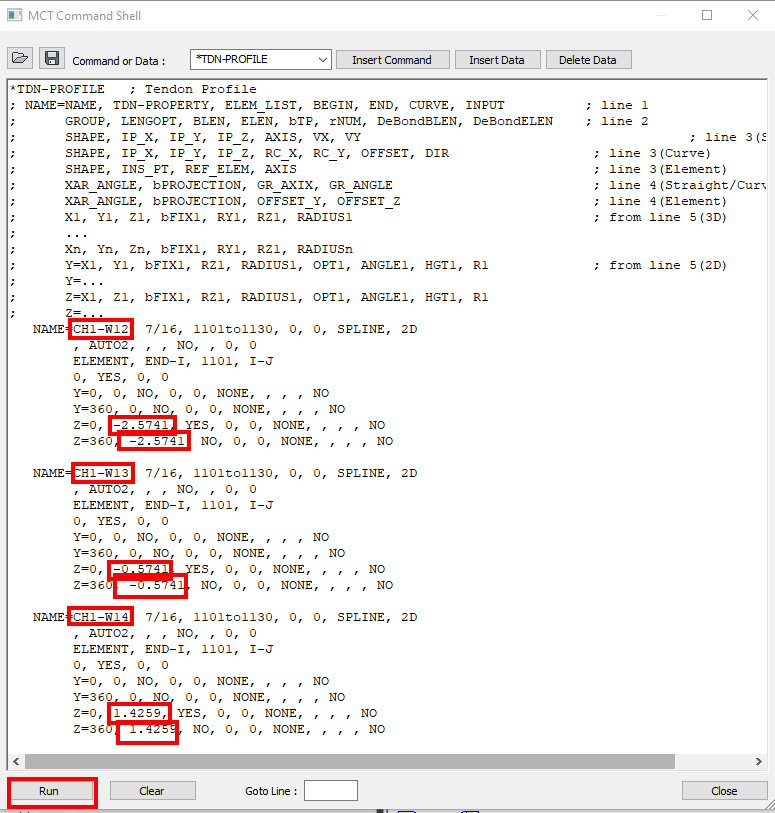
 

Figure 8 Copying tendon CH1-W11 to the remaining tendons in Girder 1 Web 1

Figure 8: Copying tendon CH1-W11 to the remaining tendons in Girder 1 Web 1


  • After clicking run, make sure that you are getting no errors in the message window and the new tendons are shown in the tree menu.
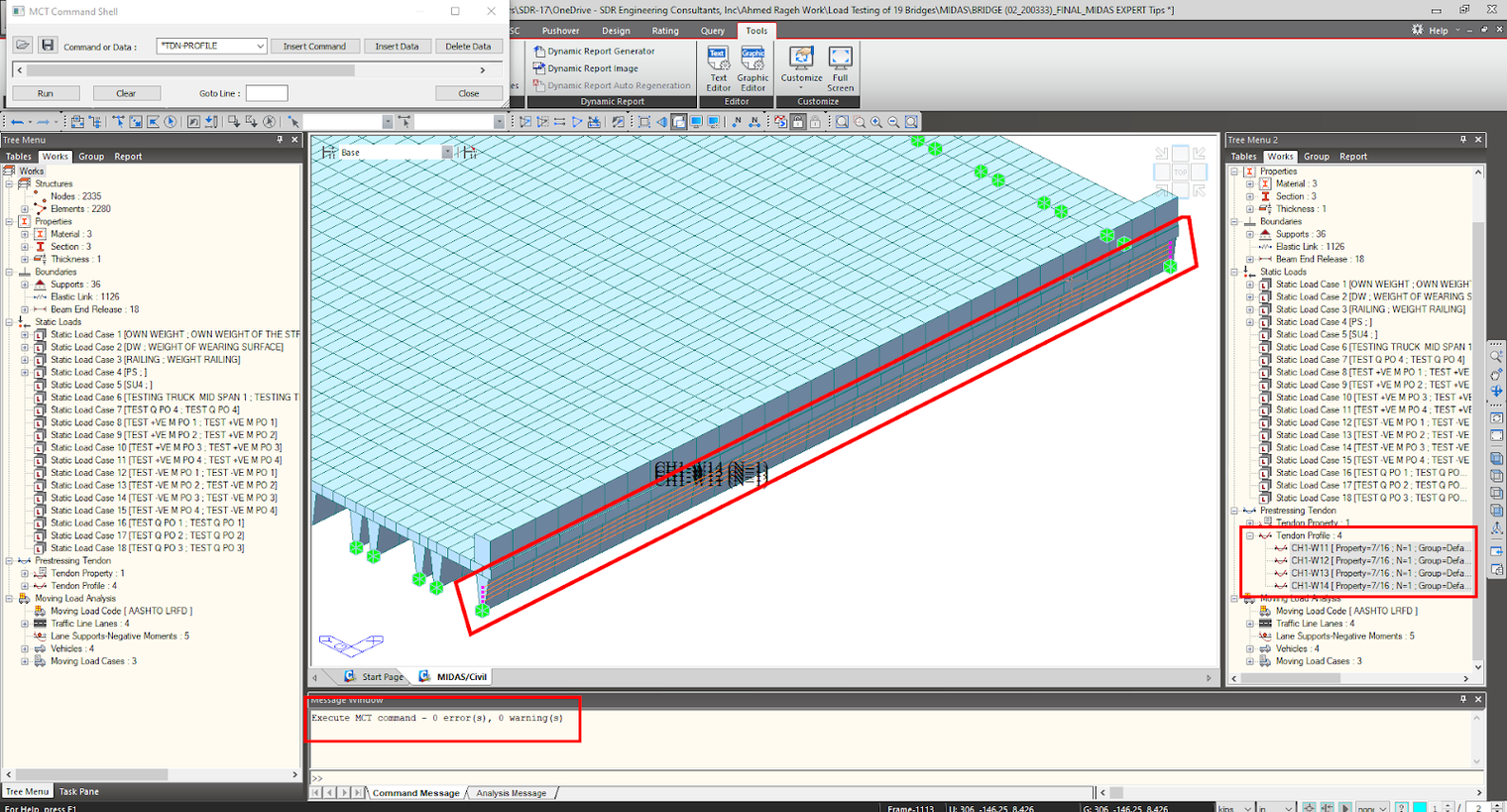
 

Figure 9 Girder 1 Web 1 remaining tendons defined with the MCT tool Figure 9: Girder 1 Web 1 remaining tendons defined with the MCT tool


  • Now we will start copying Girder 1 Web 1 tendons to Girder 1 Web 2 with the MCT tool. In the MCT tool, click the “Clear” button, then click Insert Data. After clicking run, ensure that the Command or Data is still “*TDN-PROFILE.”

  • Now we can see the definition of Girder 1 Web 1 4 tendons. To match Girder 2 Web 2 elements, we will change the following in the 4 coding segments.

    • Names to be: CH1-W21, CH1-W22, CH1-W23, and CH1-W24

    • Elements from Girder 1 Web 1 frame element numbers 1101to1130 to Girder 1 Web 1 frame element numbers 1201to1230.

    • Change the element end from Girder 1 Web 1 frame element 1101 to Girder 1 Web 2 1201.

  • Click Run and Girder 1 Web 2 tendons should be modeled.
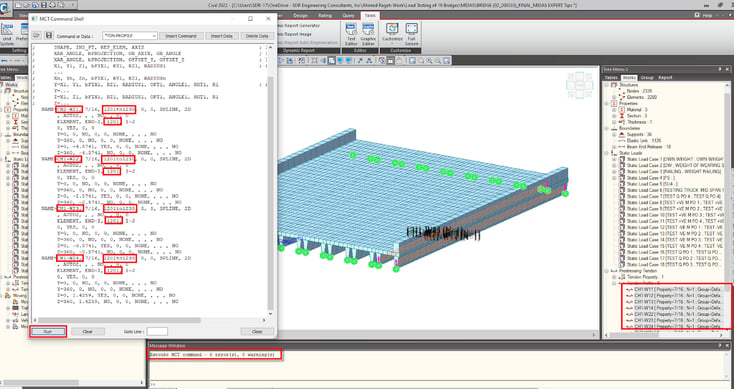
 

Figure 10 Girder 1 Web 2 tendons defined with the MCT tool Figure 10: Girder 1 Web 2 tendons defined with the MCT tool


  • To copy strands to the remaining girders webs, we have 2 options:

    • Change the current MCT 4 code segments to match each girder web one by one.

    • Or, we can copy these 4 code segments 16 times, modify names and frame element numbering to match the remaining girder's webs, then click Run.

    • Names to be: CH1-W21, CH1-W22, CH1-W23, and CH1-W24

    • Elements from Girder 1 Web 1 frame element numbers 1101to1130 to Girder 1 Web 1 frame element numbers 1201to1230.

    • Change the element end from Girder 1 Web 1 frame element 1101 to Girder 1 Web 2 1201.

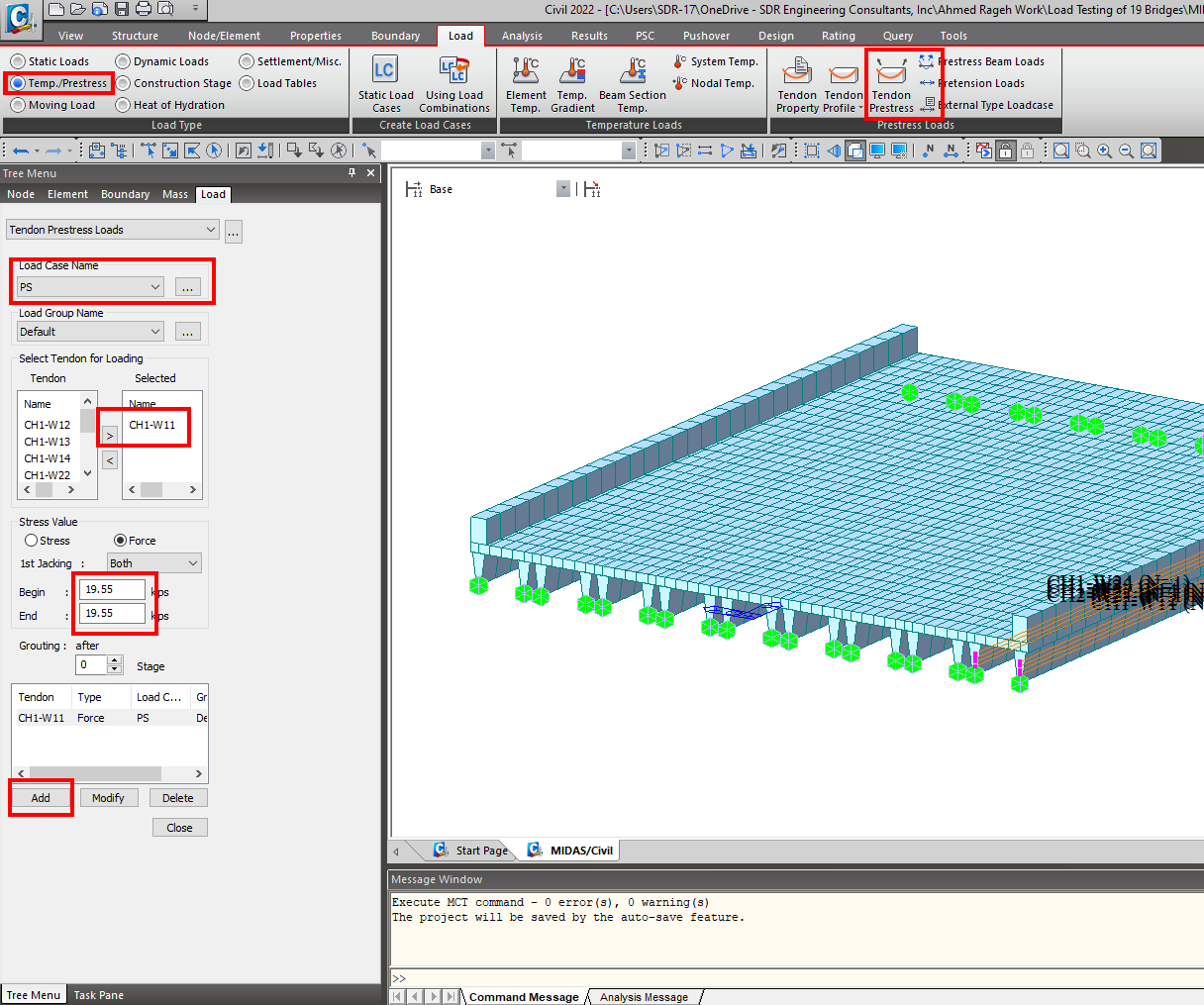
    • Now let us define the Tendon Prestress. We can also define them from the Midas interface or the MCT tool. However, we must define at least 1 from the midas interface window to get the correct coding segment. The prestressing force is calculated to be 19.55 kips.


Figure 11 Defining prestressing force for tendon CH1-W11

Figure 11: Defining prestressing force for tendon CH1-W11


  • From the MCT tool, Click Clear.

  • From the MCT tool, in the Command or Data, type “*TDN-PRESTRESS,” then Insert Data. The defined prestress force code portion could be seen in the MCT Tool.

  • Copy the tendon CH1-W11 defined prestress force code portion 7 times (number of remaining defined tendons).

  • Change the name to match the defined tendons names, then click Run.

  • The defined tendon prestress force should now be defined.
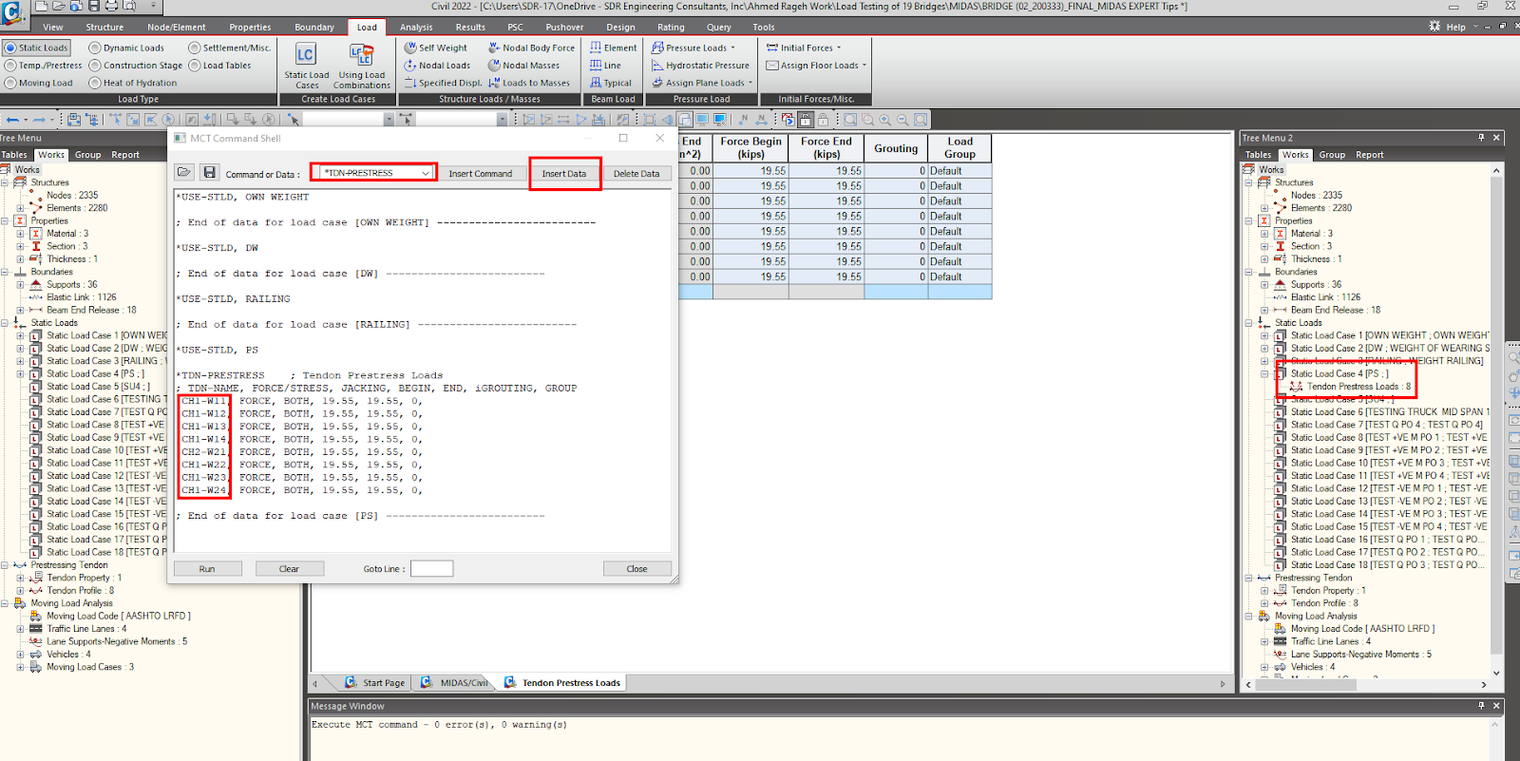
 

Figure 12 Defining tendons prestressing force with MCT tool

Figure 12: Defining tendons prestressing force with MCT tool


Co-Author: Sarah ElSawah, MS, PE,  Structural / Bridge Engineer at SDR Engineering Consultants


#Prestressed Girders
#Midas Model
#Tendon Profiling


About the Editor
Ahmed Rageh
Project Engineer Volkert, Inc. (Tallahassee, FL)

Subscribe to Newsletter

Catch the weekly engineer news!

What you may
also like