Yeop Jin | jby1007@midasit.com
Overview
This MIDAS Academy session in Vilnius takes you from your very first model in MIDAS Civil NX to a complete road bridge deck – in one afternoon. It is designed for master’s students and engineers alike, and no prior experience with the software is required.
In the first part, you will get to know the Civil NX environment by building a simple beam, and then check the software output against hand calculations – a habit that is just as valuable for experienced engineers as for those still studying. In the second part, you will apply the same workflow to a simply supported road bridge deck: from geometry and bearings to traffic loads and load combinations.
Key highlights include:
- Start From Zero: Find your way around the Civil NX environment by modelling a simple beam – a steel I-section, or a prestressed concrete section with tendons
- Supports and Loads: Fixed, pinned and roller boundary conditions, with self-weight, uniformly distributed and point loads
- Validate the Results by Hand: Calculate bending moment, shear, deflection and bending resistance (Eurocode) and compare them with the software output
- Model a Bridge Deck: Define the span, width and cross-section, and model the deck with the grillage approach, then refine it with beam and shell elements for transverse load distribution
- Bearings: Fixed, guided and free bearings, including neoprene stiffness
- Bridge Loads and Combinations: Self-weight, permanent and traffic loads (LM1, LM2), temperature, braking and wind – and load combinations defined manually and automatically
Join us in Vilnius to build your first bridge model in MIDAS Civil NX and learn how to trust its results!
Programme
Part 1
Introduction and Simple Beam Modelling
A hands-on introduction to MIDAS Civil NX on a beam with a 20–30 m span.
- Overview of the Civil NX environment
- Steel I-section, or prestressed concrete section (rectangular, T-beam or box girder) with cables / tendons
- Boundary conditions: fixed, pinned, roller
- Load cases: self-weight, uniformly distributed load, point load
- Hand calculations – bending moment, shear, deflection and bending resistance (Eurocode) – compared with the Civil NX results
Part 2
Introduction to Bridge Decks (Simply Supported Road Bridge)
A road bridge with 2 lanes and 2 sidewalks.
- Geometry definition: span, width, cross-section
- Deck as a beam model using the grillage approach, then a second iteration with beam and shell elements
- Bearings: fixed, guided and free, neoprene stiffness
- Loads: self-weight, permanent loads, traffic loads (LM1, LM2), temperature, braking force, wind
- Load combinations: manual and automatic
Key Points
- A master’s student in structural or bridge engineering who wants a practical start with bridge analysis software
- A structural or bridge engineer who is new to MIDAS Civil NX, or wants to put the fundamentals in order
- Looking to validate software results with hand calculations before trusting them in a project
- Wanting to understand bridge deck modelling – grillage and beam + shell approaches – bearings and Eurocode traffic loads (LM1 / LM2)
- Interested in a step-by-step path from a simple beam to a full bridge deck
Speaker

Cristian-Ioan Timbolmas
Bridge Expert at AB LTG Infra, Lithuania
Cristian-Ioan Timbolmas is a Bridge Expert at AB LTG Infra, working on the design, assessment and development of railway bridges and structures for the Rail Baltica project. He holds a PhD in Civil Engineering from the University of Granada, Spain, and has experience in bridge engineering, structural analysis and finite element modelling for various bridges. His professional and research interests include bridges, advanced structural modelling, composite and timber structures, and the application of numerical and experimental methods to structural engineering. He also serves as a peer reviewer for high-impact international journals in structural analysis and bridge engineering.
Venue
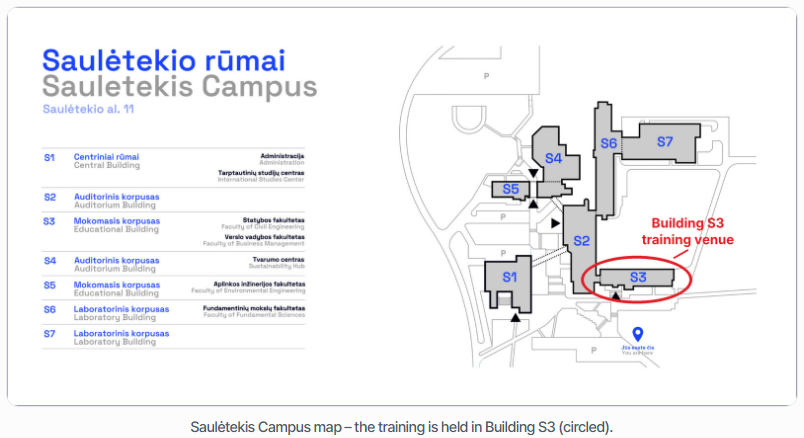
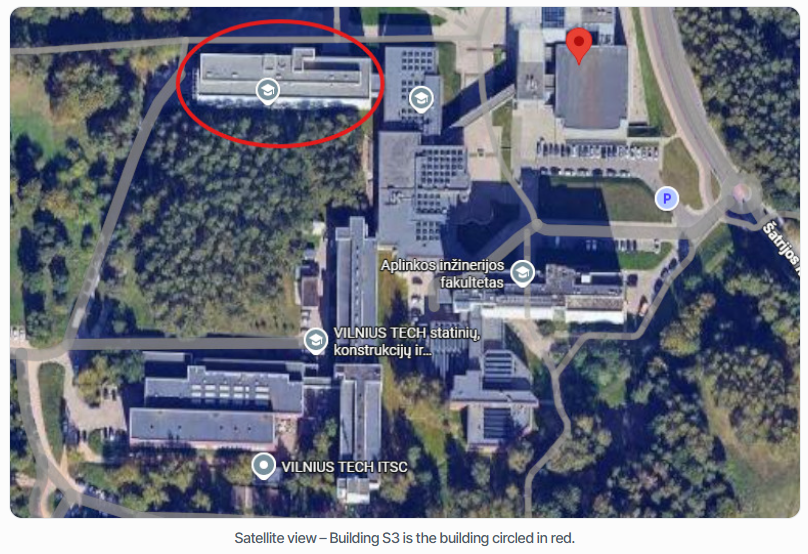
The training takes place in Building S3 (Educational Building, Faculty of Civil Engineering), Room 305, at Saulėtekio al. 11, Vilnius. The Saulėtekis Campus is quite large, so the map and satellite view below show exactly which building to look for.
What Is Required Before the Session
To take part in the hands-on session, please complete the steps below before the event. This way you can start modelling from the very first minute – thank you for preparing in advance.
Step 1Required
Bring your laptop
Make sure it can run MIDAS Civil NX (a training license will be provided on the day).
Step 2Required
Create your account
First time using MIDAS? Create your account before the session.
Step 3Required
Download the software
Download MIDAS Civil NX to your laptop – get it here.
Step 4Required
Activate your license
Activation details will be sent to the email registered with your MIDAS Member account – please check your inbox (and spam folder).
Step 5Recommended
Bring an external mouse
An external mouse is highly recommended for modelling comfort.
Reserve your seat
Join us in Vilnius for a hands-on session on MIDAS Civil NX – from a simple beam to a road bridge deck.
Starts in Vilnius on 25 November, 16:45 (EET)
--Days
--Hours
--Minutes
Adding this event to your calendar does not register your attendance.
Submit the registration form below to confirm your seat.