Webinar
Ongoing Registration In Progress Closed
Automate, Optimize, Accelerate:
Structural Engineering with Python
    🗓️ Session 1 : January 28, 2026
🗓️ Session 2 : February 4, 2026
📍Live Streaming on GoToWebinar
Automate, Optimize, Accelerate: Structural Engineering with Python.

Structural engineers often face repetitive tasks across modeling, analysis, design, and reporting as project requirements change. As complexity and time pressure increase, these manual workflows quickly become a bottleneck.


This session explains why automation is becoming essential in structural engineering and how Python can be practically used to replace repetitive manual work with more efficient and scalable workflows. Participants will see how automation reduces errors, saves time, and improves consistency without changing core engineering judgment.


Using MIDAS CIVIL NX and its API environment, the webinar demonstrates Python integration through both foundational examples and a real-world project case presented by an external industry expert, showing how automation is applied in actual engineering workflows.

What You Will Learn 

In this series, you will learn how to:


- Reduce time spent on repetitive modeling, analysis, and reporting tasks

- Minimize manual errors caused by repeated setup and rework

- Understand where automation delivers the biggest impact in real structural engineering workflows

- Apply Python-based automation without changing your existing engineering logic

- Gain hands-on experience using real engineering software, not abstract examples

- Build a practical foundation for scaling automation across future projects


And you’ll learn with engineers worldwide exchanging practical workflows shaped by real projects.


Who Should Attend

Tunnel & geotechnical engineers who want practical, field-ready tunneling analysis not just theory.


You’ll benefit if you are:

   - Design or analyze NATM/SEM or cut & cover tunnels
   - Need clear guidance on excavation control & support systems

   - Want to interpret 3D numerical results with confidence

   - Aim to apply FEM modeling directly to real site conditions


💻 Session Highlights
  • Session 1
    Jan 28, 2026

    Introduction & Foundations ▪️Speaker: Vishal Jagad | Projects Director, MIDAS IT India
    ▪️Key Topics: Transforming Structural Engineering Workflows with Python

    - Overview of automation in structural engineering
    - How Python fits into modeling, analysis, and reporting workflows
    - Mini-assignment to reinforce key concepts through simple hands-on practice

  • Session 2
    Feb 4, 2025

    Real-World Project Case Study ▪️Speaker: Vishal Jagad | Projects Director, MIDAS IT India
    ▪️Key Topics: Transforming Structural Engineering Workflows with Python

    - Practical bridge engineering case presented by an external industry expert
    - Guided, step-by-step tutorial based on a real project workflow
    - Apply automation techniques while following an actual engineering scenario


🎙️Speakers

vishal jagad-1
Vishal Jagad
Technical Support Engineer at MIDAS R&D Center Pvt. Ltd


Vishal is a Technical Support Engineer at MIDAS R&D Center Pvt. Ltd. with expertise in structural analysis and design of bridges and buildings. He supports a wide range of MIDAS users across government and private organizations and specializes in automation-driven solutions using the MIDAS API. His experience includes Python, Grasshopper, and Excel VBA to improve engineering workflows. Vishal has worked closely with engineers from India, the UK, Europe, the US, and Australia on international projects.


Key messages


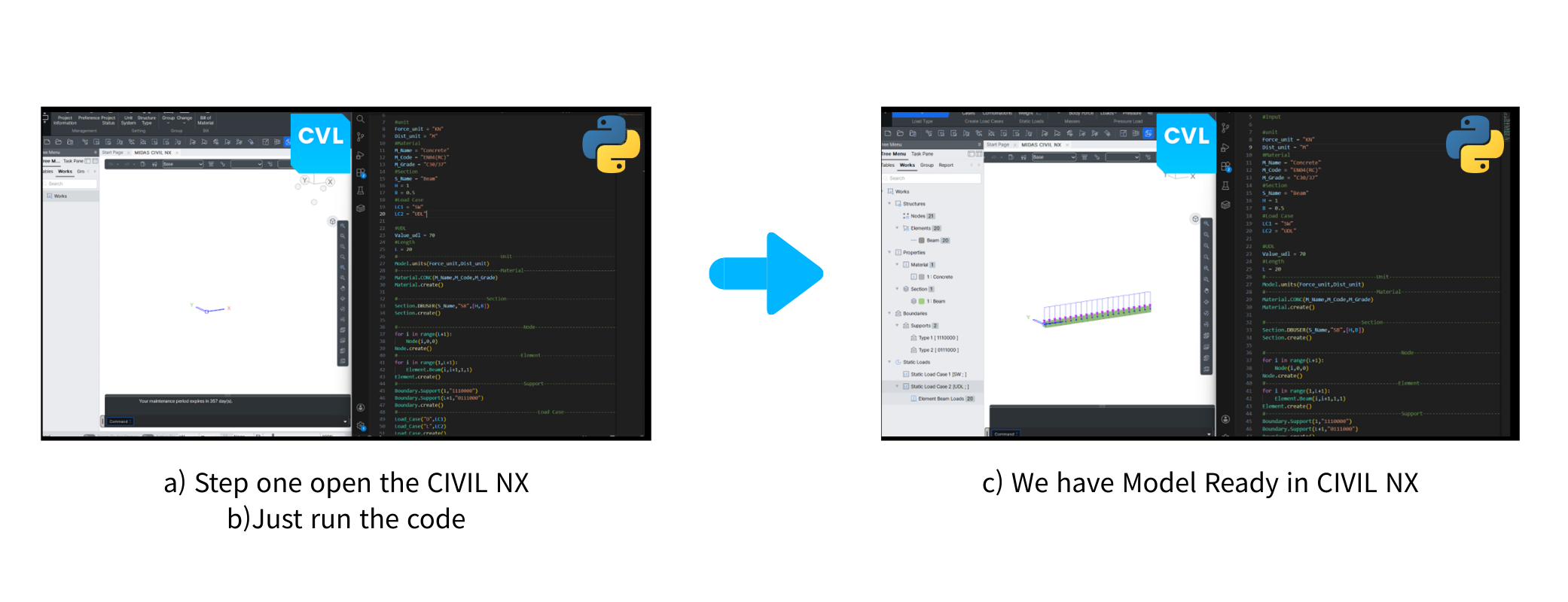
1️⃣ Input the data in code create the Model using Python 

1-4-1

Instead of manually building models element by element, Python allows engineers to generate the entire structural model directly from coded input. With just one script execution, the model is created instantly in Civil NX—saving hours of repetitive work and eliminating manual input errors. 


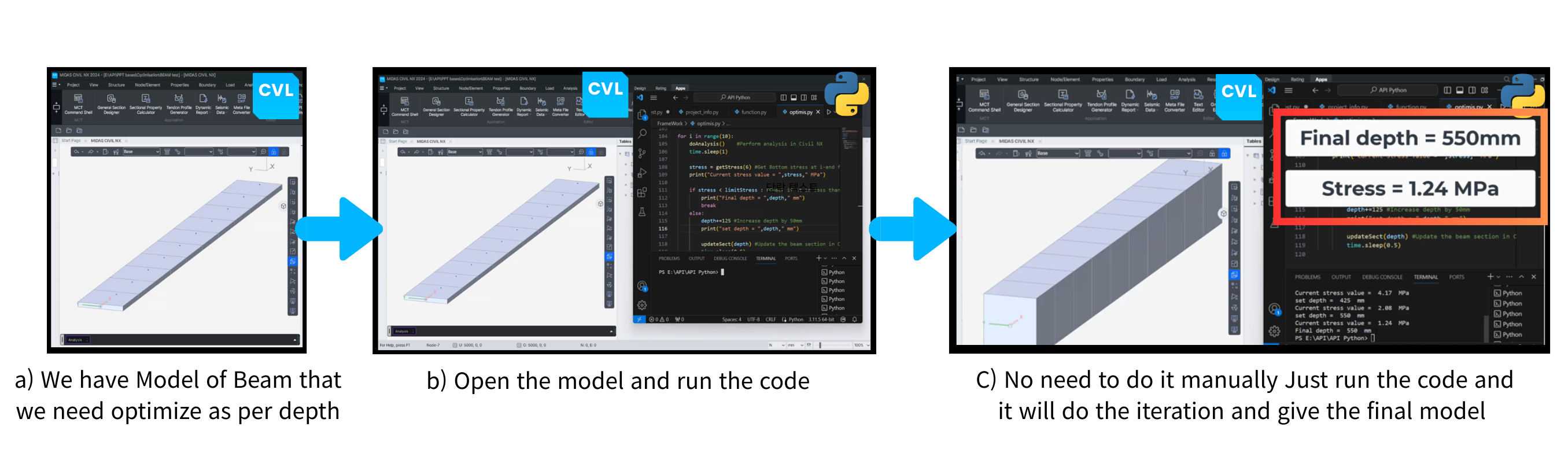
2️⃣ Smart Section Optimization Through Automated Iteration

2-Jan-12-2026-04-47-38-1262-AM-1

Python enables automatic optimization of section properties, such as beam depth, based on analysis results. Rather than manually modifying sections and reanalyzing, the code iterates through analysis checks and converges on the optimal section efficiently and consistently. 


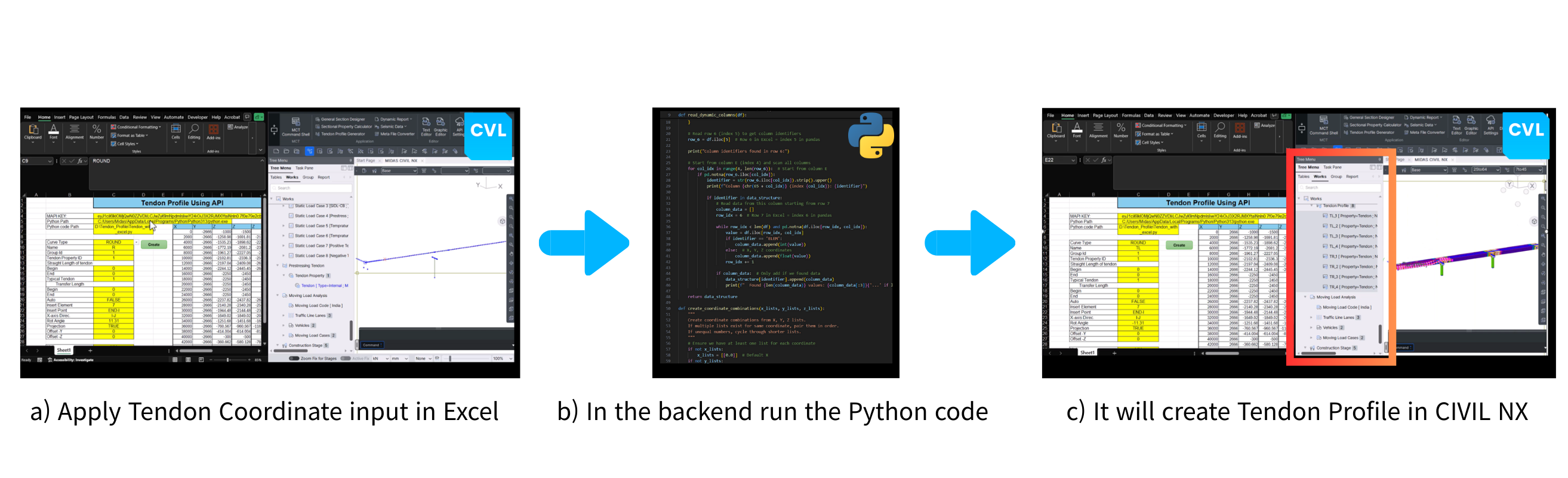
3️⃣ Fast Tendon Profile Generation Using Excel + Python

3-Jan-12-2026-04-49-08-5221-AM-1


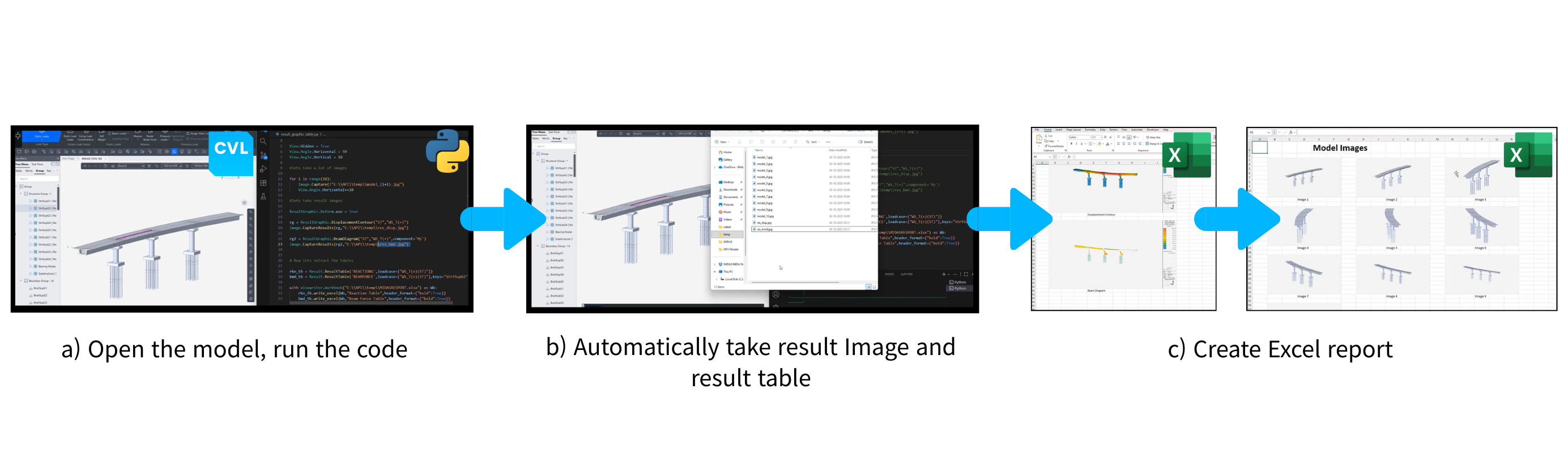
4️⃣ Automate report creation using Python 

4-Jan-12-2026-04-50-16-7007-AM-1

Python can automate the entire reporting workflow—from extracting result tables to capturing analysis images and compiling them into Excel reports. This ensures standardized, error-free documentation while drastically reducing the time spent on post-processing and report preparation. 


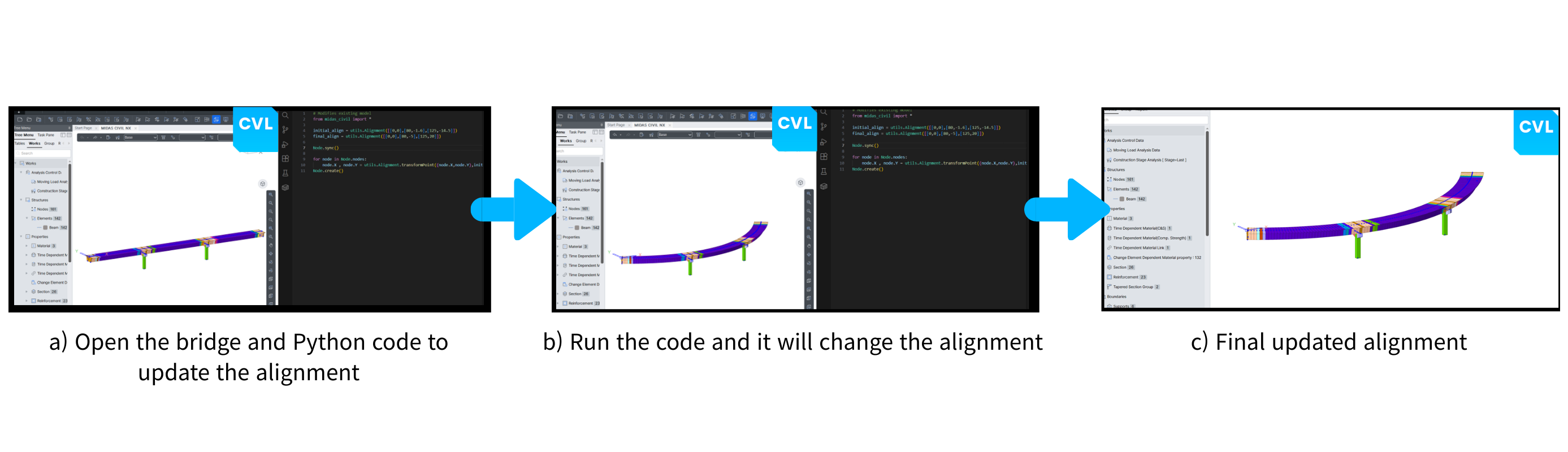
5️⃣ Dynamic Bridge Alignment Updates with Python 

5-Jan-12-2026-04-51-28-7922-AM-1

Updating bridge alignment manually can be complex and time-consuming. With Python automation, alignment parameters can be modified directly through code, instantly updating the model geometry and ensuring consistency across the entire bridge structure.


🎁 Attendee's Benefits

Register now to gain full access to premium resources, including a trial license and comprehensive tutorials designed to help you maximize your experience with MIDAS. Don't miss this opportunity to explore powerful engineering solutions!

  • 2-Week CIVIL NX Training License
    Get full access to GTS NX for 4 weeks free.
    Use the software to practice the workflows covered in the sessions and experiment with real tunneling scenarios.
  • Exclusive Technical Resources from Speakers
    Receive session-specific reference materials prepared directly by our speakers:case studies, analysis notes, modeling guides, and practical insights that connect theory to field conditions.
  • LinkedIn Certificate
    Submit 1 mini-assignment → PDF Certificate
    of Completion
    Submit 3 mini-assignments → LinkedIn Certificate
    with Credential ID (shareable)🔗 Assignment Submission Form


📋 Webinar Details

📆Date :

Session 1. January 28, 2026

Session 2. February 04, 2026

Duration : Varies by session (typically 60–90 minutes)
Platform : GoToWebinar (Live)
Language: English


A live join link will be sent to your registered email one day before each session.
✏️ You will have access to all sessions, including on-demand replays.

✏️ To receive your Certificate of Completion, you must:
   ✓ 1 mini-assignment → PDF Certificate of Completion

             ✓2 assignments → LinkedIn Shareable Certificate with Credential ID        

               🔗 Assignment Submission Form

✏️ Assignments must be submitted by February 11, 2026 (KST).
✏️ The certificate will be issued and sent via email on February 19, 2026.
✏️ All resources (training licenses, models, tutorials) will be sent via email after registration or each session.

FAQ

Q. Is this training program free of charge?

Yes. The Global Geotechnical Webinar Series 2025 is completely free of charge. Once registered, you’ll get access to all live and on-demand sessions, expert talks, hands-on tasks, and learning materials — at no cost.

Q. How do I earn the certificate?

The requirements for earning the certificate are :

✅ Submit 1 assignment by Dec 5, 2025

     (PDF Certificate of Completion)
✅ Submit 3 assignments in total by Dec 5, 2025

    (LinkedIn Shareable Certificate with Credential ID) 


🚩Certificates will be emailed to qualified participants on Dec 12, 2025.


☑️ What to do next From your session follow-up or session page: download model & tutorial → run → upload via the submission form

🔗 Assignment Submission Form

Q. How is my progress tracked?

Attendance is tracked automatically when you join with your personal join link (no extra steps). Assignments are counted after we verify your submission.

Q. Where can I get the assignment files and how should I submit them?

You can download the assignment files from replay pages of each session, and they will also be sent via email after the webinar ends. Once completed, please submit your assignments through the form link below.

🔗 Assignment Submission Form

Q. Can I receive webinar materials?

Yes, we provide all webinar materials only to those who attend the live session.
Right after the end of the session, you will receive an email with the model/assignment files, the recording, and the slides.

Q. How can I receive my training license?

The training license is provided only to registrants. If you’ve already registered for the workshop, you can find your training license in your webinar registration confirmation email.


If you’d like the license resent, please visit the page below and request a resend. Be sure to enter the same email address you used when registering for the webinar.


🔗 Resend license here →