Hello civil engineers . This is Connor and Ben!! 👬
Today, we'll explore 'How to change the stress check location in a section?’ in MIDAS CIVIL NX. Many users are inquiring about how to change the stress check location in a section.
Today's question: “How do I change the stress check location in a section?”
We're going to share the reason for that today.
When defining a section, if you define it in the Value tab of Section Data, you can change the stress review location of the section by adjusting y1(z1), y2(z2), y3(z3), and y4(z4).
Try this simple and useful method to use MIDAS CIVIL NX more easily and effectively!
First, you need to set up a new section. Select Section Properties in the Section Properties group under the Properties tab, and a window named Properties will appear.

Propertie > Section Properties
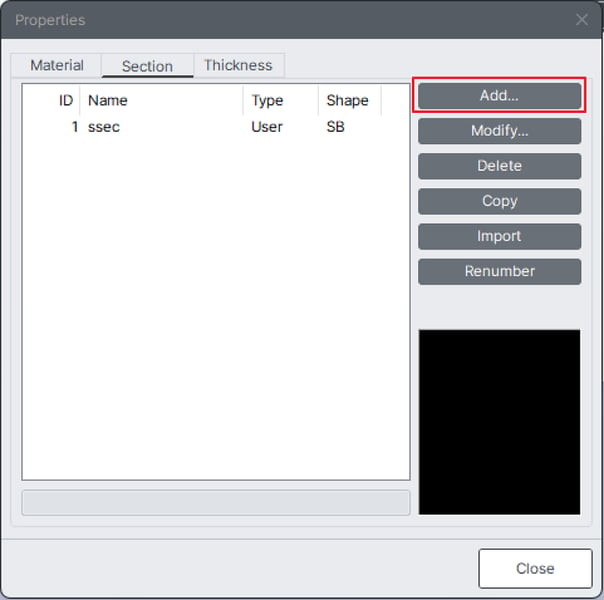
Add Section Properties
Here, if you click on ‘Add...’, a window named Section Data will appear where you can define the section. If you want to change the stress check location of the section, you must create it through Value.
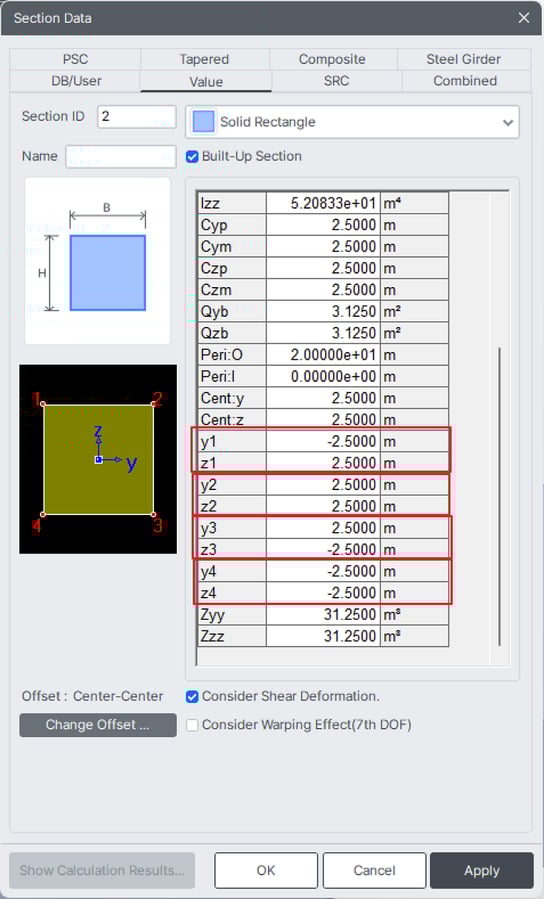
Section Data
In the changeable items, y1(z1), y2(z2), y3(z3), and y4(z4) represent the distances from the neutral axis of the section to the respective numbered positions, used in the calculation of composite stress.
Since these can be arbitrarily changed by the user, you can use this feature to adjust the stress review location.
Pretty simple, isn’t it?
This small tip for MIDAS CIVIL NX will make your work much easier. Now, become a wizard of stress check while using MIDAS CIVIL NX more effectively! 🎩🔮