Would you like to sign out?

Select Country

  • Afghanistan English
  • Albania English
  • Algeria English
  • American Samoa English
  • Andorra English
  • Angola English
  • Anguilla English
  • Antarctica English
  • Antigua and Barbuda English
  • Argentina Español
  • Armenia English
  • Aruba English
  • Australia English
  • Austria English
  • Azerbaijan English
  • Bahamas English
  • Bahrain English
  • Bangladesh English
  • Barbados English
  • Belarus English
  • Belgium English
  • Belize English
  • Benin English
  • Bermuda English
  • Bhutan English
  • Bolivia Español
  • Bosnia and Herzegovina English
  • Botswana English
  • Bouvet Island English
  • Brazil English
  • British Indian Ocean Territory English
  • British Virgin Islands English
  • Brunei English
  • Bulgaria English
  • Burkina Faso English
  • Burundi English
  • Cambodia English
  • Cameroon English
  • Canada English
  • Cape Verde English
  • Caribbean Netherlands English
  • Cayman Islands English
  • Central African Republic English
  • Chad English
  • Chile Español
  • Christmas Island English
  • Cocos (Keeling) Islands English
  • Colombia Español
  • Comoros English
  • Congo English
  • Cook Islands English
  • Costa Rica Español
  • Côte d’Ivoire English
  • Croatia English
  • Cuba Español
  • Curaçao English
  • Cyprus English
  • Czech Republic English
  • Democratic Republic of the Congo English
  • Denmark English
  • Djibouti English
  • Dominica English
  • Dominican Republic Español
  • Ecuador Español
  • Egypt English
  • El Salvador Español
  • Equatorial Guinea English
  • Eritrea English
  • Estonia English
  • Ethiopia English
  • Falkland Islands English
  • Faroe Islands English
  • Fiji English
  • Finland English
  • France English
  • French Guiana Español
  • French Polynesia English
  • French Southern Territories English
  • Gabon English
  • Gambia English
  • Georgia English
  • Germany English
  • Ghana English
  • Gibraltar English
  • Greece English
  • Greenland English
  • Grenada English
  • Guadeloupe Español
  • Guam English
  • Guatemala Español
  • Guernsey English
  • Guinea English
  • Guinea-Bissau English
  • Guyana English
  • Haiti Español
  • Heard Island and McDonald Islands English
  • Honduras Español
  • Hong Kong English
  • Hungary English
  • Iceland English
  • India English
  • Indonesia English
  • Iran English
  • Iraq English
  • Ireland English
  • Isle of Man English
  • Israel English
  • Italy English
  • Jamaica English
  • Japan 日本語
  • Jersey English
  • Jordan English
  • Kazakhstan English
  • Kenya English
  • Kiribati English
  • South Korea 한국어
  • Kuwait English
  • Kyrgyzstan English
  • Laos English
  • Latvia English
  • Lebanon English
  • Lesotho English
  • Liberia English
  • Libya English
  • Liechtenstein English
  • Lithuania English
  • Luxembourg English
  • Macau English
  • Madagascar English
  • Malawi English
  • Malaysia English
  • Maldives English
  • Mali English
  • Malta English
  • Marshall Islands English
  • Martinique English
  • Mauritania English
  • Mauritius English
  • Mayotte English
  • Mexico Español
  • Micronesia English
  • Moldova English
  • Monaco English
  • Mongolia English
  • Montenegro English
  • Montserrat English
  • Morocco English
  • Mozambique English
  • Myanmar English
  • Namibia English
  • Nauru English
  • Nepal English
  • Netherlands English
  • New Caledonia English
  • New Zealand English
  • Nicaragua Español
  • Niger English
  • Nigeria English
  • Niue English
  • Norfolk Island English
  • Northern Mariana Islands English
  • Norway English
  • Oman English
  • Pakistan English
  • Palau English
  • Palestine English
  • Panama Español
  • Papua New Guinea English
  • Paraguay Español
  • Peru Español
  • Philippines English
  • Pitcairn Islands English
  • Poland English
  • Portugal Español
  • Puerto Rico Español
  • Qatar English
  • Réunion English
  • Romania English
  • Russia English
  • Rwanda English
  • Saint Barthélemy Español
  • Saint Helena English
  • Saint Kitts and Nevis English
  • Saint Lucia English
  • Saint Martin Español
  • Saint Pierre and Miquelon English
  • Saint Vincent and the Grenadines English
  • Samoa English
  • San Marino English
  • São Tomé and Príncipe English
  • Saudi Arabia English
  • Senegal English
  • Serbia English
  • Seychelles English
  • Sierra Leone English
  • Singapore English
  • Sint Maarten English
  • Slovakia English
  • Slovenia English
  • Solomon Islands English
  • Somalia English
  • South Africa English
  • South Georgia English
  • South Sudan English
  • Spain English
  • Sri Lanka English
  • Sudan English
  • Suriname English
  • Svalbard and Jan Mayen English
  • Eswatini English
  • Sweden English
  • Switzerland English
  • Syria English
  • Taiwan English
  • Tajikistan English
  • Tanzania English
  • Thailand English
  • Togo English
  • Tokelau English
  • Tonga English
  • Trinidad and Tobago English
  • Tunisia English
  • Turkey English
  • Turkmenistan English
  • Turks and Caicos Islands English
  • Tuvalu English
  • U.S. Virgin Islands English
  • Uganda English
  • Ukraine English
  • United Arab Emirates English
  • United Kingdom English
  • United States English
  • U.S. Minor Outlying Islands English
  • Uruguay Español
  • Uzbekistan English
  • Vanuatu English
  • Vatican City English
  • Venezuela Español
  • Vietnam English
  • Wallis and Futuna English
  • Western Sahara English
  • Yemen English
  • Zambia English
  • Zimbabwe English
  • Åland Islands English
  • East Timor English
  • Netherlands Antilles English
  • Serbia and Montenegro English
  • North Macedonia English
  • Timor-Leste English

Mastering Sectional Property Calculation

February 6, 2024
BLOG BRIDGE INSIGHT

1. How to link a CAD cross-section with an analysis model at once?

   Wouldn't it be convenient if the sections of the drawings you have could be seamlessly integrated with the analysis program without any additional work? Integrating analysis models with irregular section structures, without the need for section extraction or calculation! In this content, we will show you how to easily solve the calculation of irregular sections when creating structural analysis models by integrating CIVIL NX and CAD.


2. What are sectional properties/characteristics?

   Sectional properties refer to various characteristics used to analyze how the cross-section of a structure reacts to external loads. Sectional properties are determined by the shape of the cross-section, and the strength of the structure can vary greatly depending on its shape. Calculating sectional properties is essential in the design and analysis of civil structures, as it allows us to interpret and design the relationship between the forces and stresses acting on the structure.


3. What components are included in sectional properties?

   Sectional properties mainly include the following components:

  • Area (A): The total area of the cross-section, used to determine the load distribution and strength of the section.
  • Second Moment of Area (I): Used to determine the bending strength and stiffness of the structure. This value is important in calculating the deformation of the section caused by the load.
  • Section Modulus (Z): This represents the resistance of the section to bending and is calculated by dividing the second moment of the area by the distance to the extreme fiber (the furthest fiber from the neutral axis). The larger the value, the greater the ability of the section to withstand bending loads.
  • The radius of Gyration (r): This represents the mass distribution of the section and is used to calculate the resistance to buckling of the structure. It is calculated by dividing the second moment of the area by the area and taking the square root.
  • Neutral Axis: This axis refers to the axis of the section that experiences no deformation under load. The neutral axis is used to determine the response of the section to bending loads.
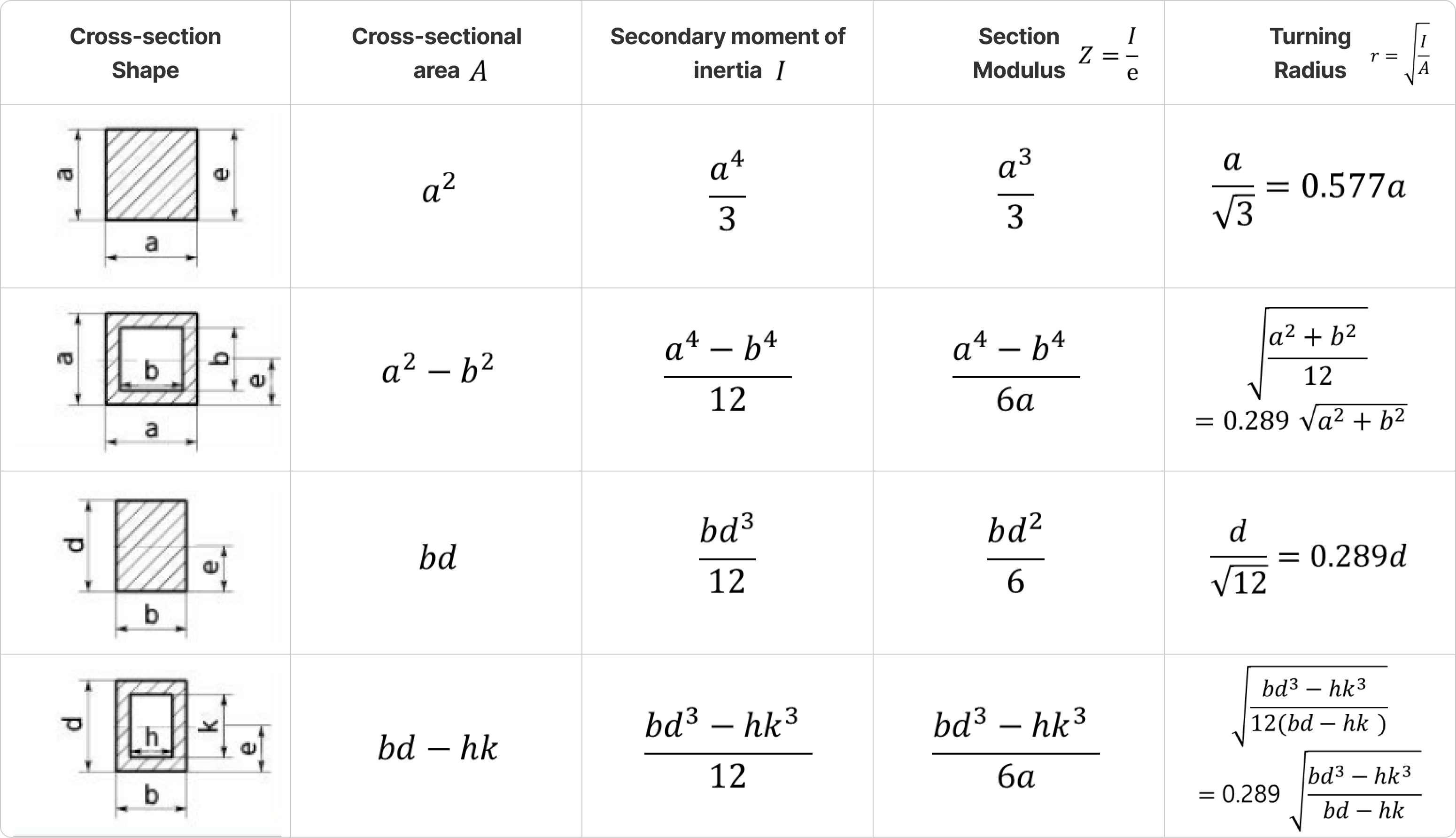
 

Figure1. ExampleFigure1. Example


   These sectional properties are essential for the design, analysis, and evaluation of civil structures, and are crucial in predicting the behavior of structures under various load conditions such as bending, compression, and buckling.


4. Easy and fast calculation of sectional properties: SPC function!

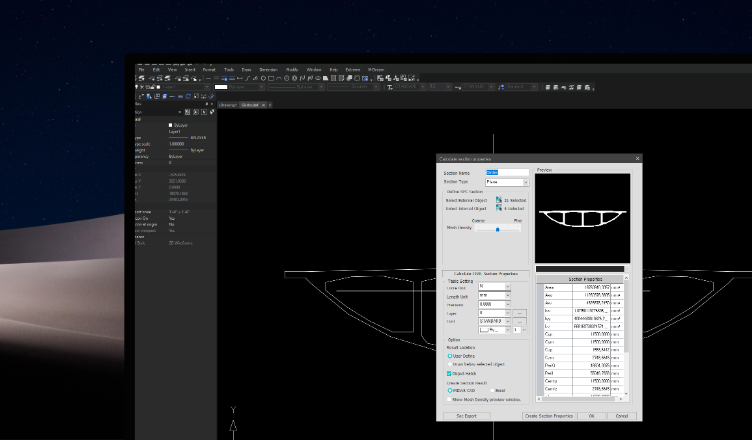
   Calculating these sectional properties can be complex and time-consuming. Especially for irregular or non-standard sections, the calculation process can be even more complicated. With MIDAS CAD, you can easily calculate these complex sectional properties using the SPC (Sectional Property Calculator) function! Previously provided as a separate program, the SPC function is now integrated into MIDAS CAD, allowing you to calculate stiffness data for any shape or form. The SPC function provides various sectional constants required for structural calculations, including the second moment of area, sectional radius of gyration, and more.
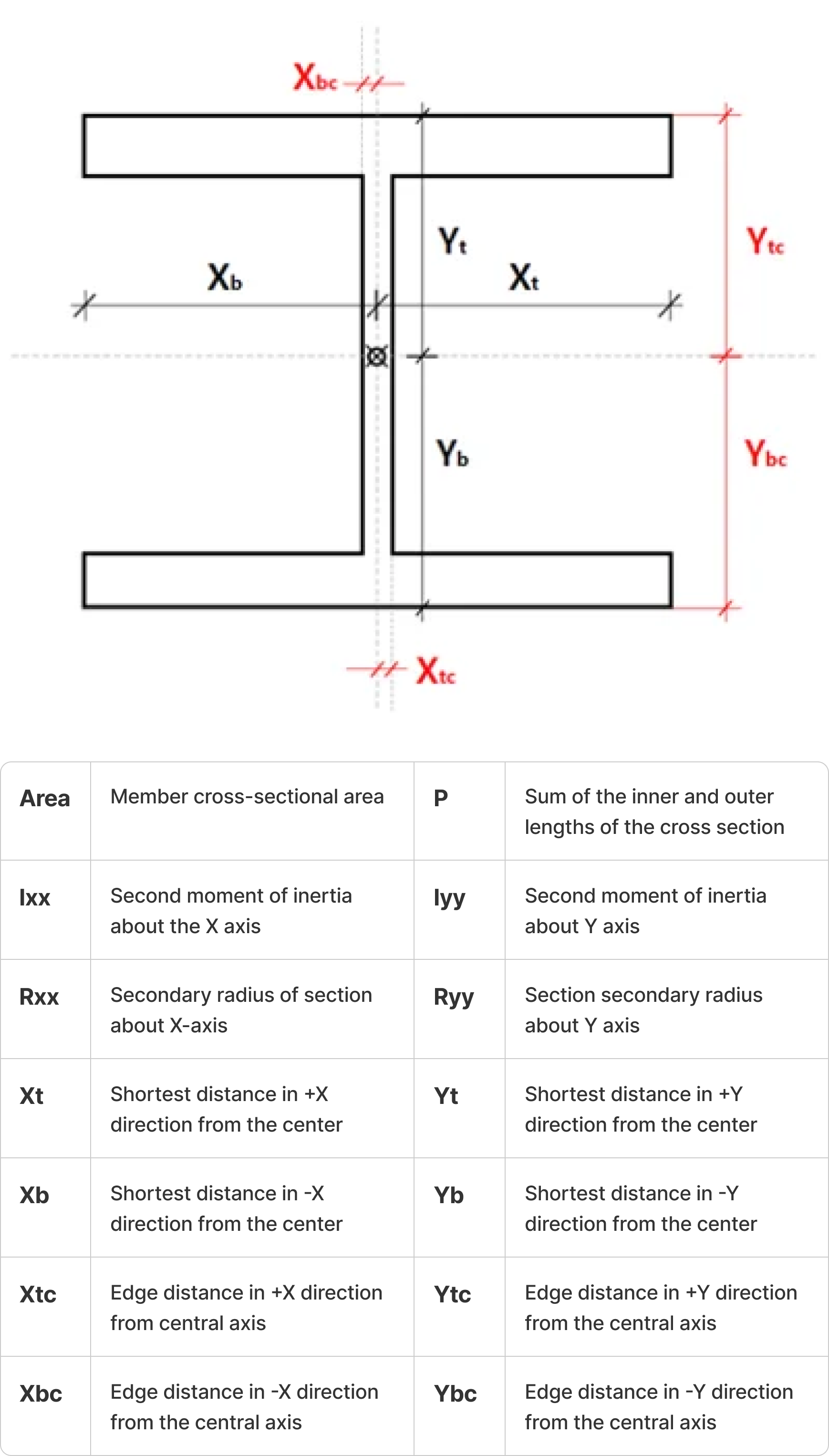
 

Figure2. SPC Function

Figure2. SPC Function


  • Second Moment of Area: Represents the properties of the section to resist bending or deflection.
  • Second Radius of Gyration: Represents the properties of the section to calculate the buckling load on the member.
  • Span Length: Distance to the edge of the steel section.


5. Features of MIDAS CAD's SPC function

   MIDAS CAD's SPC supports more efficient structural design through various features. Previously, we had to extract cross-sections from CAD, export them to a separate program for calculations, and then import them back into MIDAS CIVIL. It was a repetitive and meaningless process of exporting and importing. Now, with the SPC feature of MIDAS CAD, we can work more efficiently.
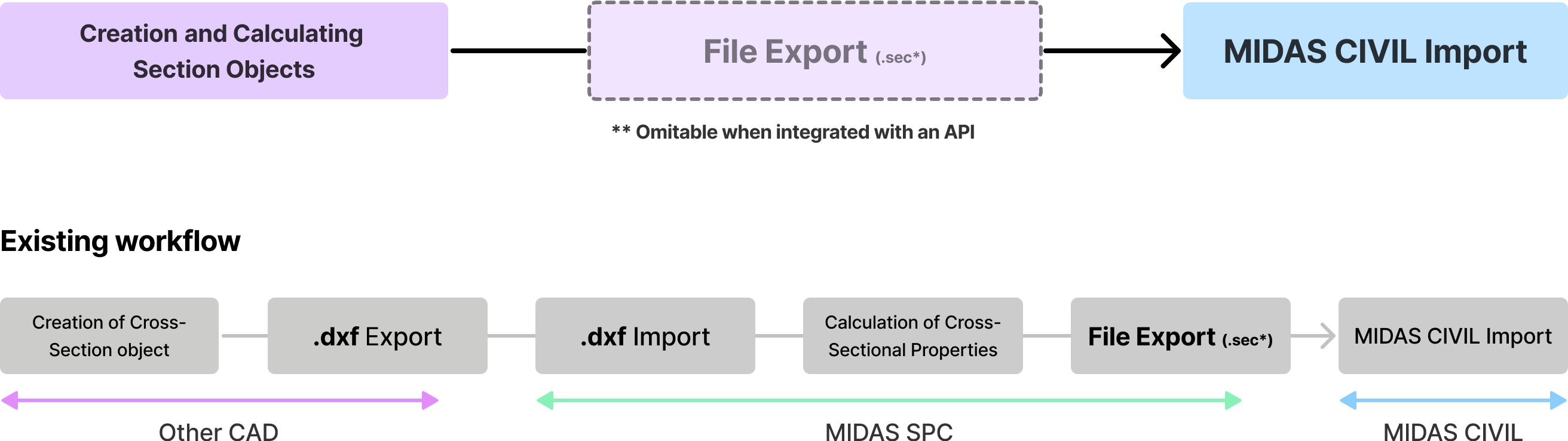
 

Figure3. MIDAS CAD SPC FunctionFigure3. MIDAS CAD SPC Function


A. Advantages of MIDAS CAD’s SPC function


MIDAS CAD's SPC function supports more efficient structural design through the following features:
From object creation to section creation and integration, all can be done in one product.
You can export section properties including section shape to MIDAS CIVIL.
The SPC module of MIDAS CIVIL is fully integrated into MIDAS CAD, ensuring no loss of information.
Manage multiple sections in one DWG file for easy file management.
If a section is modified, the modified section is automatically updated in MIDAS CIVIL.
For the input section, generate the optimal mesh and calculate the section properties.
Calculation of composite sections composed of multiple materials is possible.
Apply section creation and MIDAS CIVIL's construction stage analysis by distinguishing parts according to construction stages.


 

Preview Banner


You can check more of these details in the download file.


6. How to Use MIDAS CAD's SPC Function

A. Access the SPC Created Section List

B. Section Property Calculation Dialog

C. Cross-section Definition

C-1. Plane Type

C-2. Line Type

C-3. Composite Type

C. Cross-section Definition

Susbcribe
MIDAS Newsletter

Thank you, See you soon!
Share
About the Author
Ford | CAD Engineer | MIDAS IT HQ

Ford is a CAD expert at MIDAS IT who is in charge of MIDAS CAD planning work based on his road design experience. Through constant thought and passion, MIDAS CAD provides unique value seen from the perspective of a young engineer.

Comments
DOWNLOAD Continue for Full Contents

Please complete the form below to access the full contents download.

All