Would you like to sign out?

Select Country

  • Afghanistan English
  • Albania English
  • Algeria English
  • American Samoa English
  • Andorra English
  • Angola English
  • Anguilla English
  • Antarctica English
  • Antigua and Barbuda English
  • Argentina Español
  • Armenia English
  • Aruba English
  • Australia English
  • Austria English
  • Azerbaijan English
  • Bahamas English
  • Bahrain English
  • Bangladesh English
  • Barbados English
  • Belarus English
  • Belgium English
  • Belize English
  • Benin English
  • Bermuda English
  • Bhutan English
  • Bolivia Español
  • Bosnia and Herzegovina English
  • Botswana English
  • Bouvet Island English
  • Brazil English
  • British Indian Ocean Territory English
  • British Virgin Islands English
  • Brunei English
  • Bulgaria English
  • Burkina Faso English
  • Burundi English
  • Cambodia English
  • Cameroon English
  • Canada English
  • Cape Verde English
  • Caribbean Netherlands English
  • Cayman Islands English
  • Central African Republic English
  • Chad English
  • Chile Español
  • Christmas Island English
  • Cocos (Keeling) Islands English
  • Colombia Español
  • Comoros English
  • Congo English
  • Cook Islands English
  • Costa Rica Español
  • Côte d’Ivoire English
  • Croatia English
  • Cuba Español
  • Curaçao English
  • Cyprus English
  • Czech Republic English
  • Democratic Republic of the Congo English
  • Denmark English
  • Djibouti English
  • Dominica English
  • Dominican Republic Español
  • Ecuador Español
  • Egypt English
  • El Salvador Español
  • Equatorial Guinea English
  • Eritrea English
  • Estonia English
  • Ethiopia English
  • Falkland Islands English
  • Faroe Islands English
  • Fiji English
  • Finland English
  • France English
  • French Guiana Español
  • French Polynesia English
  • French Southern Territories English
  • Gabon English
  • Gambia English
  • Georgia English
  • Germany English
  • Ghana English
  • Gibraltar English
  • Greece English
  • Greenland English
  • Grenada English
  • Guadeloupe Español
  • Guam English
  • Guatemala Español
  • Guernsey English
  • Guinea English
  • Guinea-Bissau English
  • Guyana English
  • Haiti Español
  • Heard Island and McDonald Islands English
  • Honduras Español
  • Hong Kong English
  • Hungary English
  • Iceland English
  • India English
  • Indonesia English
  • Iran English
  • Iraq English
  • Ireland English
  • Isle of Man English
  • Israel English
  • Italy English
  • Jamaica English
  • Japan 日本語
  • Jersey English
  • Jordan English
  • Kazakhstan English
  • Kenya English
  • Kiribati English
  • South Korea 한국어
  • Kuwait English
  • Kyrgyzstan English
  • Laos English
  • Latvia English
  • Lebanon English
  • Lesotho English
  • Liberia English
  • Libya English
  • Liechtenstein English
  • Lithuania English
  • Luxembourg English
  • Macau English
  • Madagascar English
  • Malawi English
  • Malaysia English
  • Maldives English
  • Mali English
  • Malta English
  • Marshall Islands English
  • Martinique English
  • Mauritania English
  • Mauritius English
  • Mayotte English
  • Mexico Español
  • Micronesia English
  • Moldova English
  • Monaco English
  • Mongolia English
  • Montenegro English
  • Montserrat English
  • Morocco English
  • Mozambique English
  • Myanmar English
  • Namibia English
  • Nauru English
  • Nepal English
  • Netherlands English
  • New Caledonia English
  • New Zealand English
  • Nicaragua Español
  • Niger English
  • Nigeria English
  • Niue English
  • Norfolk Island English
  • Northern Mariana Islands English
  • Norway English
  • Oman English
  • Pakistan English
  • Palau English
  • Palestine English
  • Panama Español
  • Papua New Guinea English
  • Paraguay Español
  • Peru Español
  • Philippines English
  • Pitcairn Islands English
  • Poland English
  • Portugal Español
  • Puerto Rico Español
  • Qatar English
  • Réunion English
  • Romania English
  • Russia English
  • Rwanda English
  • Saint Barthélemy Español
  • Saint Helena English
  • Saint Kitts and Nevis English
  • Saint Lucia English
  • Saint Martin Español
  • Saint Pierre and Miquelon English
  • Saint Vincent and the Grenadines English
  • Samoa English
  • San Marino English
  • São Tomé and Príncipe English
  • Saudi Arabia English
  • Senegal English
  • Serbia English
  • Seychelles English
  • Sierra Leone English
  • Singapore English
  • Sint Maarten English
  • Slovakia English
  • Slovenia English
  • Solomon Islands English
  • Somalia English
  • South Africa English
  • South Georgia English
  • South Sudan English
  • Spain English
  • Sri Lanka English
  • Sudan English
  • Suriname English
  • Svalbard and Jan Mayen English
  • Eswatini English
  • Sweden English
  • Switzerland English
  • Syria English
  • Taiwan English
  • Tajikistan English
  • Tanzania English
  • Thailand English
  • Togo English
  • Tokelau English
  • Tonga English
  • Trinidad and Tobago English
  • Tunisia English
  • Turkey English
  • Turkmenistan English
  • Turks and Caicos Islands English
  • Tuvalu English
  • U.S. Virgin Islands English
  • Uganda English
  • Ukraine English
  • United Arab Emirates English
  • United Kingdom English
  • United States English
  • U.S. Minor Outlying Islands English
  • Uruguay Español
  • Uzbekistan English
  • Vanuatu English
  • Vatican City English
  • Venezuela Español
  • Vietnam English
  • Wallis and Futuna English
  • Western Sahara English
  • Yemen English
  • Zambia English
  • Zimbabwe English
  • Åland Islands English
  • East Timor English
  • Netherlands Antilles English
  • Serbia and Montenegro English
  • North Macedonia English
  • Timor-Leste English

MIDAS Alignment Generator Plug-in for Road and Railway Projects

January 9, 2024
BLOG BRIDGE INSIGHT

   In railway or highway design projects, structure engineers always receive decided alignment from the project manager. Highway or Railway alignment usually changes slightly because of many external factors while working on a project. Sometimes, slightly changed alignment can have potential critical issues to construction or other project steps, serviceability, and even a legal issue. For example, a transition curve is related to drivability and driving safety. If so, structural engineers must recognize and consider that minor change. Let's look into how structure engineers change alignment during their projects.


Plug-in Intentions

   Traditionally, structural engineers must use CAD when starting a global analysis project. Divide the entire alignment and consider the span length, bearing locations, etc, to create nodes for checking analysis results. After the CAD work process, the engineers export that CAD file in a DXF format to MIDAS CIVIL NX. For convenience, people use Lisp or Autocad VBA; however, human error issues remain. The engineers needed to conduct the above cumbersome workflows repeatedly.


How the 'Alignment Generator' plug-in can help you

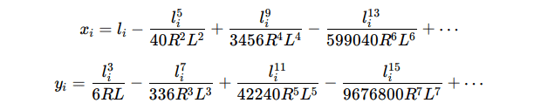
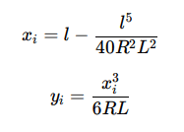
   MIDAS CIVIL NX users might need help to create models when their models have a complex alignment, such as curved bridges, cable bridges, or ramps. Alignment Generator will create complex continuous alignment based on plug-in input values. The user can select straight, arc, clothoid, and cubic parabolas for line shape, radius, and length and set up segment distances, including assigned sections and material on each part of the alignment.


   The plug-in uses internal Spiral Calculating functions as follows:


The Clothoid:
 

Cubic Parabola:
 

Manual for the Alignment Generator

   This part will explain the operating steps and each component in detail.


1. Open MIDAS CIVIL NX → Connect API → Open Plug-in Marketplace → Run Alignment Generator Plugin
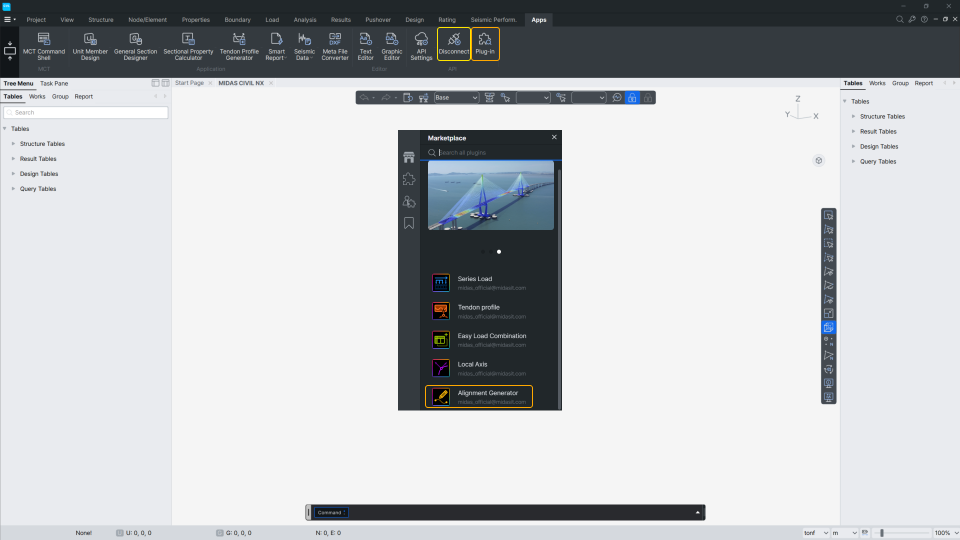
 

Alignment Generator Plugin Screenshot

Alignment Generator Plugin Screenshot


2. When users operate the Alignment Generator plug-in, they can add this plug-in to the users’ bookmark(1). The user can read plug-in information(2) and start by clicking the Run(3) button.
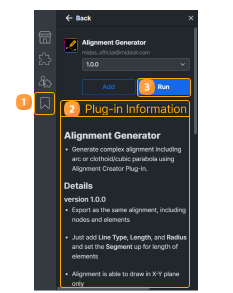
 

Alignment Generator Plugin

Alignment Generator Plugin


3. A new pop-up window will appear as this image. The user can add(1), select Line types(2), length, start, and end radius(3). In the segment setting, the user will input the distance between created nodes(=length of elements). The users can set up each segment’s Structure group, Material, and Section ID(4). The bottom of the graph(5) changes and previews the users’ inputs.

 

Preview Banner

You can check more of these details in the download file.

Conclusion

Susbcribe
MIDAS Newsletter

Thank you, See you soon!
Share
About the Author
Willow | Civil Engineer | MIDAS IT HQ

I'm Willow, a Civil engineer specializing in Structural engineering. I've worked as a railway project manager, and my current role is API project manager at MIDAS IT. Here, I'm dedicated to leveraging my structural engineering insights to pioneer API plug-ins, aiming to elevate customer experience through innovative solutions. I aspire to merge my technical insights with real-world experiences, offering a unique perspective on the intersection of engineering and life’s adventures.

Comments
DOWNLOAD Continue for Full Contents

Please complete the form below to access the full contents download.

All