Introduction to MIDAS Connector
The newly to be released MIDAS CIVIL NX has an API feature installed. API stands for Application Programming Interface, which is a language used for communication between the operating system and applications. In other words, a communication environment has been set up where you can send or receive data from MIDAS CIVIL NX through the API. However, to utilize the API, you need to know how to code using a development language. It feels like there's more to do because you need to know how to code.
At MIDAS, we have thought about how to make the API of MIDAS CIVIL NX more approachable to you. In practice, after structural analysis, a lot of work is done in Excel. Based on this, we have launched the MIDAS Connector as an Excel Add-in to make data communication between Excel and MIDAS CIVIL NX easier.
Microsoft provides an Add-ins service for MS office products as follows. Add-ins enable various services in MS Office, helping with document work.

Figure. Excel Add-ins
After running the Add-ins store through Excel, you can see the MIDAS Connector when you enter MIDAS in the search window. You can install it in Excel by clicking the Add button.
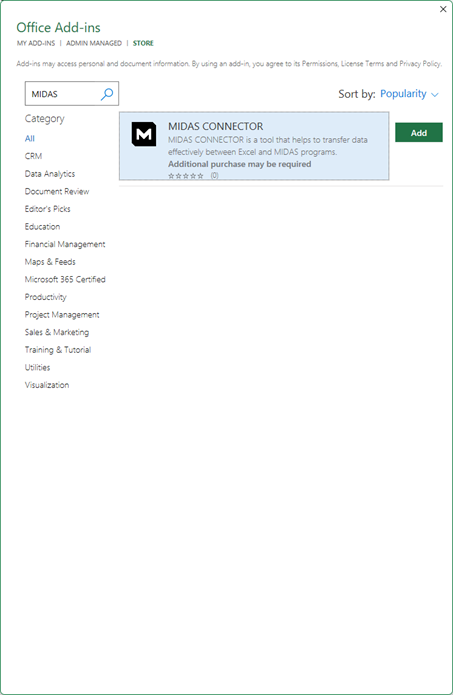
Figure. MIDAS Connector
Feature Introduction
The newly released MIDAS Connector has the ability to fetch data from MIDAS CIVIL NX. You can bring analysis result values, member forces, and model shapes, etc., of the model you are working on to Excel.
So far, MIDAS CIVIL has been able to communicate with Excel through MCT Command. However, there was a regret because only unidirectional communication was possible from Excel to MIDAS CIVIL because MCT Command could only be used in the modeling process.
With MIDAS CIVIL NX, flexible communication with Excel is possible through the API. The newly released MIDAS Connector has initially loaded the following functions.
1. Import the interpretation result table values into Excel
2. Import the model or interpretation result images into Excel
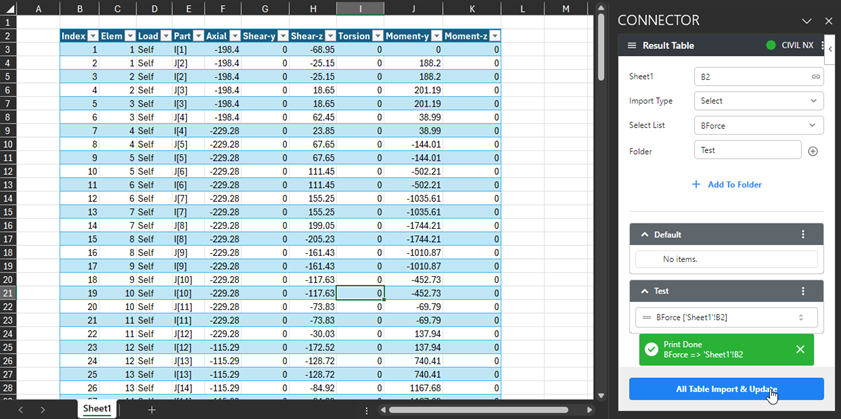
Figure. In the case of loading the result table
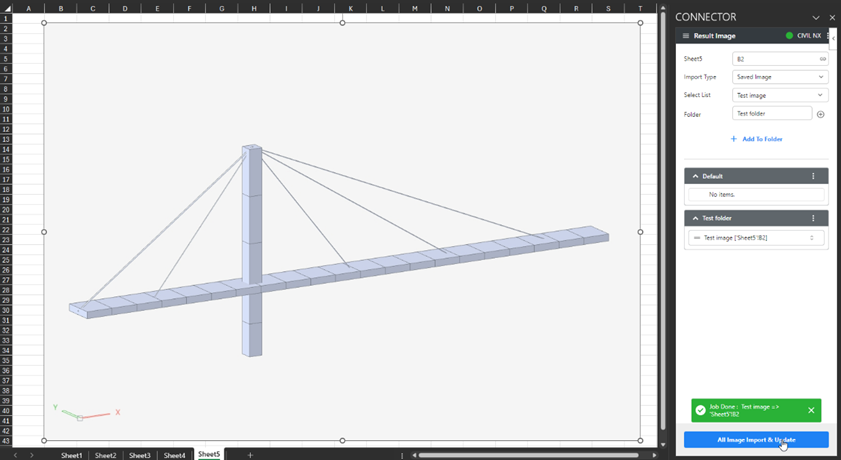
Figure. In case of loading the captured image
In each feature, you can fetch the set data individually or all at once. And through the MIDAS Connector, the data set once in the Excel file maintains its connectivity. If the connectivity is maintained, even if there are changes in the model of MIDAS CIVIL NX, you can conveniently load the modified data into the Excel file. You may not feel the benefits of the MIDAS Connector greatly when I tell you this.
To explain again, there are situations where you have to modify illustrations or result values that go into the deliverables when the analysis results in the analysis model change. It takes a considerable amount of time in this part. After modifying the analysis model, if you set the data to be copied to Excel through the MIDAS Connector and then reload the data through the MIDAS Connector, you can easily update the changes in Excel. We expect that these features will help to improve work speed.
However, seeing is believing, and you can check the use cases of the MIDAS Connector in the video below! Introduction of MIDAS Connector (youtube.com↗)

Figure. Image update
Conclusion
The MIDAS Connector plans to update with more useful features for the convenience of users using MIDAS products and for work efficiency, using the API. Your attention is greatly appreciated.