Please fill out the Download Section (Click here) below the Comment Section to download the Full Webinar PDF File
Moving loads are one of the most important factors in the bridge design. In this course, we tried to broaden your understanding of vehicle loads to get accurate moving load results. Additionally, we discussed in detail how moving loads affect the analysis results depending on how define traffic line lanes and vehicles are defined. It will be helpful to most bridge engineers who handle moving load factors on a daily basis.
The 1-hour webinar covers the whole process, from modeling a PSC girder bridge to the analysis using moving loads. An actual PSC bridge model from an actual project was used as an example.
This project tutorial highlights:
1. Girder Bridge Wizard
Prestressed Composite Bridge Wizard function in midas Civil gives versatility to engineers. The whole bridge model can be ready to run in less than an hour. We will lay out the full details so that users can apply them to their future projects.
2. Vehicular Live Loads
Vehicular live loads are the most significant factors in bridge design. Most of the time, it is not appropriately considered. This webinar will broaden the user's understanding of the vehicular loads to acquire accurate results in the design and analysis of bridges.
3. Extract & Interpret Result
After learning finite element analysis, it is crucial to understand the result value correctly. The speaker will share key results that are mainly useful for prestressed composite girder design practice.
1. Prestressed Composite Bridge Wizard
To model PSC girder bridges easily and quickly, midas Civil provides a bridge wizard function. If we define only the sections and properties of bridges in advance, the entire bridge can be modeled at once using simple numerical inputs. The wizard provides most features necessary for modeling bridges, including elastic link values according to each bearing type, a batch of the tendons, and the activation date of the load/element by each construction stage.
In this webinar, we compared the input values with the generated model one by one. If we can understand the meaning of the input value intuitively, we can edit it as we want when creating bridges for other projects.
/Modeling%20Moving%20Load%20Analysis%20of%20PSC%20Girder%20Bridge/1_Fig.%20Cable%20Stayed%20Bridge%20in%20the%20elevation%20view.jpg?width=742&name=1_Fig.%20Cable%20Stayed%20Bridge%20in%20the%20elevation%20view.jpg) Figure 1. Input value and model comparison: Layout
Figure 1. Input value and model comparison: Layout
There are some sections that the user must define before using the wizard, and there are also sections that the wizard automatically generates.
The wizard creates additional sections which have different slab width from the user-defined section. These are for the girders at the end in the transverse direction to match the total deck width.
The load value we entered in the wizard is automatically applied as beam loads or nodal loads along the girders or deck width.
/Modeling%20Moving%20Load%20Analysis%20of%20PSC%20Girder%20Bridge/Input%20value%20and%20model%20comparison%20-%20Section.jpg?width=757&name=Input%20value%20and%20model%20comparison%20-%20Section.jpg)
/Modeling%20Moving%20Load%20Analysis%20of%20PSC%20Girder%20Bridge/Fig%201%20(2).jpg?width=734&name=Fig%201%20(2).jpg)
2. How to consider traffic loads as per BS code
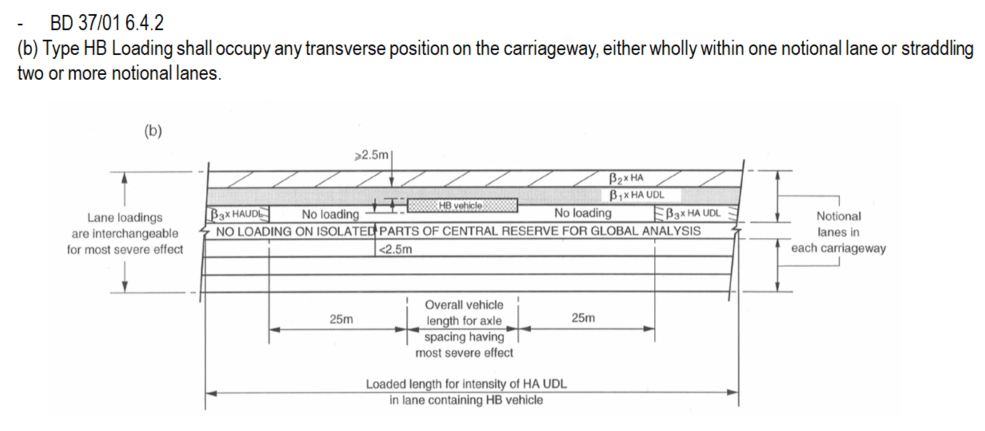
According to BD 37/01 standards, we can define various vehicle types, such as HA and HB, in midas Civil. Also, we can define other vehicle types as HA & HB(Auto), which have some differences from just HA & HB.
1. HA&HB(Auto) considers load factors on vehicle loadings according to relevant design codes.
2. HA&HB always applies HA and HB vehicles together within a lane. On the contrary, HA&HB (Auto) considers HA vehicle to the notional lanes according to 6.4.1, and HB vehicle wholly within one notional lane or straddling two notional lanes.
/Modeling%20Moving%20Load%20Analysis%20of%20PSC%20Girder%20Bridge/Fig%201%20(3).jpg?width=1014&name=Fig%201%20(3).jpg)
When the Transverse Lane Optimization option is checked, the vehicle will be positioned at the middle and left&right ends within the allowable width specified. Each vehicle will have two additional positions, left and right ends, within each lane. Of course, this option requires more analysis time compared with the case without the option. However, the most critical member forces, stresses, or reactions at each location may not always generate the vehicle loads placed in the middle of traffic lanes. In other words, the worst effect of vehicle placement is not guaranteed by placing the vehicle loads in the middle of the lane only.
/Modeling%20Moving%20Load%20Analysis%20of%20PSC%20Girder%20Bridge/Fig%201%20(5).jpg?width=723&name=Fig%201%20(5).jpg)
There is another useful function called Moving load optimization. This function allows the user to find the number of loaded lanes and the vehicles' exact position in the transverse direction and longitudinal direction, which will give the most critical responses.
/Modeling%20Moving%20Load%20Analysis%20of%20PSC%20Girder%20Bridge/Fig%201%20(6).jpg?width=676&name=Fig%201%20(6).jpg)
3. Analysis Results
The loading positions and vehicle values can be displayed when the maximum moment occurs in the key element. The loading positions can appear clearly by using the moving load tracer function.
/Modeling%20Moving%20Load%20Analysis%20of%20PSC%20Girder%20Bridge/Fig%201%20(7).jpg?width=700&name=Fig%201%20(7).jpg)
We can display the bending moment and beam forces for each construction stage and also determine the appropriate loading positions through the influence line for a specific element. It is also possible to see the value of loaded length for each lane in detail result.
/Modeling%20Moving%20Load%20Analysis%20of%20PSC%20Girder%20Bridge/Fig%201%20(1).jpg?width=771&name=Fig%201%20(1).jpg)
Watch the full webinar video