Would you like to sign out?

Select Country

  • Afghanistan English
  • Albania English
  • Algeria English
  • American Samoa English
  • Andorra English
  • Angola English
  • Anguilla English
  • Antarctica English
  • Antigua and Barbuda English
  • Argentina Español
  • Armenia English
  • Aruba English
  • Australia English
  • Austria English
  • Azerbaijan English
  • Bahamas English
  • Bahrain English
  • Bangladesh English
  • Barbados English
  • Belarus English
  • Belgium English
  • Belize English
  • Benin English
  • Bermuda English
  • Bhutan English
  • Bolivia Español
  • Bosnia and Herzegovina English
  • Botswana English
  • Bouvet Island English
  • Brazil English
  • British Indian Ocean Territory English
  • British Virgin Islands English
  • Brunei English
  • Bulgaria English
  • Burkina Faso English
  • Burundi English
  • Cambodia English
  • Cameroon English
  • Canada English
  • Cape Verde English
  • Caribbean Netherlands English
  • Cayman Islands English
  • Central African Republic English
  • Chad English
  • Chile Español
  • Christmas Island English
  • Cocos (Keeling) Islands English
  • Colombia Español
  • Comoros English
  • Congo English
  • Cook Islands English
  • Costa Rica Español
  • Côte d’Ivoire English
  • Croatia English
  • Cuba Español
  • Curaçao English
  • Cyprus English
  • Czech Republic English
  • Democratic Republic of the Congo English
  • Denmark English
  • Djibouti English
  • Dominica English
  • Dominican Republic Español
  • Ecuador Español
  • Egypt English
  • El Salvador Español
  • Equatorial Guinea English
  • Eritrea English
  • Estonia English
  • Ethiopia English
  • Falkland Islands English
  • Faroe Islands English
  • Fiji English
  • Finland English
  • France English
  • French Guiana Español
  • French Polynesia English
  • French Southern Territories English
  • Gabon English
  • Gambia English
  • Georgia English
  • Germany English
  • Ghana English
  • Gibraltar English
  • Greece English
  • Greenland English
  • Grenada English
  • Guadeloupe Español
  • Guam English
  • Guatemala Español
  • Guernsey English
  • Guinea English
  • Guinea-Bissau English
  • Guyana English
  • Haiti Español
  • Heard Island and McDonald Islands English
  • Honduras Español
  • Hong Kong English
  • Hungary English
  • Iceland English
  • India English
  • Indonesia English
  • Iran English
  • Iraq English
  • Ireland English
  • Isle of Man English
  • Israel English
  • Italy English
  • Jamaica English
  • Japan 日本語
  • Jersey English
  • Jordan English
  • Kazakhstan English
  • Kenya English
  • Kiribati English
  • South Korea 한국어
  • Kuwait English
  • Kyrgyzstan English
  • Laos English
  • Latvia English
  • Lebanon English
  • Lesotho English
  • Liberia English
  • Libya English
  • Liechtenstein English
  • Lithuania English
  • Luxembourg English
  • Macau English
  • Madagascar English
  • Malawi English
  • Malaysia English
  • Maldives English
  • Mali English
  • Malta English
  • Marshall Islands English
  • Martinique English
  • Mauritania English
  • Mauritius English
  • Mayotte English
  • Mexico Español
  • Micronesia English
  • Moldova English
  • Monaco English
  • Mongolia English
  • Montenegro English
  • Montserrat English
  • Morocco English
  • Mozambique English
  • Myanmar English
  • Namibia English
  • Nauru English
  • Nepal English
  • Netherlands English
  • New Caledonia English
  • New Zealand English
  • Nicaragua Español
  • Niger English
  • Nigeria English
  • Niue English
  • Norfolk Island English
  • Northern Mariana Islands English
  • Norway English
  • Oman English
  • Pakistan English
  • Palau English
  • Palestine English
  • Panama Español
  • Papua New Guinea English
  • Paraguay Español
  • Peru Español
  • Philippines English
  • Pitcairn Islands English
  • Poland English
  • Portugal Español
  • Puerto Rico Español
  • Qatar English
  • Réunion English
  • Romania English
  • Russia English
  • Rwanda English
  • Saint Barthélemy Español
  • Saint Helena English
  • Saint Kitts and Nevis English
  • Saint Lucia English
  • Saint Martin Español
  • Saint Pierre and Miquelon English
  • Saint Vincent and the Grenadines English
  • Samoa English
  • San Marino English
  • São Tomé and Príncipe English
  • Saudi Arabia English
  • Senegal English
  • Serbia English
  • Seychelles English
  • Sierra Leone English
  • Singapore English
  • Sint Maarten English
  • Slovakia English
  • Slovenia English
  • Solomon Islands English
  • Somalia English
  • South Africa English
  • South Georgia English
  • South Sudan English
  • Spain English
  • Sri Lanka English
  • Sudan English
  • Suriname English
  • Svalbard and Jan Mayen English
  • Eswatini English
  • Sweden English
  • Switzerland English
  • Syria English
  • Taiwan English
  • Tajikistan English
  • Tanzania English
  • Thailand English
  • Togo English
  • Tokelau English
  • Tonga English
  • Trinidad and Tobago English
  • Tunisia English
  • Turkey English
  • Turkmenistan English
  • Turks and Caicos Islands English
  • Tuvalu English
  • U.S. Virgin Islands English
  • Uganda English
  • Ukraine English
  • United Arab Emirates English
  • United Kingdom English
  • United States English
  • U.S. Minor Outlying Islands English
  • Uruguay Español
  • Uzbekistan English
  • Vanuatu English
  • Vatican City English
  • Venezuela Español
  • Vietnam English
  • Wallis and Futuna English
  • Western Sahara English
  • Yemen English
  • Zambia English
  • Zimbabwe English
  • Åland Islands English
  • East Timor English
  • Netherlands Antilles English
  • Serbia and Montenegro English
  • North Macedonia English
  • Timor-Leste English

Moving Load Optimization in MIDAS CIVIL

June 29, 2022
BLOG BRIDGE INSIGHT
Please fill out the Download Section (Click here) below the Comment Section to download the Model Files!


1. Introduction

There are different types of loads to be applied on the bridge. Traffic loads are one of the leading actions in Bridges. The vehicle will move in both transverse and longitudinal directions. Therefore, moving load analysis is an important part of the bridge design. Moving load definition mainly consists of three steps


1. Defining the traffic lane
2. Vehicle Standard
3. Moving load Case

We can define a few traffic lanes manually, but we cannot judge that the lane position of the vehicle defined will create the maximum moment and force. This will lead to an approximate analysis. To perform an accurate analysis, we need to create multiple lanes along a transverse direction for a single load case. Defining multiple lanes manually is a time-consuming process. Along with that, we need to define multiple moving load cases. We can utilize the moving load optimization feature in MIDAS CIVIL.  This feature will help us to create the number of lanes required in the transverse direction by defining a single lane. Let us see the procedure for the moving load optimization in MIDAS CIVIL.


2. Moving load Optimization in MIDAS CIVIL

Moving load optimization allows you to find the number of loaded lanes and the exact position of vehicles in the transverse direction and a longitudinal direction, which will give the most critical responses.

Applicable Codes for Moving Load Optimization
AASHTO Standard
AASHTO LRFD
BS
CANADA
CHINA
EUROCODE
POLAND Standard
PENNDOT
RUSSIA
SOUTH AFRICA

The following parameters need to be defined for moving load optimization
      a. Optimization of lane and lane width
      b. Generate analysis lane
      c. Wheel spacing
      d. Margin
      e. Offset distance to the lane center


a. Optimization lane and lane width:

The optimization lane is equal to the carriage-way width for which the vehicle should be placed at a different location in the transverse direction. Lane width is the width of a single design lane.


b. Generate Analysis Lane:

There are two methods in MIDAS CIVIL to generate the m number of lanes for moving load optimization.
Where m = number of lanes generated in transverse direction using moving load optimization

Method 1:
Number of lanes to be generated for analysis =m =2N +1
Example if N =1, then number of lanes generated = m =21 +1 = 3

Method 2:
Offset from centerline:
The vehicle will be placed at the centerline of the lane defined. Then it moves with the distance mentioned in the Offset from the centerline towards the left side and right side as shown in Figure 1.
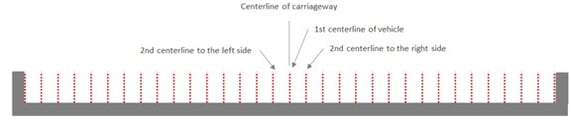


Fig 1. Offset from the centerline of the adjacent vehicle
Figure 1: Offset from the centerline of the adjacent vehicle


A vehicle centerline that does not satisfy the requirements of margin and minimum spacing between vehicles will be removed from the vehicle application.


c. Wheel Spacing:

It is the transverse spacing between the wheels in an axle. For influence line analysis, the program automatically applies a load equal to "Load ÷ no. of wheels" to each wheel.


d. Margin:

It is the minimum distance between a wheel load and the boundary of a single lane. The centreline is denoted with a red dotted line and the boundary line with a blue dotted line. Margin should be so chosen that the sum of vehicle width and 2 times margin does not exceed the single-lane width. The margin distance is shown in Figure 2.
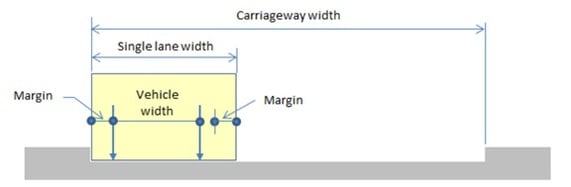


Fig 2. Margin distance in the single lane width
Figure 2: Margin distance in the single lane width


Example:
Single Lane width = 3m
Vehicle Width = 2m
The Sum of the Margins on each side should be less than (3-2=1m)

Distance between two vehicles for generating another lane is a maximum of
a. Two times the margin
b. Min Vehicle clear distance

Stradling lane type in moving load case is supported for BS and Eurocode such as HB load, Special Vehicles, and Load Model 3. The vehicle will straddle from one lane to another lane.


e. Offset distance to the lane center:

It is the distance from reference nodes to the center of the carriageway width.


3. Application in MIDAS CIVIL

To explain the output of the two methods, present in the generate analysis lane, I have taken one example for each method and shown the images of the lanes generated by the software automatically.

Example of Method 1:
The total width of the bridge is 9.65m. The width of each crash barrier is taken as 0.45m.
The clear Carriageway width is 9.65-2*(0.45) =8.75 m,
Number of lanes generated for N=1 is m= 21 +1 = 3.
The inputs for method 1 are shown in Figure 3.
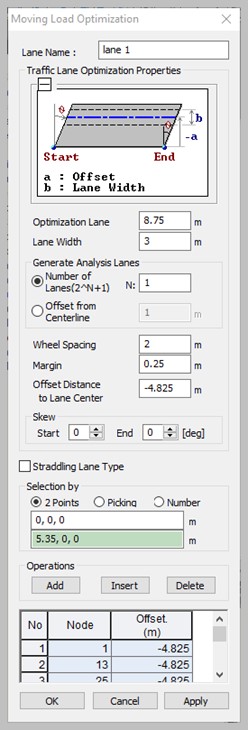


Fig 3. Method 1 input data
Figure 3: Method 1 input data


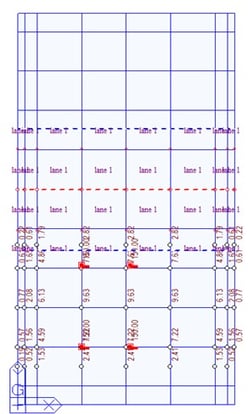
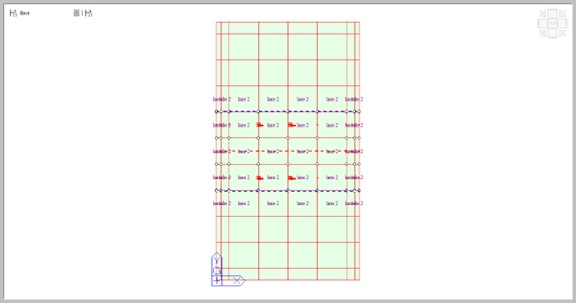
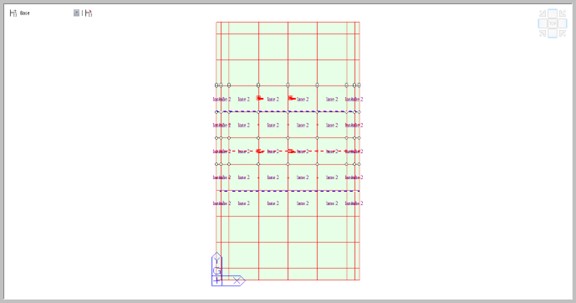
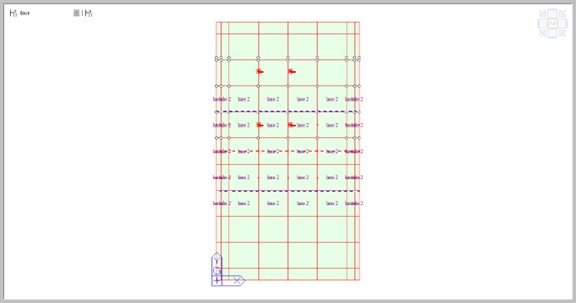
The lanes are automatically generated by the software as shown in Figures 4 to 6. The red dotted line represents the center line of the lane defined and the blue dots represent the boundary of the lane. Axle loads are represented by the red vertical line in the 3D view and the red dot in the top view.
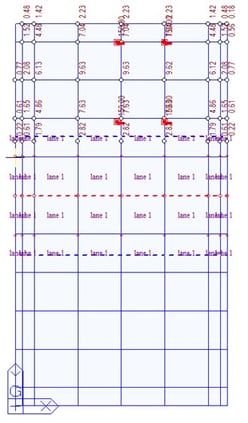
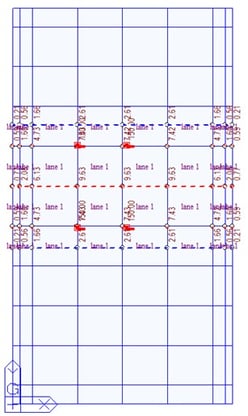


Fig 4. Lane 1 of method 1
Figure 4: Lane 1 of method 1


Fig 5. Lane 2 of method 1
Figure 5: Lane 2 of method 1


Fig 6. Lane 3 of method 1
Figure 6: Lane 3 of method 1


Example of Method 2:
The optimization lane width is taken as 8.75m and the single lane width as 3m. Offset distance from the center line is taken as 1 m. The traffic surface Lane is defined at the center of the carriage-way width at an offset distance of -4.825 m from the origin. Five lanes are automatically generated by the software with an offset distance of 1 m from the center line of the adjacent vehicle. It continues to create the lanes till the spacing for the end lane is not sufficient. The input data for method 2 in MIDAS CIVIL is shown in Figure 7.
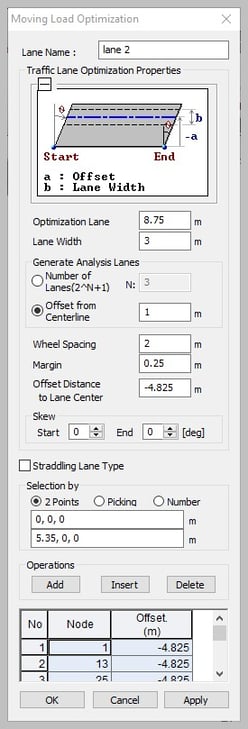
 

Fig 7. Method 2 input data
Figure 7: Method 2 input data


The number of lanes generated in this method is m=5. The five lanes are automatically generated by the software as shown in Figures 8 to 12.
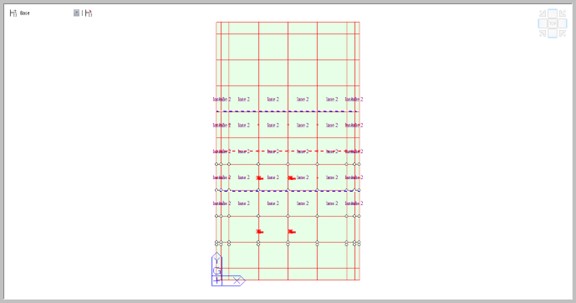
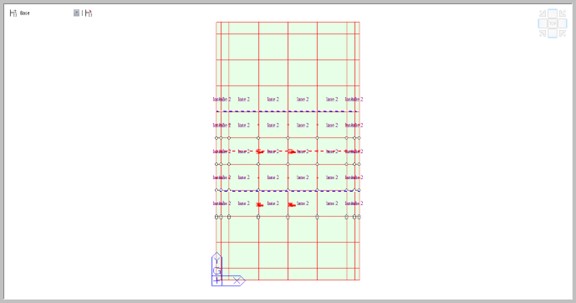


Fig 8. Lane 1 of method 2
Figure 8: Lane 1 of method 2
 
 
Fig 9. Lane 2 of method 2
Figure 9: Lane 2 of method 2
 
Fig 10. Lane 3 of method 2
Figure 10: Lane 3 of method 2
 
 
Fig 11. Lane 4 of method 2
Figure 11: Lane 4 of method 2
 
Fig 12. Lane 5 of method 2
Figure 12: Lane 5 of method 2


4. Conclusion

Defining the ‘m’ number of lanes manually is a time-consuming process. The Moving load optimization feature in MIDAS CIVIL makes the job simple. It defines the ‘m’ number of lanes if we define a single lane manually. It generates the influence lines/surfaces for the ‘m’ number of lanes and gives precise results for moving loads in the transverse direction. This feature will become handy when you need to define lanes in large carriageway-width bridges with multiple load cases. The user can choose any one of the methods as per convenience.


Susbcribe
MIDAS Newsletter

Thank you, See you soon!
Share
About the Author
Zulfekhar Ali | Technical Support Engineer | MIDAS IT India

Mohammad Zulfekhar Ali is a Technical Support Engineer at MIDAS IT India. He completed his Master's Degree in Structural Engineering from Osmania University. He is interested in solving technical issues related to Building and Bridge engineering projects with engineers in the Middle East, Africa, and India.

Comments
DOWNLOAD Download the Model Files

Fill out the below form to download the Model Files

All