Would you like to sign out?

  • Afghanistan English
  • Albania English
  • Algeria English
  • American Samoa English
  • Andorra English
  • Angola English
  • Anguilla English
  • Antarctica English
  • Antigua and Barbuda English
  • Argentina Español
  • Armenia English
  • Aruba English
  • Australia English
  • Austria English
  • Azerbaijan English
  • Bahamas English
  • Bahrain English
  • Bangladesh English
  • Barbados English
  • Belarus English
  • Belgium English
  • Belize English
  • Benin English
  • Bermuda English
  • Bhutan English
  • Bolivia Español
  • Bosnia and Herzegovina English
  • Botswana English
  • Bouvet Island English
  • Brazil English
  • British Indian Ocean Territory English
  • British Virgin Islands English
  • Brunei English
  • Bulgaria English
  • Burkina Faso English
  • Burundi English
  • Cambodia English
  • Cameroon English
  • Canada English
  • Cape Verde English
  • Caribbean Netherlands English
  • Cayman Islands English
  • Central African Republic English
  • Chad English
  • Chile Español
  • Christmas Island English
  • Cocos (Keeling) Islands English
  • Colombia Español
  • Comoros English
  • Congo English
  • Cook Islands English
  • Costa Rica Español
  • Côte d’Ivoire English
  • Croatia English
  • Cuba Español
  • Curaçao English
  • Cyprus English
  • Czech Republic English
  • Democratic Republic of the Congo English
  • Denmark English
  • Djibouti English
  • Dominica English
  • Dominican Republic Español
  • Ecuador Español
  • Egypt English
  • El Salvador Español
  • Equatorial Guinea English
  • Eritrea English
  • Estonia English
  • Ethiopia English
  • Falkland Islands English
  • Faroe Islands English
  • Fiji English
  • Finland English
  • France English
  • French Guiana Español
  • French Polynesia English
  • French Southern Territories English
  • Gabon English
  • Gambia English
  • Georgia English
  • Germany English
  • Ghana English
  • Gibraltar English
  • Greece English
  • Greenland English
  • Grenada English
  • Guadeloupe Español
  • Guam English
  • Guatemala Español
  • Guernsey English
  • Guinea English
  • Guinea-Bissau English
  • Guyana English
  • Haiti Español
  • Heard Island and McDonald Islands English
  • Honduras Español
  • Hong Kong English
  • Hungary English
  • Iceland English
  • India English
  • Indonesia English
  • Iran English
  • Iraq English
  • Ireland English
  • Isle of Man English
  • Israel English
  • Italy English
  • Jamaica English
  • Japan 日本語
  • Jersey English
  • Jordan English
  • Kazakhstan English
  • Kenya English
  • Kiribati English
  • South Korea 한국어
  • Kuwait English
  • Kyrgyzstan English
  • Laos English
  • Latvia English
  • Lebanon English
  • Lesotho English
  • Liberia English
  • Libya English
  • Liechtenstein English
  • Lithuania English
  • Luxembourg English
  • Macau English
  • Madagascar English
  • Malawi English
  • Malaysia English
  • Maldives English
  • Mali English
  • Malta English
  • Marshall Islands English
  • Martinique English
  • Mauritania English
  • Mauritius English
  • Mayotte English
  • Mexico Español
  • Micronesia English
  • Moldova English
  • Monaco English
  • Mongolia English
  • Montenegro English
  • Montserrat English
  • Morocco English
  • Mozambique English
  • Myanmar English
  • Namibia English
  • Nauru English
  • Nepal English
  • Netherlands English
  • New Caledonia English
  • New Zealand English
  • Nicaragua Español
  • Niger English
  • Nigeria English
  • Niue English
  • Norfolk Island English
  • Northern Mariana Islands English
  • Norway English
  • Oman English
  • Pakistan English
  • Palau English
  • Palestine English
  • Panama Español
  • Papua New Guinea English
  • Paraguay Español
  • Peru Español
  • Philippines English
  • Pitcairn Islands English
  • Poland English
  • Portugal Español
  • Puerto Rico Español
  • Qatar English
  • Réunion English
  • Romania English
  • Russia English
  • Rwanda English
  • Saint Barthélemy Español
  • Saint Helena English
  • Saint Kitts and Nevis English
  • Saint Lucia English
  • Saint Martin Español
  • Saint Pierre and Miquelon English
  • Saint Vincent and the Grenadines English
  • Samoa English
  • San Marino English
  • São Tomé and Príncipe English
  • Saudi Arabia English
  • Senegal English
  • Serbia English
  • Seychelles English
  • Sierra Leone English
  • Singapore English
  • Sint Maarten English
  • Slovakia English
  • Slovenia English
  • Solomon Islands English
  • Somalia English
  • South Africa English
  • South Georgia English
  • South Sudan English
  • Spain English
  • Sri Lanka English
  • Sudan English
  • Suriname English
  • Svalbard and Jan Mayen English
  • Eswatini English
  • Sweden English
  • Switzerland English
  • Syria English
  • Taiwan English
  • Tajikistan English
  • Tanzania English
  • Thailand English
  • Togo English
  • Tokelau English
  • Tonga English
  • Trinidad and Tobago English
  • Tunisia English
  • Turkey English
  • Turkmenistan English
  • Turks and Caicos Islands English
  • Tuvalu English
  • U.S. Virgin Islands English
  • Uganda English
  • Ukraine English
  • United Arab Emirates English
  • United Kingdom English
  • United States English
  • U.S. Minor Outlying Islands English
  • Uruguay Español
  • Uzbekistan English
  • Vanuatu English
  • Vatican City English
  • Venezuela Español
  • Vietnam English
  • Wallis and Futuna English
  • Western Sahara English
  • Yemen English
  • Zambia English
  • Zimbabwe English
  • Åland Islands English
  • East Timor English
  • Netherlands Antilles English
  • Serbia and Montenegro English
  • North Macedonia English
  • Timor-Leste English

What is Footing Types and Design Method?

April 6, 2021
BLOG NEWS & TRENDS

OVERVIEW


The footing is a structural member that safely transmits the load of the upper building to the ground, and is the first construction member of the building. The basic method of footing design is to distribute the load so that the size per area of ​​the load transmitted from the upper part of the building is less than the strength that the ground can support, that is, the bearing capacity. With this function, the footing is a structure installed between the ground and the column or wall immediately above it, and the important point in the basic design is to reduce the total amount of settlement and prevent the occurrence of immobile settlement.

In a general building, the footing design is to determine the area of ​​the footing, the thickness of the footing and the amount of required rebar.

In this topic, we deal with starting from finding out the Footing Type necessary for a building and proceeding with the Footing Design step by step in nGen.


1. Footing Type

1-1. Supporting Scope for Footing

midas nGen supports modeling, analysis and design of various footing systems.

   - Enables to design of members connected to the footing.

   - Provides tools to quickly model files.
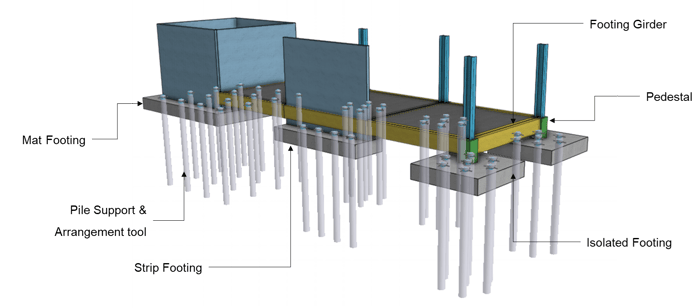
Supporting Scope for Footing-2<Supporting Scope for Footing>


1-2. Footing Type

Footing can be categorized by Member and Design type. There are three types of footing members.

- Mat Footing, Strip Footing, Isolated Footing

There are two types of footing design.

- Rigid Design: Footing is assumed to be infinitely rigid. The bearing pressure against the bottom of the footing follows a planar distribution where the centroid of the bearing pressure coincides with the line of action of the resultant force of all loads acting on the footing. 

- FEA Design: Footing is designed according to the results of finite element analysis. Since it is designed based on analysis, more accurate analysis results can be obtained.
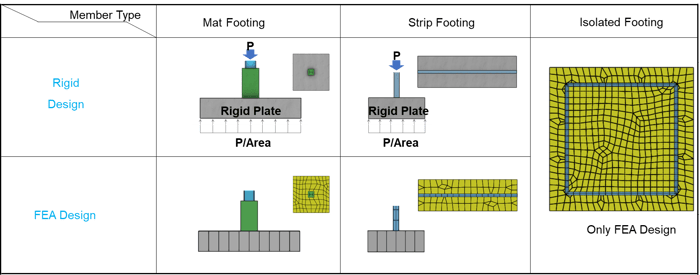
Supporting Scope for Footing<Supporting Scope for Footing>

1-3. Support for Footing

Soil Spring and Pile Spring is supported in midas nGen.

- Supported Soil Spring Property: Linear Elastic, Compression-Only

- Supported Pile Spring Property: Linear Elastic, Tension Only, Compression-Only, General
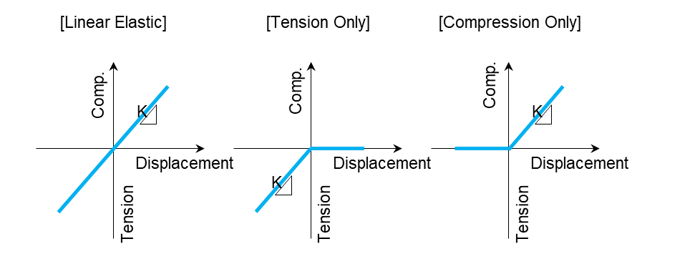
 

Support for footing-1<Support For Footing>


2. Footing Design

2-1. How to Design Isolated Footing with Rigid method

An isolated mat footing transfers the loads from a single column to the supporting soil. The size of the footing is determined by the allowable soil bearing pressure. The footing is designed for flexure, punching or two-way shear and one-way shear. The depth of the footing is generally governed by punching shear.


The calculation of soil pressure in serviceability state and the ultimate state as below.
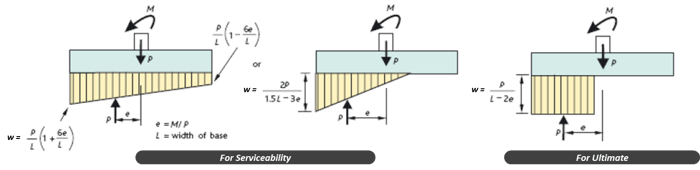
rigid_method<Calculation of Pressure Distributions by Each Status>


2-2. How to calculate a design bending moment

The value of the design bending moment at the column face is applied to the calculation.
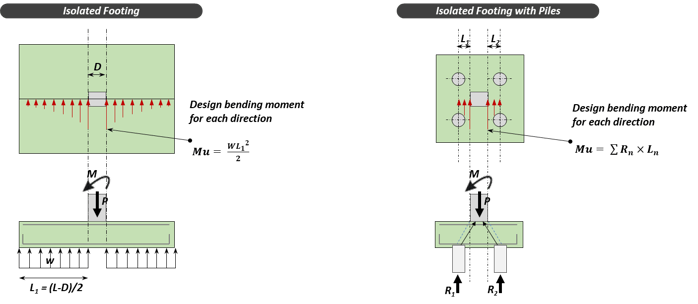
bending_moment<Calculation of Bending Moment>


2-3. How to calculate a design shear force

The soil pressure inside the shear face or shear perimeter is not considered in the design shear force calculation, assuming the load is transferred to the column.
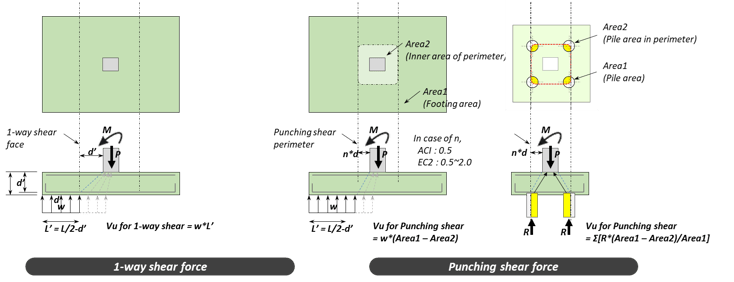
Shear_Force

<Calculation of Shear Force>


2-4. Supporting Design Items for Rigid Method


Ultimate Status

Flexural design

All

1-way shear design

All

Punching shear design

All

Serviceability Status

Stress limitation check

Only Eurocode-2

Crack width check

Only Eurocode-2

Linear creep check

Only Eurocode-2
Stability

Sliding

All

Bearing capacity of Soil

All

Bearing capacity of Pile

All

Overturning

All
Sliding All


For a full description of the basics or to know the type and design of footing, you can click on the following link > Footing - Type & Design


In this topic, we will cover how to build the foundation of the building.


1. Create Footing 

1-1. Isolated Footing

Isolated footings (also known as Pad or Spread footings) are commonly used for shallow foundations in order to carry and spread concentrated loads, caused for example by columns or pillars. Isolated footings can consist either of reinforced or non-reinforced material.
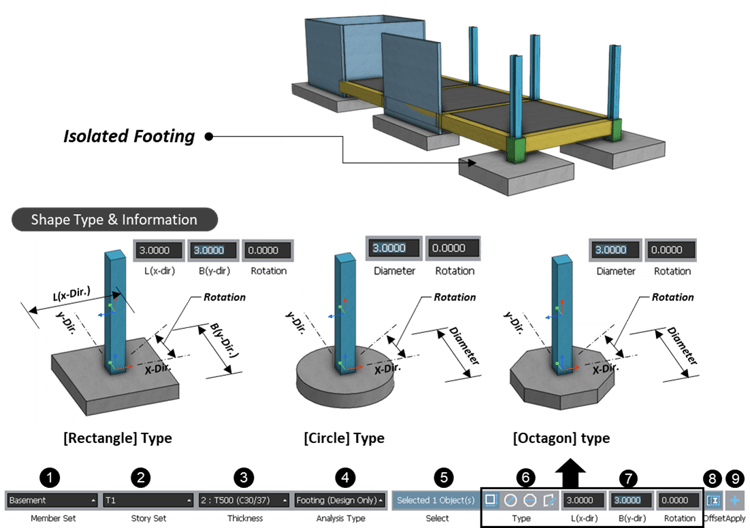
Isolated_Footing<Create Isolated Footing>

  1) Select a member Set
  2) Select Story set.
  3) Select Thickness of footing.
  4) Select Analysis type. (Refer to “Footing Type” guide.)
  5) Select target columns or pedestals.
  6) Select a footing shape.
  7) Enter shape information of footing according to the footing shape
  8) Click to turn on/off an offset option. (Footing is placed considering an offset Info. of the column.)
  9) Click “Apply”
 

1-2. Strip Footing 

Strip foundations (or strip footings) are a type of shallow foundation that is used to provide a continuous, level (or sometimes stepped) strip of support to a linear structure such as a wall or closely-spaced rows of columns built centrally above them.
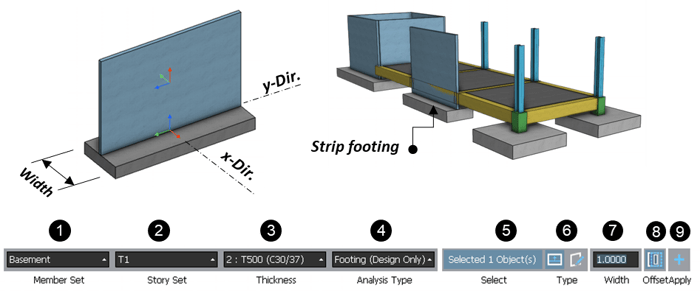
Strip_Footing

<Create Isolated Footing> 
 

  1) Select a member Set

  2) Select Story set.

  3) Select Thickness of footing.

  4) Select Analysis type. (Refer to “Footing Type” guide.)

  5) Select target columns or pedestals.

  6) If you select “By Drawing”, you can create a footing by manual.

  7) Enter a width value.

  8) Click to turn on/off an offset option. (Footing is placed considering an offset Info. of the wall.)

  9) Click “Apply”
 
 1-3. Footing Girder
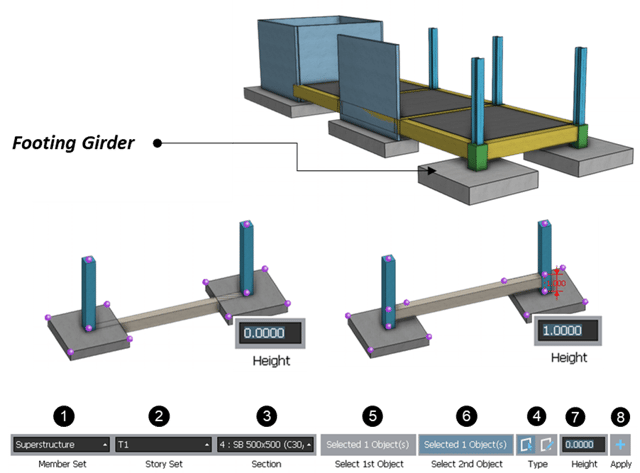
A grade beam or grade beam footing is a component of a building's foundation. It consists of a reinforced concrete beam that transmits the load from a bearing wall into spaced foundations such as pile caps or caissons. It is used in conditions where the surface soil’s load-bearing capacity is less than the anticipated design loads.

FootingGirder<Create Footing Girder> 

  1) Select a member Set
  2) Select Story set.
  3) Select a Section Name
  4) Click the creating method.

     - “By Select”: by selecting two vertical elements.

     - “By Drawing”: by clicking two points.

  5) Click 1st column or pedestal to create a footing girder (under “By Select”).
  6) Click 2nd column or pedestal to create a footing girder (under “By Select”).
  7) Enter a height to create a footing girder.
  8) Click “Apply”.


 1-4. Pedestal

A concrete pedestal is a compression element provided to carry the loads from supported elements like columns, statues, etc. to footing below the ground. It is generally provided below the metal columns. In general, the pedestal width is greater than its height.
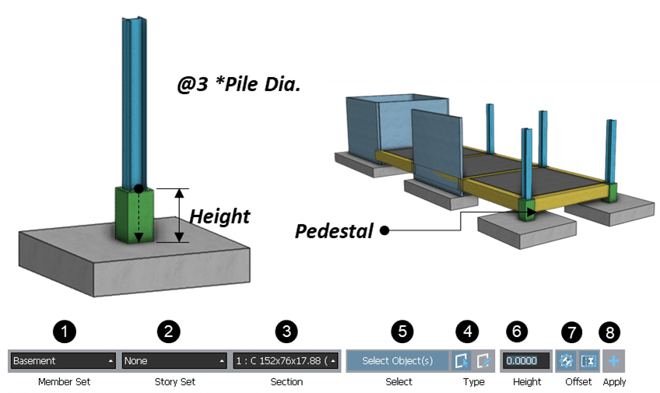
 

Pedestal

<Create Footing Girder> 

  1) Select a member Set
  2) Select the Story set.
  3) Select a Section Name
  4) Click the creating method.

     - “By Select”: by selecting two vertical elements.

     - “By Drawing”: by clicking two points.

  5) Click a column to create a pedestal (under “By Select”).
  6) Enter the height of the pedestal.
  7) Click to turn on/off “Offset” (Pedestal is placed considering an offset Info. of target Column.
 
 
Please submit the form and download the full white paper.

Subscribe S.O.S Newsletter

Young-il Seo
Young-il Seo | Principal Structural Engineer

Young-il has over 13+ years of experience in building design, especially high-rise buildings with column reduction analysis, plant structures, pushover analysis, health monitoring, and vibration control projects. Since 2016, he is planning and providing technical supports for midas building products such as midas Gen, nGen, and Design+.

E-BOOK Practical Design Guide for
Footings and
Basement Walls

This Design Guide provides basic concepts to design the footing and basement walls.
It is helpful in understanding a variety of member types which are composed of
the footing and basement walls.