
Please fill out the Download Section below the Comment Section to download the Webinar Presentation file

This webinar is the follow-up session for "Traffic Load Consideration to Different Types of Bridges: Case Study by Vishal Prasad"
When we consider Moving Load (Live Load) Analysis in MIDAS CIVIL it is important to use various options properly for the purpose. In this session, we took a look at each function and option deeply in MIDAS CIVIL. We highly recommend this session to all bridge designers who have to deal with vehicle loads daily around the world.
This project tutorial highlights...
1. Traffic Line/Surface Lanes & Vehicles
MIDAS CIVIL has 2 types of traffic lanes. The one is the line type and the other is the surface type. The line type of traffic lane is defined along the frame elements and the surface type of traffic lane is defined along the nodes of planar elements. Those traffic lane types have a Moving Load (Live Load) Optimization function. To check critical results from the moving load analysis, we need to define various load cases. Moving Load Optimization helps the user to find the results with a few load cases.
The vehicles function suggests 2 types of vehicles according to the selected design code to cover various vehicle loading. The user can select a vehicle loading that is provided by SW directly or user-defined vehicles that have editable values.
2. Moving Load Cases & Moving Load Analysis Control
The user can define moving load cases with traffic lanes and vehicles in the Moving Load Cases function. Depending on the selected design code, the Moving Load Cases function provides different options such as Lane Scale Factor, Combination methods, Fatigue, etc.
Moving Load Analysis Control provides some optional selection. The user can see results on certain element groups or get certain results types among Concurrent Forces/Stresses, Reaction, Displacement, Forces/Moments, and Elastic/General Links. And also, there are some options regarding the influence line/surface analysis.
3. Post-processing
MIDAS CIVIL results about forces, stresses, displacement, etc. after the moving load (live load) analysis. Results are shown on the model view or the table. For the moving load analysis, SW shows the influence line/surface diagram with the critical location of vehicles for each element and load case.
1. Traffic Line/Surface Lanes & Vehicles
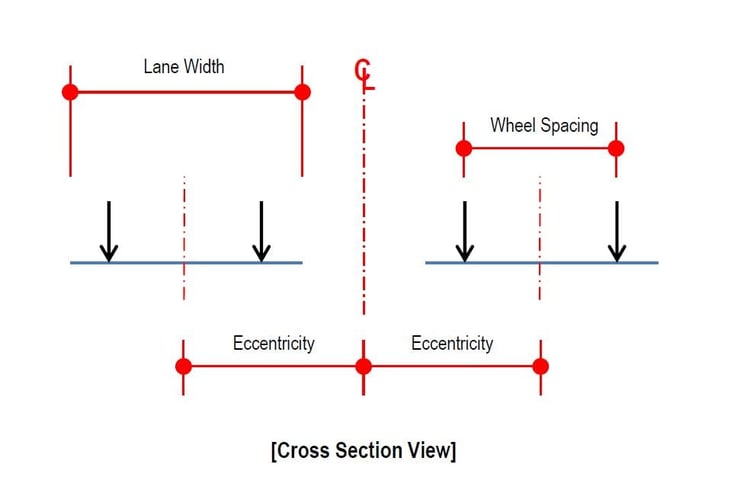
Traffic Lines/Surface Lanes have several options to cover the information of a traffic lane. Here are some details as shown in the figure for the options.
A. Traffic Lane Properties
Lane Width, Eccentricity for Line type / Offset Distance to Lane Center for Surface type, and Wheel Spacing. These options are regarding the information of a notional lane and vehicle loading.
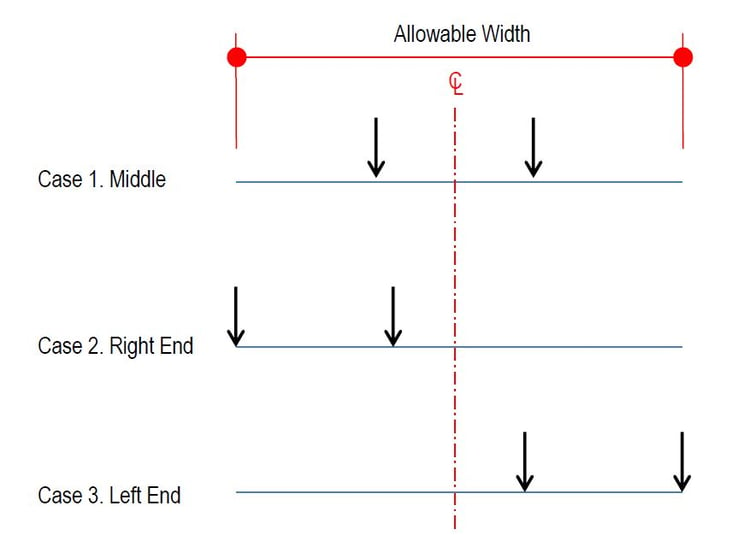
B. Transverse Lane Optimization
This option is used for checking additional cases.
C. Vehicular Load Distribution for Traffic Line Lane
There are two types to consider wheel loads of a vehicle. These have a different concept.
Therefore, select a suitable one for your design.
/Moving%20Load%20All%20You%20Need%20to%20Know/3.jpg?width=726&name=3.jpg)
D. Skew
This option is used to consider the skew angle of a lane and it is available for cross-beam type in Vehicular Load Distribution.
/Moving%20Load%20All%20You%20Need%20to%20Know/4.jpg?width=729&name=4.jpg)
E. Moving Direction
When the moving load analysis is performed, the vehicle will be moving along the lane path. The direction of movement depends on the direction of the lane. Through this option, we can select a certain direction or consider both directions.
/Moving%20Load%20All%20You%20Need%20to%20Know/5.jpg?width=729&name=5.jpg)
F. Select by
This option provides 3 methods for defining the path of the lane.
a) 2 Points method
/Moving%20Load%20All%20You%20Need%20to%20Know/6.jpg?width=734&name=6.jpg)
b) Picking method
/Moving%20Load%20All%20You%20Need%20to%20Know/7.jpg?width=734&name=7.jpg)
c) Number method
/Moving%20Load%20All%20You%20Need%20to%20Know/8.jpg?width=734&name=8.jpg)
The Moving Load (Live Load) Optimization function has similar options as Traffic Line/Surface Lanes. However, there is a special option to consider lanes automatically instead of defining the location of lanes. It is called Generate Analysis Lanes.
1. Traffic Lane Optimization Properties
/Moving%20Load%20All%20You%20Need%20to%20Know/9.jpg?width=700&name=9.jpg)
2. Generate Analysis Lanes
a) Number of Lanes: This option creates lanes in the middle of a carriageway and both ends of the carriageway(When N=1). If N is more than 1, additional lanes are created between the middle lane and both end lanes. The available value is 1 to 5.
/Moving%20Load%20All%20You%20Need%20to%20Know/10.jpg?width=734&name=10.jpg)
b) Offset from centerline: This option creates lanes in the offset line of the center line.
/Moving%20Load%20All%20You%20Need%20to%20Know/11.jpg?width=734&name=11.jpg)
Vehicle function provides two types. MIDAS CIVIL has various vehicle types in each design code. And also vehicle types are updated continuously./Moving%20Load%20All%20You%20Need%20to%20Know/12.jpg?width=734&name=12.jpg)
2. Moving Load Cases & Moving Load Analysis Control
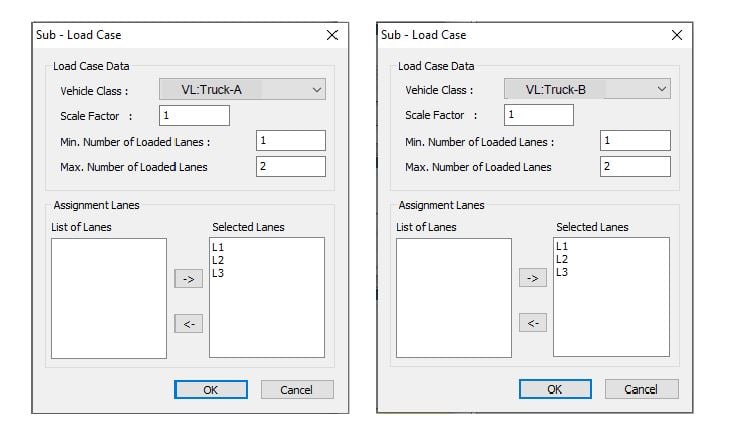
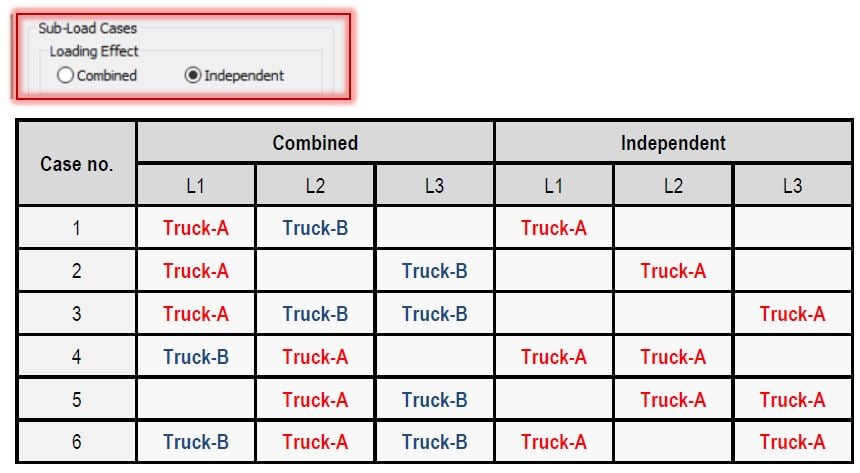
The Moving Load (Live Load) Cases function is used for defining a moving load case with vehicles and traffic lanes. Some details of options such as Fatigue, Lane Factor, etc. The load Cases option is a common option that you can see under various design codes. Through this option, we can consider combination cases for vehicles and lanes. Here is the comparison between the Combined and Independent options.
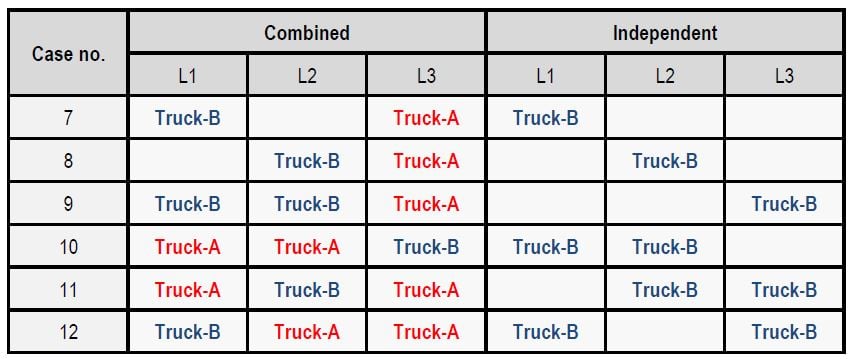
After finishing work for the moving load analysis, we need the additional function for more effective analysis. The moving Load Analysis Control function helps you to control result types and the moving load analysis.
/Moving%20Load%20All%20You%20Need%20to%20Know/16.jpg?width=1127&name=16.jpg)
3. Post-processing
Moving Load (Live Load) is one of the variable load types. Therefore, MIDAS CIVIL shows critical results for the moving load as the maximum or minimum results. And there are All cases. It shows result values of max. and min. together.
/Moving%20Load%20All%20You%20Need%20to%20Know/17.jpg?width=734&name=17.jpg)
/Moving%20Load%20All%20You%20Need%20to%20Know/18.jpg?width=600&name=18.jpg) Fig. Bending moment diagrams
Fig. Bending moment diagrams
In the Moving Load Tracer function, we can see the influence line/surface diagrams and the location of a vehicle according to the selected load case, element number, and force/moment component.
/Moving%20Load%20All%20You%20Need%20to%20Know/19.jpg?width=734&name=19.jpg)
/Moving%20Load%20All%20You%20Need%20to%20Know/20.jpg?width=684&name=20.jpg)
This function has an additional option called Write Min/Max Load to File. This option converts the selected moving load to the static load case. We can consider the vertical load as well as centrifugal forces and braking forces.
/Moving%20Load%20All%20You%20Need%20to%20Know/21.jpg?width=734&name=21.jpg)
Fig. The dialogue of Write Min/Max Load to File
When we select a design code, we can see additional functions next to the Moving Load Cases function. Those depend on the selected design code. To get more details, please take a look at the document attached.
/Moving%20Load%20All%20You%20Need%20to%20Know/22.jpg?width=734&name=22.jpg)
Watch the full webinar video