Would you like to sign out?

Select Country

  • Afghanistan English
  • Albania English
  • Algeria English
  • American Samoa English
  • Andorra English
  • Angola English
  • Anguilla English
  • Antarctica English
  • Antigua and Barbuda English
  • Argentina Español
  • Armenia English
  • Aruba English
  • Australia English
  • Austria English
  • Azerbaijan English
  • Bahamas English
  • Bahrain English
  • Bangladesh English
  • Barbados English
  • Belarus English
  • Belgium English
  • Belize English
  • Benin English
  • Bermuda English
  • Bhutan English
  • Bolivia Español
  • Bosnia and Herzegovina English
  • Botswana English
  • Bouvet Island English
  • Brazil English
  • British Indian Ocean Territory English
  • British Virgin Islands English
  • Brunei English
  • Bulgaria English
  • Burkina Faso English
  • Burundi English
  • Cambodia English
  • Cameroon English
  • Canada English
  • Cape Verde English
  • Caribbean Netherlands English
  • Cayman Islands English
  • Central African Republic English
  • Chad English
  • Chile Español
  • Christmas Island English
  • Cocos (Keeling) Islands English
  • Colombia Español
  • Comoros English
  • Congo English
  • Cook Islands English
  • Costa Rica Español
  • Côte d’Ivoire English
  • Croatia English
  • Cuba Español
  • Curaçao English
  • Cyprus English
  • Czech Republic English
  • Democratic Republic of the Congo English
  • Denmark English
  • Djibouti English
  • Dominica English
  • Dominican Republic Español
  • Ecuador Español
  • Egypt English
  • El Salvador Español
  • Equatorial Guinea English
  • Eritrea English
  • Estonia English
  • Ethiopia English
  • Falkland Islands English
  • Faroe Islands English
  • Fiji English
  • Finland English
  • France English
  • French Guiana Español
  • French Polynesia English
  • French Southern Territories English
  • Gabon English
  • Gambia English
  • Georgia English
  • Germany English
  • Ghana English
  • Gibraltar English
  • Greece English
  • Greenland English
  • Grenada English
  • Guadeloupe Español
  • Guam English
  • Guatemala Español
  • Guernsey English
  • Guinea English
  • Guinea-Bissau English
  • Guyana English
  • Haiti Español
  • Heard Island and McDonald Islands English
  • Honduras Español
  • Hong Kong English
  • Hungary English
  • Iceland English
  • India English
  • Indonesia English
  • Iran English
  • Iraq English
  • Ireland English
  • Isle of Man English
  • Israel English
  • Italy English
  • Jamaica English
  • Japan 日本語
  • Jersey English
  • Jordan English
  • Kazakhstan English
  • Kenya English
  • Kiribati English
  • South Korea 한국어
  • Kuwait English
  • Kyrgyzstan English
  • Laos English
  • Latvia English
  • Lebanon English
  • Lesotho English
  • Liberia English
  • Libya English
  • Liechtenstein English
  • Lithuania English
  • Luxembourg English
  • Macau English
  • Madagascar English
  • Malawi English
  • Malaysia English
  • Maldives English
  • Mali English
  • Malta English
  • Marshall Islands English
  • Martinique English
  • Mauritania English
  • Mauritius English
  • Mayotte English
  • Mexico Español
  • Micronesia English
  • Moldova English
  • Monaco English
  • Mongolia English
  • Montenegro English
  • Montserrat English
  • Morocco English
  • Mozambique English
  • Myanmar English
  • Namibia English
  • Nauru English
  • Nepal English
  • Netherlands English
  • New Caledonia English
  • New Zealand English
  • Nicaragua Español
  • Niger English
  • Nigeria English
  • Niue English
  • Norfolk Island English
  • Northern Mariana Islands English
  • Norway English
  • Oman English
  • Pakistan English
  • Palau English
  • Palestine English
  • Panama Español
  • Papua New Guinea English
  • Paraguay Español
  • Peru Español
  • Philippines English
  • Pitcairn Islands English
  • Poland English
  • Portugal Español
  • Puerto Rico Español
  • Qatar English
  • Réunion English
  • Romania English
  • Russia English
  • Rwanda English
  • Saint Barthélemy Español
  • Saint Helena English
  • Saint Kitts and Nevis English
  • Saint Lucia English
  • Saint Martin Español
  • Saint Pierre and Miquelon English
  • Saint Vincent and the Grenadines English
  • Samoa English
  • San Marino English
  • São Tomé and Príncipe English
  • Saudi Arabia English
  • Senegal English
  • Serbia English
  • Seychelles English
  • Sierra Leone English
  • Singapore English
  • Sint Maarten English
  • Slovakia English
  • Slovenia English
  • Solomon Islands English
  • Somalia English
  • South Africa English
  • South Georgia English
  • South Sudan English
  • Spain English
  • Sri Lanka English
  • Sudan English
  • Suriname English
  • Svalbard and Jan Mayen English
  • Eswatini English
  • Sweden English
  • Switzerland English
  • Syria English
  • Taiwan English
  • Tajikistan English
  • Tanzania English
  • Thailand English
  • Togo English
  • Tokelau English
  • Tonga English
  • Trinidad and Tobago English
  • Tunisia English
  • Turkey English
  • Turkmenistan English
  • Turks and Caicos Islands English
  • Tuvalu English
  • U.S. Virgin Islands English
  • Uganda English
  • Ukraine English
  • United Arab Emirates English
  • United Kingdom English
  • United States English
  • U.S. Minor Outlying Islands English
  • Uruguay Español
  • Uzbekistan English
  • Vanuatu English
  • Vatican City English
  • Venezuela Español
  • Vietnam English
  • Wallis and Futuna English
  • Western Sahara English
  • Yemen English
  • Zambia English
  • Zimbabwe English
  • Åland Islands English
  • East Timor English
  • Netherlands Antilles English
  • Serbia and Montenegro English
  • North Macedonia English
  • Timor-Leste English

How to Define Material Properties for Your Successful Analysis

June 22, 2020
BLOG TIPS & TUTORIALS

Material properties must be applied when performing analysis. midas Civil provides 'Material Properties' function to define various materials. Some users who are a beginner or are not familiar with midas Civil might be confused while defining a material property because there are various options. These options are used for linear analysis or nonlinear analysis and those are used or not depending on the purpose of analysis.


In this session, we will introduce the meaning of each option and how to use it more effectively. We hope you use 'Material Properties' function properly.


This content highlights


1. Basic Tutorial about 'Material Properties' function

Material Property is a necessary factor for analysis. We will see the basic options and usages of 'Material Properties' function.


2. Useful Tips for Using 'Material Properties' function & FAQs

We have different projects that have the same material properties sometimes. We will see useful tips to avoid repeated works. And also, we will look into additional options and frequently asked questions regarding material properties.


3. 'Material Properties' Function for Advance analysis

'Material Properties' function has additional options for non-linear analysis as well as linear static analysis. Let's see the options and how to apply the options.


1. Basic Tutorial about 'Material Properties' function


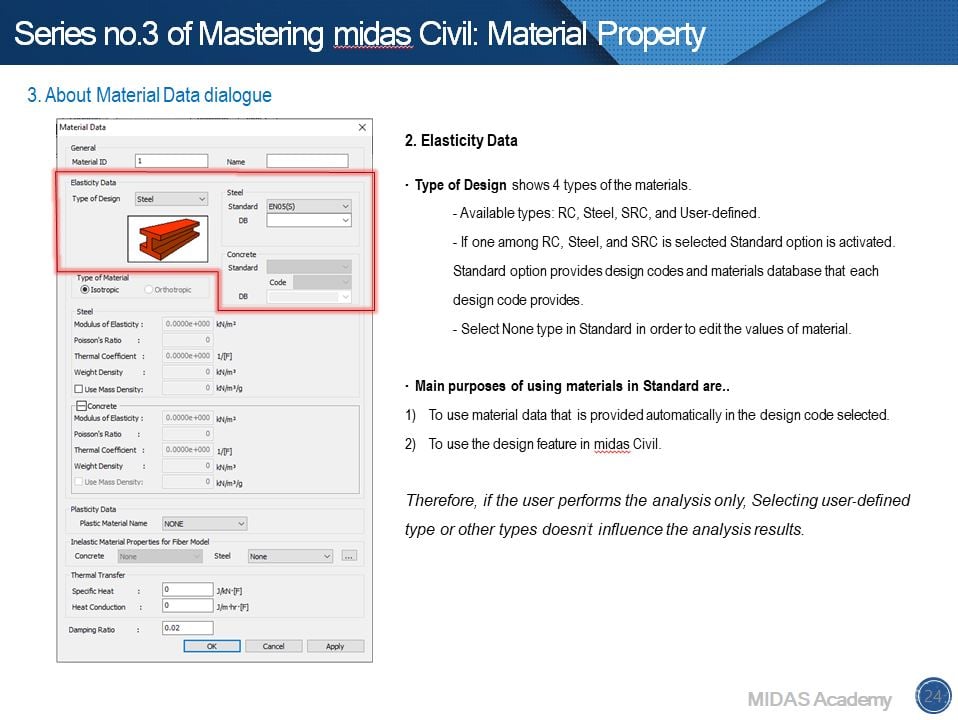
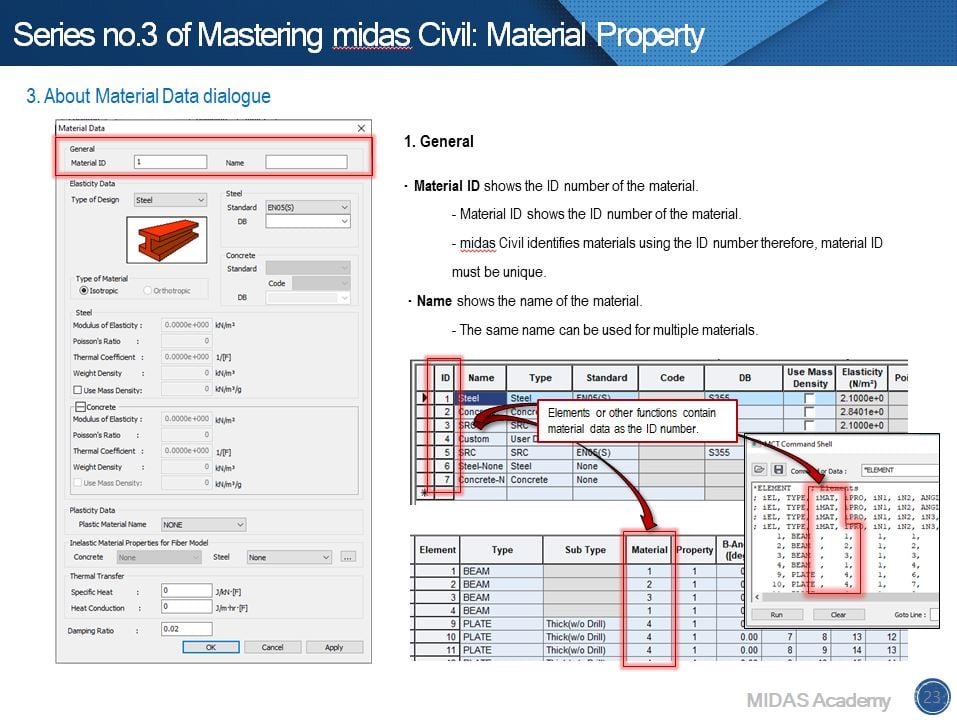
We can define material properties using 'Material Properties' function easily. It has material data for each national design code and also a space for user-defined material. Here are steps to define material properties.


1. Enter ID number and Name. 

2. Select a type of design after that, select a standard and material data.

3. In Type of Material, Isotropic or Orthotropic can be selected. 

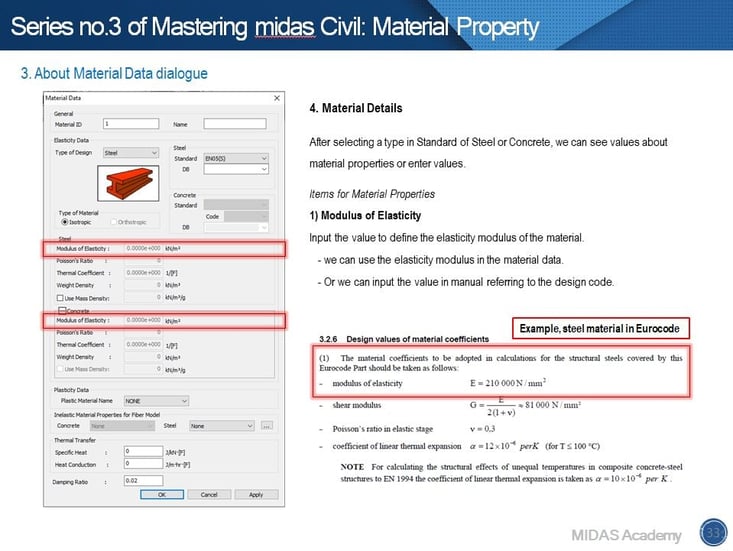
4. Enter the mechanical properties of the material such as Elasticity modulus, Poisson's Ratio,

Thermal Coefficient, and Weight Density.

5. Lastly, check 'Use Mass Density' option to consider the mass for Eigenvalue analysis.
 

Basic Tutorial about 'Material Properties' function 1

Basic Tutorial about 'Material Properties' function 2


Basic Tutorial about 'Material Properties' function 3
Fig. Introduction of Material Data Dialogue


2. Useful Tips for Using 'Material Properties' function & FAQs


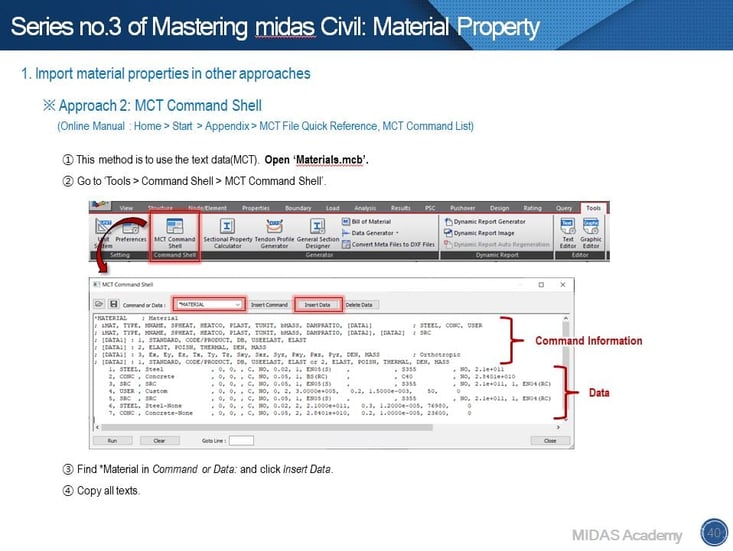
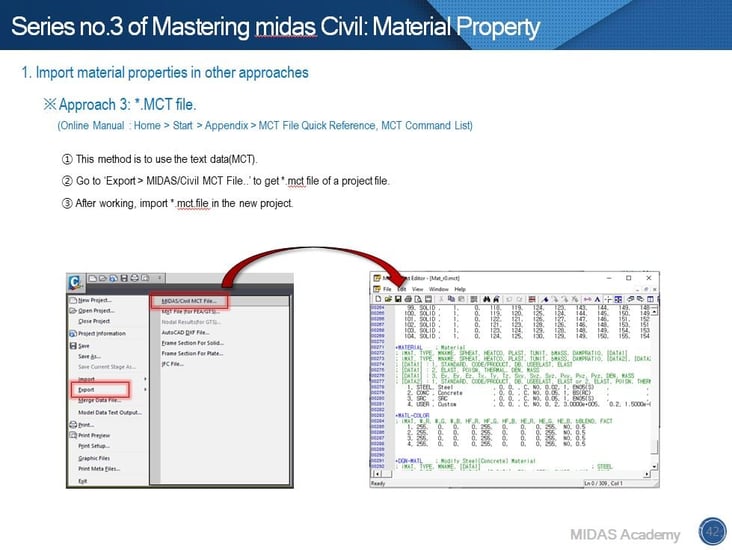
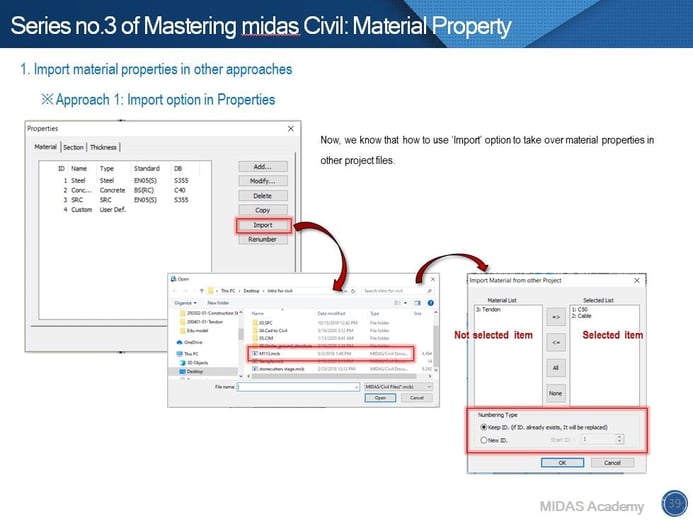
Do you have experience doing something repeatedly to define the same materials? midas Civil provides several ways to reduce time.  That is the Import option. In order to import material data from other models, we can use three options. Especially, you can use texts to manage material data or others using no.2 and no.3 approaches.


1. Import option in Properties dialogue.
2. Use MCT Command Shell.
3. Use *.mct file.
 

Useful Tips for Using 'Material Properties' function & FAQs 1
Fig. Import option in Properties dialogue


Useful Tips for Using 'Material Properties' function & FAQs 2
Fig. MCT Command Shell


Useful Tips for Using 'Material Properties' function & FAQs 3
Fig. *mct file


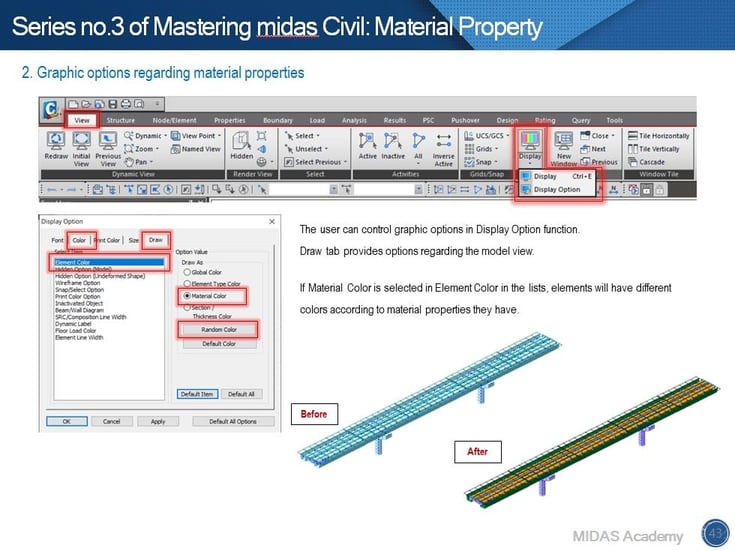
The display option gives you different color types for element models.


Useful Tips for Using 'Material Properties' function & FAQs 4
Fig. Draw types in Display Option 


FAQs session regarding material properties.


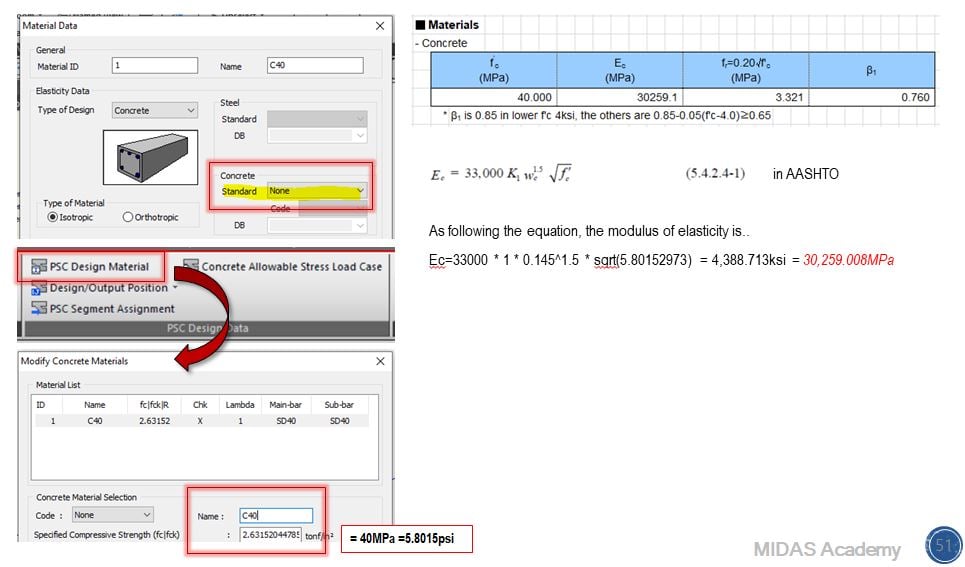
Q1. Why does the design report show different modulus of elasticity?


The modulus of elasticity in Material Data isn’t used.


A1. The key is None type in Standard. If the None type is selected, we should enter values to define a material property for design calculation. Based on the entered value, material properties will be calculated.
Why does the design report show different modulus of elasticity?


Q2. Why do we select material properties again when we define Composite or SRC section?


A2. Composite and SRC section is a section made up of two different materials for enhancing mechanical properties. In order to simplify the calculation for section properties of a composite section, the ratio of material properties is used.
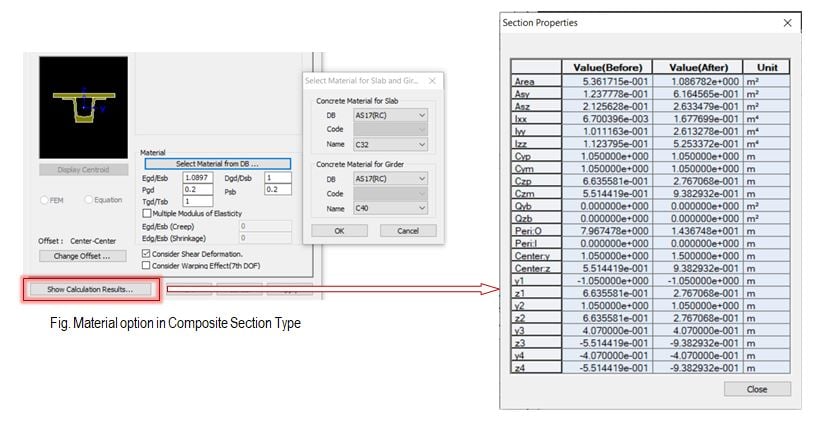
Why do we select material properties again when we define  Composite or SRC section?


Q3. Which material should I assign to the element if I have many material properties and have the construction stage analysis?


A3. Case 1: Construction Stage Analysis(X), Composite Section(O)


In this case, assign the material property of part1 to elements that have the composite section property. The material property of part 2 will be calculated by using the ratio inputted in the composite section property. Therefore, it is important to select materials desired in the composite section property in order to obtain the expected results.
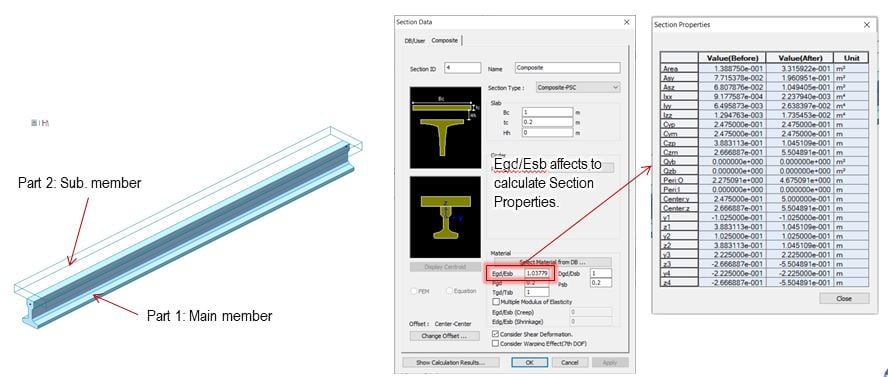
Which material should I assign to the element if I have many material properties and have the construction stage analysis?


Case 2: Construction Stage Analysis(O), Composite Section(O)


In this case, we don’t care about what material is assigned if the Composite Section for Construction Stage option is defined. When we consider the construction stage analysis, Composite Section for C.S function helps us assign different material properties to part 1 and part 2 of the composite section. Based on selected materials, the section properties of the composite section will be re-calculated and used for the analysis.
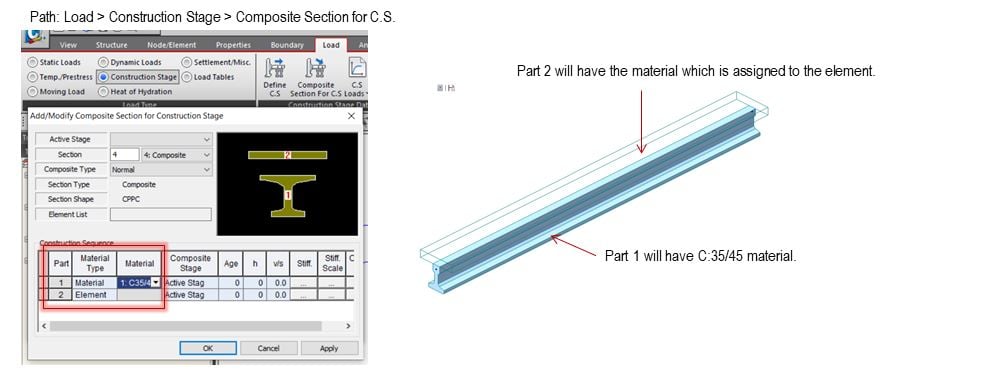
 

Which material should I assign to the element if I have many material properties and have the construction stage analysis? 2


3. 'Material Properties' Function for Advance analysis 


In this webinar, we had skimmed material properties for advance analysis.


1. Plastic Material Properties


This option is used to consider the plastic material behaviors of the model. You can check permanent or irreversible deformations that occur in the structure in plastic behaviors. In order to select a plastic material, you need to define the plastic material in the Plastic Material function.
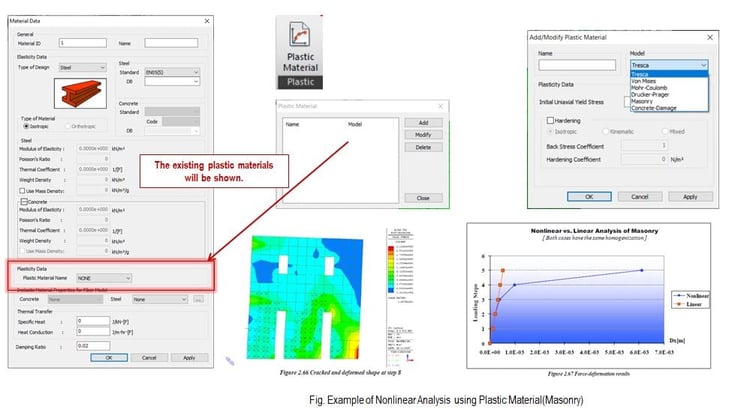
Plastic Material Properties 1


2. Inelastic Material Properties for Fiber Model


This option is used to assign the concrete and steel material to the Fiber Section.

Fiber Model or Fiber element is used for Nonlinear Analysis. Inelastic material properties will be assigned to cells of the section that are divided by Fiber Division of Section function. Fiber Model discretizes the section of beam elements into cells. And each cell is able to have each material property to consider the inelastic characters of each material in one section. We can consider this option for the non-linear seismic analysis which includes inelastic material properties.
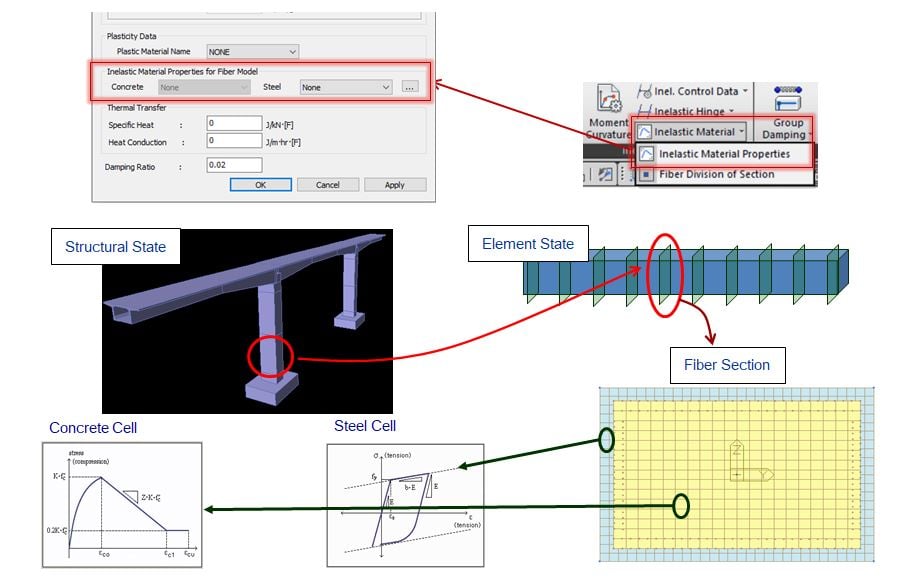
 

Inelastic Material Properties for Fiber Model


3. Thermal Transfer


Specific Heat and Heat Conduction under Thermal Transfer option is regarded as the Heat Transfer Analysis and Thermal Stress Analysis.


You can find those values in Thermo-Mechanical Properties of Materials.


Specific Heat: Specific heat capacity

Heat Conduction: Thermal conductivity

These inputs will be used for Heat of Hydration function.
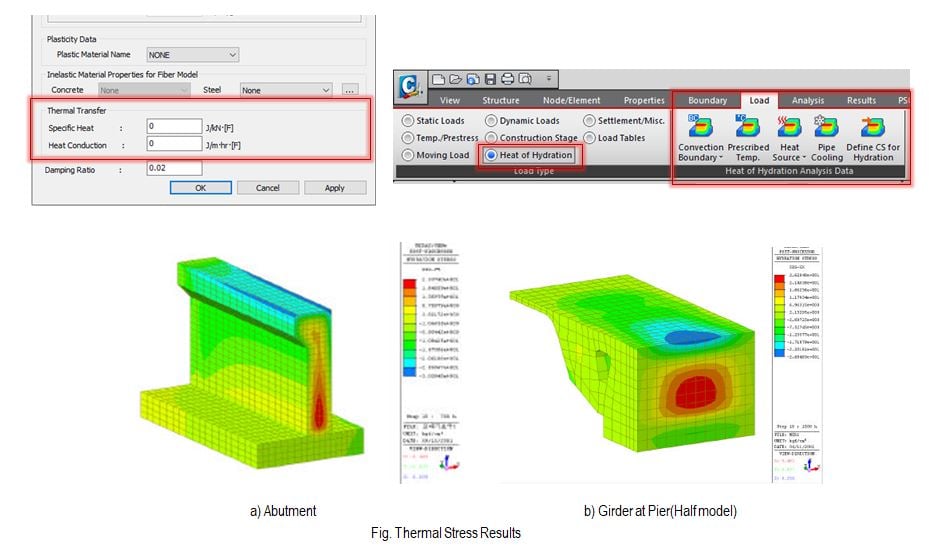
 

Thermal Transfer


4. Damping Ratio


The damping Ratio in material properties is used to define Group Damping. The group Damping function assigns the same damping ratio as per materials, sections, and boundaries. (Path: Properties > Damping > Group Damping)


For the response spectrum analysis: Select Strain Energy Proportional in Damping Method.

For the time history analysis: Select Element Mass & Stiffness Proportional in Damping Method or Strain Energy Proportional in Damping Method.
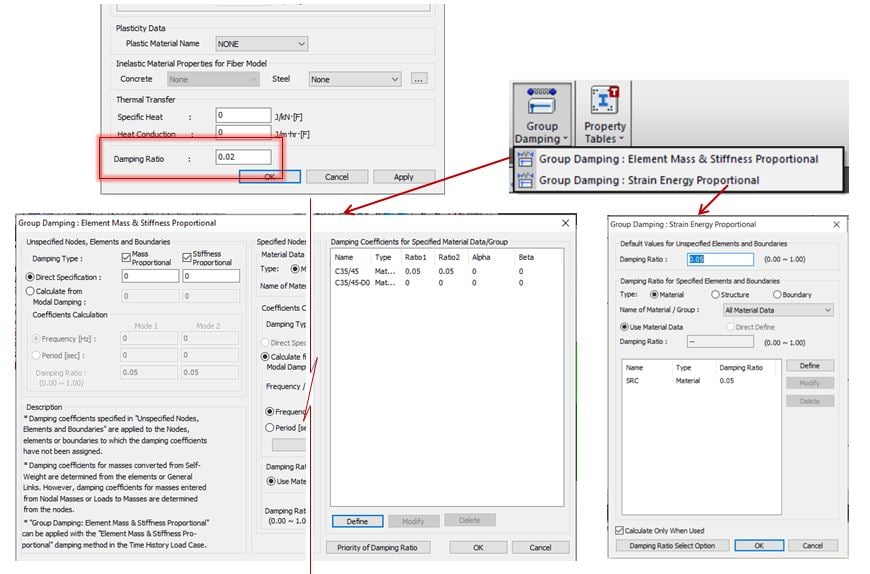


Damping Ratio


Watch the full webinar video


Susbcribe
MIDAS Newsletter

Thank you, See you soon!
Share
Taeyong Yu | Technical Engineer | MIDAS IT

Taeyong is a bridge engineer within MIDASIT Technical Planning Team in South Korea. He has over 3 years of experience in the design of bridges and civil structures in Korea. He is familiar with international codes of practice including AASHTO, Eurocode and BS code. He has experience in discussing technical issues with engineers in Singapore, Malaysia, and Romania. From this webinar, he will share one of his experiences in Cable-stayed bridge design.

Comments
Download Download the Webinar
Presentation file

midas Civil Tips & Tutorials of 'How to Define
Material Properties for Your Successful Analysis'

All