Would you like to sign out?

Select Country

  • Afghanistan English
  • Albania English
  • Algeria English
  • American Samoa English
  • Andorra English
  • Angola English
  • Anguilla English
  • Antarctica English
  • Antigua and Barbuda English
  • Argentina Español
  • Armenia English
  • Aruba English
  • Australia English
  • Austria English
  • Azerbaijan English
  • Bahamas English
  • Bahrain English
  • Bangladesh English
  • Barbados English
  • Belarus English
  • Belgium English
  • Belize English
  • Benin English
  • Bermuda English
  • Bhutan English
  • Bolivia Español
  • Bosnia and Herzegovina English
  • Botswana English
  • Bouvet Island English
  • Brazil English
  • British Indian Ocean Territory English
  • British Virgin Islands English
  • Brunei English
  • Bulgaria English
  • Burkina Faso English
  • Burundi English
  • Cambodia English
  • Cameroon English
  • Canada English
  • Cape Verde English
  • Caribbean Netherlands English
  • Cayman Islands English
  • Central African Republic English
  • Chad English
  • Chile Español
  • Christmas Island English
  • Cocos (Keeling) Islands English
  • Colombia Español
  • Comoros English
  • Congo English
  • Cook Islands English
  • Costa Rica Español
  • Côte d’Ivoire English
  • Croatia English
  • Cuba Español
  • Curaçao English
  • Cyprus English
  • Czech Republic English
  • Democratic Republic of the Congo English
  • Denmark English
  • Djibouti English
  • Dominica English
  • Dominican Republic Español
  • Ecuador Español
  • Egypt English
  • El Salvador Español
  • Equatorial Guinea English
  • Eritrea English
  • Estonia English
  • Ethiopia English
  • Falkland Islands English
  • Faroe Islands English
  • Fiji English
  • Finland English
  • France English
  • French Guiana Español
  • French Polynesia English
  • French Southern Territories English
  • Gabon English
  • Gambia English
  • Georgia English
  • Germany English
  • Ghana English
  • Gibraltar English
  • Greece English
  • Greenland English
  • Grenada English
  • Guadeloupe Español
  • Guam English
  • Guatemala Español
  • Guernsey English
  • Guinea English
  • Guinea-Bissau English
  • Guyana English
  • Haiti Español
  • Heard Island and McDonald Islands English
  • Honduras Español
  • Hong Kong English
  • Hungary English
  • Iceland English
  • India English
  • Indonesia English
  • Iran English
  • Iraq English
  • Ireland English
  • Isle of Man English
  • Israel English
  • Italy English
  • Jamaica English
  • Japan 日本語
  • Jersey English
  • Jordan English
  • Kazakhstan English
  • Kenya English
  • Kiribati English
  • South Korea 한국어
  • Kuwait English
  • Kyrgyzstan English
  • Laos English
  • Latvia English
  • Lebanon English
  • Lesotho English
  • Liberia English
  • Libya English
  • Liechtenstein English
  • Lithuania English
  • Luxembourg English
  • Macau English
  • Madagascar English
  • Malawi English
  • Malaysia English
  • Maldives English
  • Mali English
  • Malta English
  • Marshall Islands English
  • Martinique English
  • Mauritania English
  • Mauritius English
  • Mayotte English
  • Mexico Español
  • Micronesia English
  • Moldova English
  • Monaco English
  • Mongolia English
  • Montenegro English
  • Montserrat English
  • Morocco English
  • Mozambique English
  • Myanmar English
  • Namibia English
  • Nauru English
  • Nepal English
  • Netherlands English
  • New Caledonia English
  • New Zealand English
  • Nicaragua Español
  • Niger English
  • Nigeria English
  • Niue English
  • Norfolk Island English
  • Northern Mariana Islands English
  • Norway English
  • Oman English
  • Pakistan English
  • Palau English
  • Palestine English
  • Panama Español
  • Papua New Guinea English
  • Paraguay Español
  • Peru Español
  • Philippines English
  • Pitcairn Islands English
  • Poland English
  • Portugal Español
  • Puerto Rico Español
  • Qatar English
  • Réunion English
  • Romania English
  • Russia English
  • Rwanda English
  • Saint Barthélemy Español
  • Saint Helena English
  • Saint Kitts and Nevis English
  • Saint Lucia English
  • Saint Martin Español
  • Saint Pierre and Miquelon English
  • Saint Vincent and the Grenadines English
  • Samoa English
  • San Marino English
  • São Tomé and Príncipe English
  • Saudi Arabia English
  • Senegal English
  • Serbia English
  • Seychelles English
  • Sierra Leone English
  • Singapore English
  • Sint Maarten English
  • Slovakia English
  • Slovenia English
  • Solomon Islands English
  • Somalia English
  • South Africa English
  • South Georgia English
  • South Sudan English
  • Spain English
  • Sri Lanka English
  • Sudan English
  • Suriname English
  • Svalbard and Jan Mayen English
  • Eswatini English
  • Sweden English
  • Switzerland English
  • Syria English
  • Taiwan English
  • Tajikistan English
  • Tanzania English
  • Thailand English
  • Togo English
  • Tokelau English
  • Tonga English
  • Trinidad and Tobago English
  • Tunisia English
  • Turkey English
  • Turkmenistan English
  • Turks and Caicos Islands English
  • Tuvalu English
  • U.S. Virgin Islands English
  • Uganda English
  • Ukraine English
  • United Arab Emirates English
  • United Kingdom English
  • United States English
  • U.S. Minor Outlying Islands English
  • Uruguay Español
  • Uzbekistan English
  • Vanuatu English
  • Vatican City English
  • Venezuela Español
  • Vietnam English
  • Wallis and Futuna English
  • Western Sahara English
  • Yemen English
  • Zambia English
  • Zimbabwe English
  • Åland Islands English
  • East Timor English
  • Netherlands Antilles English
  • Serbia and Montenegro English
  • North Macedonia English
  • Timor-Leste English

How to Add a Transverse Moving Load?

November 24, 2020
BLOG TIPS & TUTORIALS

When a static concentrated load is applied on a deck, the deck will deflect transversely as well as longitudinally, similar to the structural behavior of a two-way slab. The load distribution becomes more complex when multiple point loads are applied to the deck, such as truck loads. When the structural model is simplified to a 2D frame model, it is important to obtain the resulting 3D forces from the 2D model.


Commonly, there are two ways of handling live load distributions in the transverse direction:


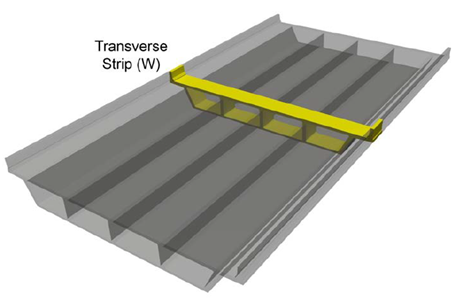
Approximate Method - AASHTO LRFD Article 4.6.2 presents an approximate method of analysis in which the deck is subdivided into strips perpendicular to the supporting elements (webs). Internal forces are determined first by structural analysis of a unit width of transverse cross-section and then by dividing these force and moment results by the width of the strip to determine forces per foot along the superstructure.

  •  
Transverse Strip for Approximate Design Method
Figure – Transverse Strip for Approximate Design Method
(Reference: US DOT Federal Highway Administration Post-Tensioned Box Girder Manual)


Equations for the width of the transverse strip in the longitudinal direction for cast-in-place concrete box girder bridges are:


  • Overhang: W = 45.0 + 10X

  • Positive Moment: W = 26.0 + 6.6S

  • Negative Moment: W = 48.0 + 3.0S 


Where S = spacing of supporting components (ft)

X = distance from load to point of support (ft)

W = width of transverse strip in the longitudinal length of the transverse strip (in)


Multi-cell box girder bridges with three or more cells, and with web spacing not greater than 15 feet, use the LRFD strip method to determine transverse moments resulting from concentrated wheel loads. Single-cell or dual-cell box girders, and multi-cell box girders with web spacing greater than 15 feet, use a refined approach to account for the longitudinal distribution of concentrated wheel loads in determining the transverse live load moments.


Refined Method - A more accurate method is based on a partial 3D finite element model of the box girder. The term partial” implies that the entire bridge superstructure need not be modeled; rather it should be interpreted as a partial length of the box that will be long enough to include three-dimensional effects. From this model, influence lines can be generated at any section of interest. The influence lines should be generated using a line load consisting of the front and rear wheels of a design truck. Since general finite element programs are readily available presently, it is recommended that this method be used for the final design.


The following steps will give you how to add transverse moving loads in Midas.


Step 1. Create a 2D frame model. The width of all 2D frames is taken as a unit width (1 ft).

 

Step 1. Create a 2D frame model. The width of all 2D frames is taken as a unit width (1 ft).


Step 2. Select Transverse for Moving Load Code.

 

Step 2. Select Transverse for Moving Load Code.


Step 3. Define a Traffic Line Lane on the top slab.

Scale Factors are 1.0 for now.
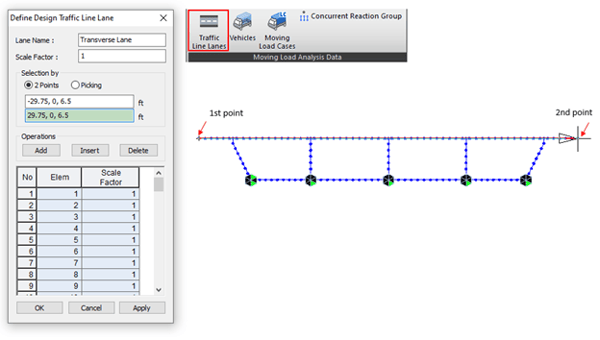
 

Step 3. Define a Traffic Line Lane on the top slab.


Step 4. Define Vehicles.


Distribution Width represents the width of the slab that may be taken as effective in resisting the bending moment due to wheel loads. These widths are different depending on the position of the slab, i.e. overhang, positive moment region, and negative moment region. We will enter 1.0 here and the distribution width will be taken into account using scale factors from Traffic Line Lane.


Longitudinal Width represents the width of 2D frame elements, which is a unit width.
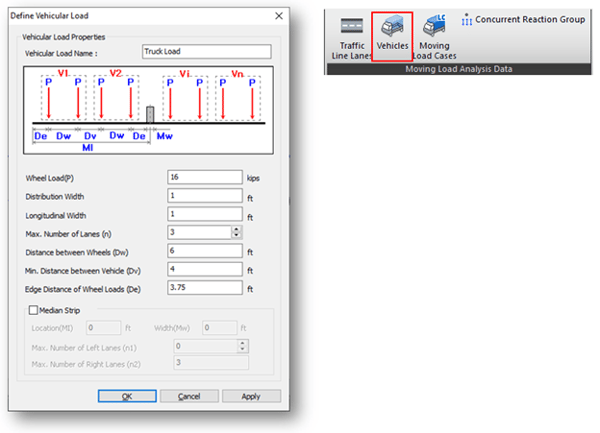
 

Step 4. Define Vehicles.


Step 5. Define Moving Load Case.

Scale Factor here can be used to apply for dynamic load allowance. Also, multiple factors should be defined.
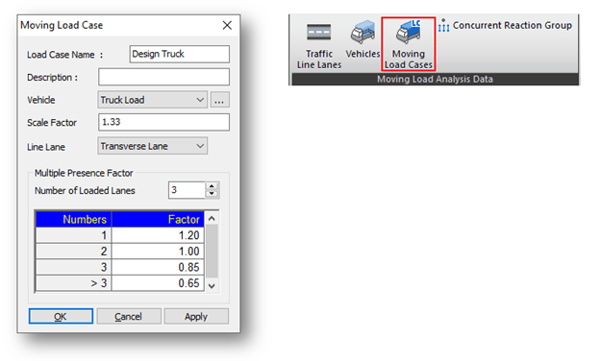
 

Step 5. Define Moving Load Case.


Step 6. Modify Scale Factor from the Traffic Line Lane.

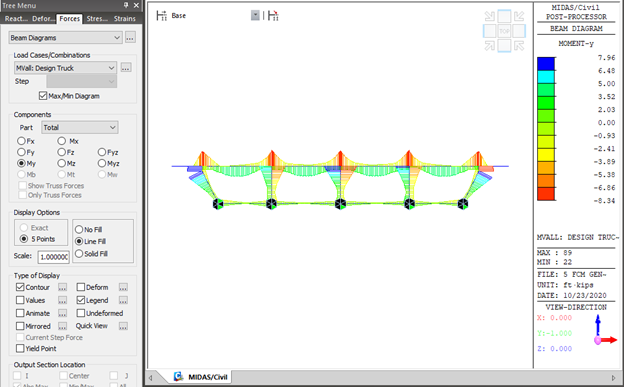
After performing analysis, check the moment diagram due to the moving load case. The scale factor is calculated as 1/W. W represents the distribution width of the wheel load.
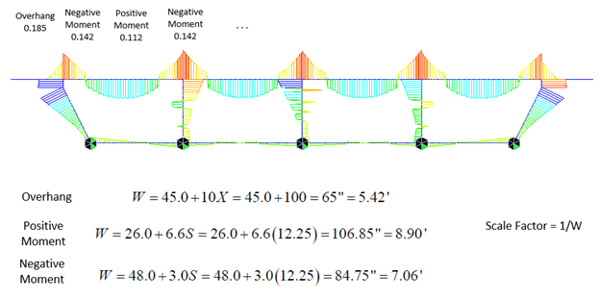


   Step 6. Modify Scale Factor from the Traffic Line Lane.


Modify scale factors for each element that corresponds to the overhang, positive moment region, and negative moment region, respectively.
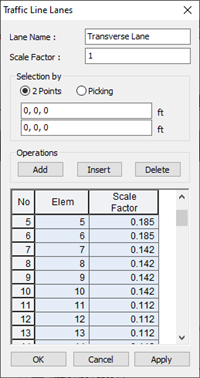
 

   Step 6. Modify Scale Factor from the Traffic Line Lane. 2


Step 7. Perform analysis and check results.
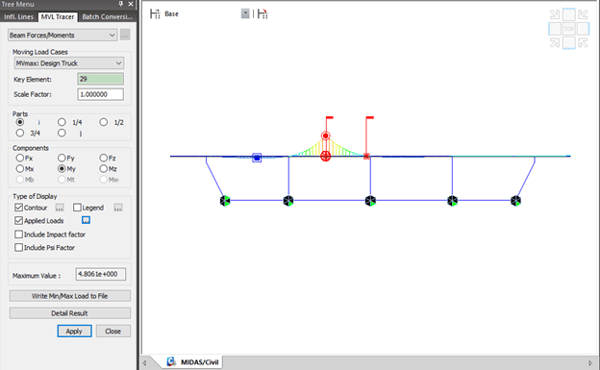
 

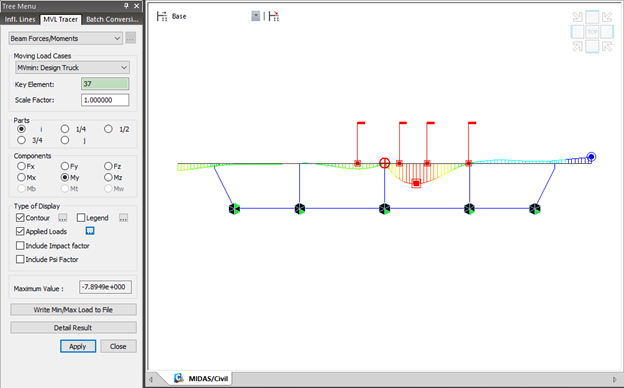
Vehicle position causing maximum positive moments.
Figure. Vehicle position causing maximum positive moments.


Vehicle position causing maximum negative moments.
Figure. Vehicle position causing maximum negative moments.


Moment diagram due to moving load.
Figure. Moment diagram due to moving load.

Susbcribe
MIDAS Newsletter

Thank you, See you soon!
Share
About the Author
YongKi Kwak | Associate Product Manager | MIDAS IT HQ

YongKi is an  Associate Product Manager of customer service for midas civil products. He hopes that MIDAS products will help users with their tasks. He has over 5 years of experience in providing technical advice to engineers who want to learn and use midas Civil.

Comments
Project Application Download the
Project Application

Please fill out the below form to
download 80 Masterworks of Civil Engineering

All